
AI-narrated version of this post using a synthetic voice. Great for accessibility or listening while busy.
Spinning drives still win on capacity per dollar, and that is not going to change soon. But plenty of home labs do not need 60TB. If your storage needs sit somewhere between 4TB and 24TB, and the machine lives in a bedroom, a lounge or a cupboard next to a desk, an all-NVMe NAS starts to look less like an indulgence and more like the sensible choice.
This guide is for anyone weighing up an SSD-only box for a small home lab: Proxmox VM storage, container volumes, Time Machine and PC backups, a modest Plex library, maybe a Git server and some photo sync. It covers the things that actually decide whether one of these boxes performs well — PCIe lane allocation per M.2 slot, thermals in a tiny chassis, and the network port that will cap most of your transfers regardless of what the drives can do.
It also covers the uncomfortable part: when you should walk away and buy a hard-drive NAS instead.
Who should skip spinning drives entirely
Noise is the honest reason most people go all-flash. A four-bay HDD NAS rebuilding an array is audible through a closed door, and drive vibration transmits into whatever shelf it sits on. Flash removes that entirely — the only moving part left is the chassis fan.
The second reason is size and power draw. An NVMe NAS the size of a paperback can hold as much usable data as a tower that needs its own corner of the room, and low-TDP chips like the Intel N150 keep idle consumption modest, which matters when the box runs all day.
The third reason is random I/O. If you run VMs or databases on network storage, a mirrored pair of NVMe drives behaves very differently from a RAID array of 7,200rpm disks. Sequential throughput is the headline number, but latency under mixed load is where flash genuinely changes how a home lab feels.
PCIe lanes: why six slots does not mean six fast drives
This is the single most misunderstood spec in this category. Low-power Intel N-series and Celeron chips have a small pool of PCIe lanes — far fewer than a desktop CPU — and vendors divide those lanes across every M.2 slot, both network controllers, and USB.
The practical result is that many slots run at PCIe 3.0 x1 or x2 rather than x4. A drive rated at 7,000MB/s in a laptop will not reach that in a one-lane slot, because a single PCIe 3.0 lane tops out near 1GB/s by the standard’s own definition. That is not a defect; it is arithmetic.
Does it actually matter?
For most home lab work, no. Even a heavily constrained x1 slot comfortably saturates 2.5GbE with room to spare, and random I/O barely notices lane width. It matters if you plan a 10GbE upgrade, or if you want the array itself to run fast local workloads such as a Proxmox datastore on the same machine.
Heat is the other lane tax
Packing six or eight M.2 drives into a palm-sized enclosure concentrates a lot of heat in a small volume. Throttling under sustained writes is the normal failure mode, not outright failure. Vendors handle this differently — the TerraMaster F8 SSD Plus, for example, specifies heat sinks on each SSD alongside a convection-based active cooling design. If you are fitting drives yourself, our guide to NVMe heatsinks and M.2 cooling covers what fits in tight bays.
2.5GbE is the real ceiling
Almost every compact NVMe NAS ships with dual 2.5GbE. That is roughly 280MB/s per link in practice, which a single mid-range NVMe drive exceeds without effort. Link aggregation helps multiple clients at once, but it will not make one file copy twice as fast.
So be realistic about what you are buying. Flash in a 2.5GbE box buys you silence, density, low power and excellent random I/O — not record sequential transfers. If sequential speed is the goal, you need a 10GbE port on the NAS, a 10GbE client, and a switch to match, which changes the budget and the noise calculation on the switch side too.
Compact NVMe boxes and barebones worth researching
The M1S N150 sits at the barebones end: you supply memory and drives, and it takes four 2280 NVMe SSDs, with an optional accessory converting the internal WiFi interface into a 2230 bay for a fifth drive. Its two Intel i226-V 2.5G controllers can be aggregated, and the vendor lists support for Proxmox VE, TrueNAS, Unraid, OMV, ESXi and mainstream Linux distributions. The all-aluminium body doubles as the heatsink.
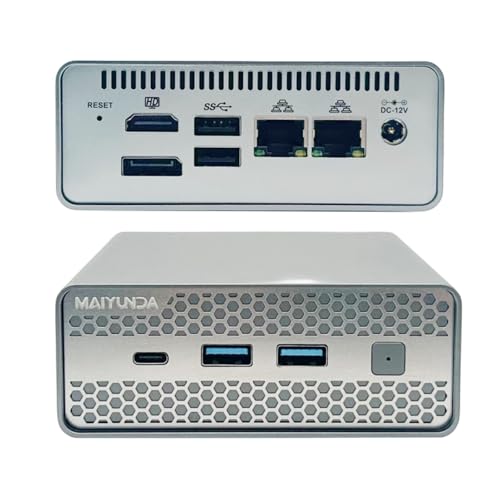
- High-speed 5G Network Connectivity Mini Computer:Equipped with two built-in i226-v 2.5G network cards,the mini-pc can…
- Up to 48GB DDR5 Mini PC: The M1S N150 minipc supports the latest DDR5 laptop memory,with a maximum memory expansion o…
- Up to 34TB Expansion Desktop NAS:The mini pc ssd nas supports the installation of 4 NVMe 2280 SSD (up to 32TB) NAS St…
The Beelink Me Mini takes a different route — it arrives with 12GB of LPDDR5 and 64GB of eMMC already installed, so the six M.2 slots are free for storage rather than a boot drive. Those slots are PCIe 3.0 and accept 2230, 2242 and 2280 drives, and the internal 45W power supply means one AC cable instead of a power brick. At a 3.9-inch cube, it is the least obtrusive option here.

- Beelink N150 Mini PC NAS – Beelink Me Mini is equipped with Intel Twin Lake N150 processor, 4 cores 4 threads, 3.6GHz…
- Massive Expandable Storage – Me Mini desktop computer comes with 12GB LPDDR5 and 64GB eMMC storage, the 6*M.2 NVMe SS…
- Superb Networking – Beelink Mini PC features Dual 2.5G LAN ports, WiFi 6 and Bluetooth 5.2 for high-speed sharing, li…
The Asustor Flashstor 6 FS6706T is the turnkey choice: six M.2 slots, dual 2.5GbE, a Celeron N5105 and ADM, the vendor’s own NAS operating system, with HDMI 2.0b and hardware transcoding for Plex duty. You give up OS freedom and get app catalogues, backup tooling and a support line in return.

- [Intel Quad-Core Performance for Creative Workloads] Powered by Intel Celeron N5105 quad-core CPU, optimized for mult…
- [All-Flash NVMe High-Speed NAS Storage] Built with 6x M.2 NVMe SSD slots, delivering ultra-fast all-flash storage per…
- [Dual 2.5GbE High-Speed Network Connectivity] Dual 2.5GbE ports provide fast and stable network performance for large…
The TerraMaster F8 SSD Plus is the one to look at if 2.5GbE genuinely bothers you. It pairs eight bays with a Core i3-N305 (8 cores, 8 threads) and 16GB of DDR5 4800, and it includes a 10Gbps Ethernet port — a meaningful difference in this class.

- access Peak Performance: The F8 SSD Plus is a full-SSD NAS server with a high-performance solution powered by a Core…
- A Palm-Sized 8-Bay NAS for Versatile Storage: The F8 SSD Plus NAS storage features an ultra-compact, lightweight desi…
- Whisper-Quiet Performance for a Peaceful Environment: The F8 SSD Plus network attached storage offers top-tier perfor…
| Model | Processor | M.2 slots | Networking | Software approach |
|---|---|---|---|---|
| M1S N150 barebones | Intel N150 | 4x 2280, plus optional 2230 bay | Dual 2.5GbE (Intel i226-V) | Bring your own OS |
| Beelink Me Mini | Intel N150, 25W TDP | 6x PCIe 3.0, 2230/2242/2280 | Dual 2.5GbE, WiFi 6 | Bring your own OS |
| Asustor Flashstor 6 FS6706T | Intel Celeron N5105 | 6x M.2 NVMe | Dual 2.5GbE | Vendor NAS OS |
| TerraMaster F8 SSD Plus | Intel Core i3-N305 | 8 bays | 10Gbps Ethernet | Vendor NAS OS with backup suite |
Choosing drives for an SSD-only array
NAS-labelled drives such as the WD Red SN700 are built around sustained mixed workloads and endurance rather than peak burst speed — it is a PCIe Gen3 x4 design rated up to 3,400MB/s, available in capacities up to 4TB. In slots limited to one or two lanes, a Gen3 drive loses nothing anyway.

- sturdy system responsiveness and exceptional I/O performance
- Tackle NAS workloads with exceptional reliability and endurance
- Tame tough projects like virtualization and collaborative editing
Mixing capacities is where SSD arrays get awkward. ZFS mirrors and RAIDZ both want matched drives, so decide your final capacity before buying the first pair. Our breakdown of RAID levels for a home NAS applies to flash just as it does to disks, and the wider M.2 NVMe SSD picks for home labs cover endurance ratings in more depth.
TrueNAS, Unraid or the vendor’s own OS
Barebones boxes give you the choice, which is either freedom or homework depending on your mood. TrueNAS with ZFS gives you checksums, snapshots and replication, but it wants more RAM than the entry-level configurations of these machines ship with — worth checking against NAS RAM upgrade options before committing.
Unraid suits mixed drive sizes and an app-first workflow, though its parity model was designed around disks and offers less benefit on an all-flash array. Proxmox VE makes sense if the box is primarily a hypervisor that happens to serve files.
Vendor operating systems win on convenience. Mobile apps, hardware-specific fan control, one-click backup jobs and firmware that already knows the thermal limits of the chassis are real advantages if you would rather not maintain the platform yourself.
When a hard-drive NAS still makes more sense
Media hoarders should stay on spinning rust. A Blu-ray-quality library grows in terabytes, sequential reads are what matters for streaming, and disk noise is irrelevant if the box lives in a basement or a rack cupboard. The capacity gap at the top end is not close.
Long-term cold archives also favour disks, as does any setup where you want to add capacity gradually over several years. Eight small SSDs cost considerably more than two large drives for the same usable space, and expansion beyond the built-in slots usually means starting over. If you want the fast tier without abandoning bulk capacity, a hard-drive NAS with NVMe cache — or a separate mini PC handling VMs and containers — splits the difference well.
What we would actually buy
For a quiet, general-purpose home lab where 2.5GbE is the network you already have, the Beelink Me Mini is the easiest recommendation: six slots, memory and boot storage included, a single power cable, and small enough to sit on a shelf unnoticed.
Choose the M1S N150 if you want to pick your own memory and run Proxmox or TrueNAS on your own terms, with dual i226-V controllers to aggregate. Pick the Asustor Flashstor 6 if you would rather manage a NAS through a polished vendor interface than a shell. And if you are already planning 10GbE, the TerraMaster F8 SSD Plus is the one here with the port and the CPU to use it.
How these picks were chosen: HomeNode compares products using manufacturer specifications, current Amazon listing details and published owner feedback. Products are not tested in-house, and listings change often, so confirm current specifications on the product page before buying.
Affiliate disclosure: As an Amazon Associate, HomeNode earns from qualifying purchases at no additional cost to you.
Related Auburn AI Products
Building a homelab or self-hosting content site? Auburn AI has practical kits: