
Affiliate disclosure: As an Amazon Associate, HomeNode earns from qualifying purchases at no additional cost to you.
Updated November 14, 2026. What changed: picks moved to the top, product photos added, and two out-of-season links removed. The five picks are unchanged.
Quick picks
| Best overall CyberPower CP1500PFCLCD Pure sine wave, 1500VA / 1000W, USB monitoring. Suits a NAS plus mini PC. |
Check price on Amazon |
| Most outlets APC Back-UPS Pro BR1500MS2 10 outlets, 1500VA / 900W, widely supported USB monitoring. |
Check price on Amazon |
| Pure sine (Eaton) Eaton 5SC1500 Pure sine wave on battery, 1440VA / 1080W, 8 battery-backed outlets. |
Check price on Amazon |
| Tower or rack Tripp Lite SMART1500LCDT Tower unit, with a rack-mount sibling (SMU1500RT2U) at the same tier. |
Check price on Amazon |
| Budget / single NAS CyberPower CP900AVR 900VA for a router, modem and one NAS. |
Check price on Amazon |
Why a UPS?
Summer thunderstorms and winter ice storms both knock out residential power. If you run a home server, NAS, or smart-home hub, even a 30-second outage can corrupt databases, kill VMs mid-write, and force hours of recovery. A properly sized UPS rides through short outages and gives your server time to shut down cleanly during long ones.
In this guide (jump ahead)
- Quick picks
- How much UPS do you actually need?
- Comparison table
- 1. CyberPower CP1500PFCLCD — best overall
- 2. APC Back-UPS Pro BR1500MS2 — brand reliability
- 3. Eaton 5SC1500 — pure sine step-up
- 4. Tripp Lite SMART1500LCD — rack option
- 5. CyberPower CP900AVR — budget pick
- Setup notes for home lab owners
- Which UPS for your situation?
- Budget option: Mini UPS for router / modem only
- FAQ
- Related HomeNode guides
Below are five UPS picks compared on the criteria that matter for home labs and home offices in 2026: real run-time under load, sine-wave output quality (which protects sensitive NAS hardware), USB monitoring support (so your server can shut down gracefully), and price-to-VA ratio.
Not sure how big a UPS you need? Add up your gear in our free home-lab power and UPS runtime calculator first, then match the result to the picks below.
Safety note: Power equipment and batteries can cause shock, fire or injury. Follow the manufacturer’s instructions and local code, and have a licensed electrician do any household wiring. Changes to storage, firmware and network settings can lose data or expose your systems. Back up first, check any steps against your own hardware and software versions, and understand a command before you run it.
Gifting power protection?
A UPS suits anyone with a NAS, home server or work-from-home desk in an area with outages. It is not exciting to unwrap, but it protects everything else they own.
- Under $40: a mini DC UPS for the router and modem, such as the 6000mAh mini UPS (USB 5V plus DC 5V/9V/12V outputs per the listing) or the mini UPS with 24V PoE output. Check the router’s input voltage and plug first.
- Under $250, simulated sine: CyberPower CP1500AVRLCD3, 1500VA/900W with simulated sine wave output and 12 outlets per the listing.
- Under $250, sine wave: CyberPower CP1500PFCLCD, 1500VA/1000W per the listing.
- Under $250, more outlets on battery: Eaton Tripp Lite SMART1500LCDT, 1500VA/900W with 10 outlets per the listing.
Pair it with: a replacement battery plan for later years (see UPS replacement batteries).
Router-only backup explained: DC mini UPS for modem, router and ONT. More gift ideas: our NAS and self-hosting gift guide. Budget tiers reflect Amazon listings checked on November 16, 2026. Prices change often, so check the current price before you buy.
How much UPS do you actually need?
The rule of thumb: your UPS VA rating should be at least 1.5x your continuous load. Most home setups draw 100-300W continuous:
- Single NAS + small switch: 60-120W — 600-900VA UPS is enough
- NAS + Mini PC + switch + modem: 150-250W — 1000-1500VA UPS
- Home lab rack with 2-3 servers: 300-600W — 1500-2200VA UPS
Run-time at half load on a 1500VA UPS is typically 15-25 minutes. Plenty of time for orderly shutdown but not enough to “ride out” a long outage. If you need ride-through (e.g., for a 30-min outage), step up to 2200VA+.
Comparison table
| Model | VA / W | Sine wave | USB monitor | Best for |
|---|---|---|---|---|
| CyberPower CP1500PFCLCD | 1500 / 1000 | Pure sine | Yes | Best overall home lab |
| APC Back-UPS Pro BR1500MS2 | 1500 / 900 | Stepped approx | Yes | Brand reliability + lots of outlets |
| Eaton 5SC1500 | 1440 / 1080 | Pure sine | Yes | Pure sine step-up from Eaton |
| Tripp Lite SMART1500LCD | 1500 / 900 | Stepped approx | Yes | Rack-mount option available |
| CyberPower CP900AVR | 900 / 560 | Stepped approx | Yes | Budget single-NAS setup |
Our Top Pick: CyberPower CP1500PFCLCD
Pure sine-wave output (matters for NAS power supplies), 1500VA capacity that handles realistic home-lab loads with 20-minute headroom, AVR for browndown protection, USB monitoring that works out of the box with Synology, TrueNAS, Unraid, and apcupsd on Linux.
1. CyberPower CP1500PFCLCD — best overall
Pure sine-wave output is the differentiator here. Many UPS units output a stepped/approximated sine wave which works fine for PCs but causes audible humming and reduced lifespan on active-PFC power supplies (found in most NAS units, mini PCs, and modern routers). Pure sine eliminates that.
At 1500VA / 1000W you can run a Synology DS923+ (40W) + Mini PC (60W) + 10-port switch (15W) + cable modem (10W) + router (10W) for 25-35 minutes on battery. That’s enough to ride out short brownouts entirely and gracefully shut down for longer outages.
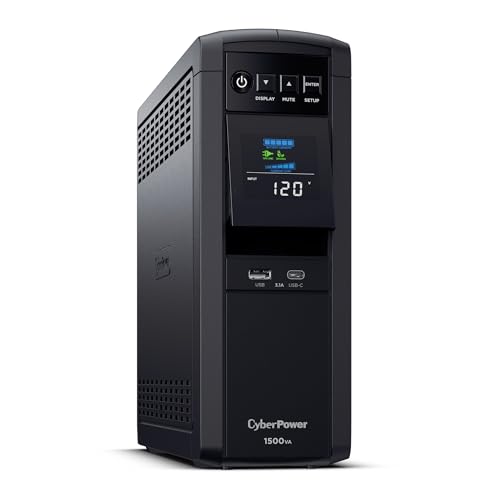
- Best for: NAS plus mini PC setups with active-PFC power supplies
- 1500VA / 1000W, pure sine wave output
- USB monitoring for automatic shutdown
2. APC Back-UPS Pro BR1500MS2 — brand reliability
APC is a widely known UPS brand with decades of experience and broad USB monitoring support. The BR1500MS2 has 10 outlets (6 battery-backed + surge, 4 surge-only) which is more than you’d expect at this price tier. The output is stepped-approximation rather than pure sine, which is fine for most setups but not ideal if you have a high-end NAS.
See also: Best UPS Replacement Battery 2026: APC RBC, CyberPower, Tripp Lite, and Generic SLA Picks
3. Eaton 5SC1500 — pure sine step-up
The Eaton 5S1500LCD that used to fill this slot shows as currently unavailable on Amazon, so the slot now goes to Eaton’s 5SC1500. Per Eaton’s listing it is a line-interactive unit with pure sine wave output on battery (active-PFC compatible), 1440VA / 1080W, eight battery-protected outlets, automatic voltage regulation and a USB port for automatic shutdown on Windows, Mac and Linux. It sits in a noticeably higher budget tier than the 1500VA picks above, so it suits a NAS or workstation that needs clean sine output more than a first UPS on a tight budget.
For the whole CyberPower range, including rackmount units, see the CyberPower UPS buyer’s guide.
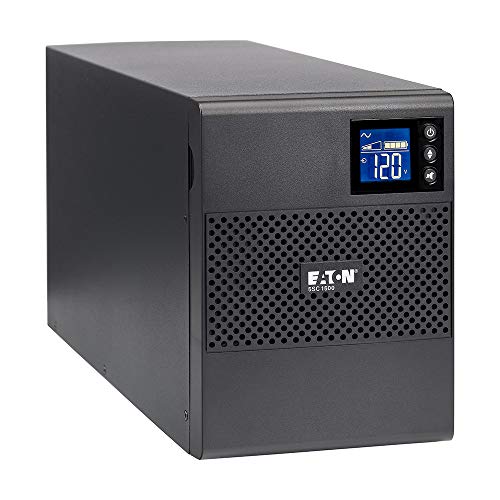
- Best for: a NAS or workstation that needs pure sine output
- 1440VA / 1080W, pure sine wave on battery
- USB port for automatic shutdown
4. Tripp Lite SMART1500LCD — rack option
Tripp Lite (now Eaton-owned) makes the most flexible mid-range UPS in this category, with both tower and rack-mount form factors at the same VA tier. If your home lab is in a 12U rack, the SMU1500RT2U rack version slides right in and gives you network-management options that the consumer-tier models don’t have.

- Best for: buyers who may move to a rack later
- 1500VA / 900W tower unit
- USB monitoring for automatic shutdown
5. CyberPower CP900AVR — budget pick
For single-NAS households or anyone with a sub-100W load (consumer router + cable modem + a NAS), 900VA is plenty and the CP900AVR costs about half what the 1500VA units do. Don’t downgrade below this; sub-700VA units have run-times measured in seconds rather than minutes, which doesn’t give you time to shut down gracefully.
Setup notes for home lab owners
- Plug the UPS into a surge-protected outlet — UPSs handle brownouts and outages but cheap circuit-board surge protection is rarely as good as dedicated surge protectors. A whole-house surge protector at your breaker panel is even better.
- Run network-UPS-tools (NUT) or apcupsd on your NAS — This lets the NAS shut down automatically when the UPS reports low battery. Synology, TrueNAS, and Unraid all have built-in UPS monitoring.
- Replace the batteries every 3-5 years — UPS batteries are consumables. Most units have user-replaceable battery packs, and replacement packs cost far less than a new UPS. A UPS with a dead battery is worse than no UPS at all (it can fail dangerously under load).
- Don’t plug a laser printer or space heater into the UPS — These have inrush currents that exceed UPS surge ratings. Surge-only outlet is fine.
Which UPS for your situation?
Single NAS + router + modem: CyberPower CP900AVR. View on Amazon
NAS + Mini PC + smart home hub: CyberPower CP1500PFCLCD (pure sine matters here). View on Amazon
Rack-mount home lab: Tripp Lite SMU1500RT2U. View on Amazon
Pure sine from Eaton: Eaton 5SC1500. View on Amazon
Budget option: Mini UPS for router / modem only
If you don’t have a NAS or home server but you still want to keep your Wi-Fi alive during short outages so your phone stays online (or so your smart home hub keeps working), a dedicated Mini UPS for network gear is a fraction of the cost of a full 1500VA unit. These are DC-output units designed specifically for router + modem + ONT power (12V and 9V rails), typically providing 4-8 hours of run-time on that light load.
Combine this with a larger UPS for the NAS + server and you have full-stack protection without paying for a single oversized unit.
Related HomeNode guides
- Best UPS Battery Backup Under $200 2026: CyberPower, APC, and Tripp Lite Entry Picks
- Best UPS Replacement Battery 2026: APC RBC, CyberPower, Tripp Lite, and Generic SLA Picks
- Best 10GbE Switch for a Home Lab in 2026: Five Models That Won’t Drain Your Power Bill
- How Much UPS Does a Home Lab Actually Need? Every Tier From $60 to $7,050
- Best NAS Under $500 in 2026: 4 Picks That Actually Fit a Home Budget
- Best Mini PCs for Proxmox in 2026
- The Dream Home Lab: What We’d Build With Zero Budget Limits
Frequently asked questions
How long will a UPS run my NAS?
A 1500VA UPS at half load (~150W draw) gives roughly 20-30 minutes of battery time. At full load it’s closer to 5-8 minutes. Match the VA rating to ~1.5x your continuous load for best results.
Do I need pure sine-wave output?
If you have a modern NAS with an active-PFC power supply (most do), yes. Stepped-approximation can cause humming, reduced power-supply lifespan, and occasional unexpected shutdowns. For a desktop PC or a basic router, stepped is fine.
How often should I replace UPS batteries?
Every 3-5 years for sealed lead-acid (the standard). Battery-only failures don’t always trigger UPS alarms, so test once a year by pulling power and confirming the LCD shows expected runtime.
Can I daisy-chain UPS units?
Don’t. Most UPS units explicitly prohibit this in their manuals because the output waveform can interact badly with the input filter of the next unit. Use one larger UPS instead.
How were these products selected?
This guide is a research-based synthesis of product specs, brand reputation, current Amazon reviews, and category trends. It is not a hands-on review – use it to narrow options before you buy.
Shop the Amazon Storefront
Every mini PC, NAS, and networking pick from HomeNode – curated for home lab builders in one Amazon Storefront.
Try Amazon Prime free for 30 days – fast shipping on home lab gear plus Prime Video streaming
As an Amazon Associate and Amazon Influencer, we earn from qualifying purchases at no extra cost to you.
General information only, not professional advice. Details can change or contain errors, so check with the manufacturer or an official source before you rely on them. Use of this site is subject to our Disclaimer and Terms of Service.

