
A closet or cabinet full of gear heats up quietly. Nothing beeps, nothing flashes, and the first sign of trouble is usually a drive throttling, a NAS logging a thermal warning, or a mini PC that reboots on a hot afternoon. By then the equipment has already spent hours soaking in air warmer than it was designed for.
This guide is for anyone running a home lab inside an enclosed space: a hallway closet, a wall-mounted network cabinet, a garage rack, or a converted media cupboard. The goal is a sensor setup that tells you the temperature before something fails, and ideally does something about it automatically.
We compared the common sensor types, looked at how each one delivers alerts, and pulled together placement and threshold advice based on the operating ranges manufacturers publish for storage and networking gear.
Why ambient temperature matters more than you think
Your equipment does not care about the reading on your thermostat. It cares about the air it pulls in through its intake, which in a closed cupboard can sit well above the rest of the house because every watt drawn eventually leaves as heat.
Spinning drives are usually the weak link. Spec sheets for 3.5-inch NAS and desktop drives commonly list a maximum operating temperature of roughly 60-70 °C, measured at the drive itself, and drive temperature tends to run meaningfully above the intake air feeding it. Switches and small servers often list ambient ranges ending around 40 °C, sometimes lower.
Humidity is the second half of the picture. Condensation is the real enemy in a garage or unconditioned outbuilding, where a cold night followed by warm humid air can leave moisture on cold metal. A sensor that reports relative humidity alongside temperature costs no more than one that does not.
Wi-Fi, Bluetooth or Zigbee: picking the radio
The radio you choose determines how the alert reaches you, how often you change batteries, and whether the alert still works when your internet drops.
Wi-Fi sensors
Wi-Fi sensors talk straight to your router and then to a vendor cloud, so there is no extra hub to buy. The Govee H5179 does exactly this, pairing a Wi-Fi link with Bluetooth for local setup, and it is limited to 2.4 GHz networks. Worth knowing: its alert ranges are configured over Bluetooth, so you need to be near the unit to change thresholds.

- Two Ways to Connect: Easily monitor temp and humidity data in real time from anywhere. With stable WiFi and Bluetooth…
- Fast & Accurate: Equipped with a Swiss made sensor, this humidity gauge provides precise readings. Temperature is acc…
- Alert Function: Set preset temp and humidity ranges, and receive an app alert immediately whenever levels fall out of…
Bluetooth sensors
Bluetooth units sip battery and log locally. The catch is range. The Inkbird IBS-TH2 stores up to 30,000 data points on the device and quotes up to 98 feet of Bluetooth range in the open, which suits a closet you walk past daily; for remote alerts you would pair it with an Inkbird IBS-M1 or IBS-M2 gateway.
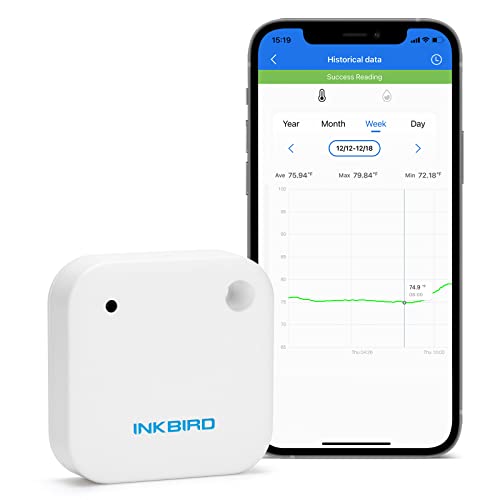
- Sensitive temperature and humidity sensor; Stores max 30000 data points on the device
- The temperature sensor ranges from minus 40 to 140 degrees Fahrenheit and the humidity sensor ranges from 0 % RH-99 % RH
- Graph, accuracy calibrating, high and low-temperature alarm notification, data export, and setting the sampling inter…
Zigbee sensors
Zigbee is the option most home lab owners settle on, because the sensors are small, batteries last a long time, and the data lands in a local system rather than a vendor cloud. The Aqara Temperature and Humidity Sensor also reports atmospheric pressure, uses a Sensirion sensing element, and expects to sit within roughly 400 inches of its hub. Aqara’s own hub is required for the vendor app path, and Aqara states that third-party Zigbee coordinators and Zigbee2MQTT are not officially supported, so some functions may be limited if you pair them that way. Many Home Assistant users do run them on a generic coordinator anyway — see our roundup of Zigbee and Z-Wave USB dongles for Home Assistant if you are going that route.

- [Notes] An Aqara Hub is required and sold separately. Hubs from other brands are not supported. A secured 2.4GHz Wi-F…
- [3-in-1 Environmental Monitoring] Monitor your home’s environment with ease using the Aqara smart temperature sensor’…
- [Proximity] For a sturdy connection and accurate transmission of temperature and humidity data, ensure that the Aqara…
How the options compare
| Sensor | Connection | Hub needed for remote alerts | On-device logging | Notable extras |
|---|---|---|---|---|
| SwitchBot Meter Plus (2-pack with Hub Mini) | Bluetooth, cloud via hub | Included in this bundle | Up to 68 days | 3-inch LCD, ±0.2 °C stated accuracy, dew point and VPD readings |
| Govee H5179 | Wi-Fi 2.4 GHz plus Bluetooth | No | App-side, 20 days online view | Stated ±0.3 °C and ±3% RH, 2-second refresh, lanyard loop |
| Aqara Temperature and Humidity Sensor (3-pack) | Zigbee | Yes, Aqara hub sold separately | No | Adds barometric pressure, Sensirion sensing element |
| Inkbird IBS-TH2 | Bluetooth | Yes, IBS-M1 or IBS-M2 gateway | Up to 30,000 points | -40 to 140 °F range, IPX4 rated, calibration in app |
Where to put the sensors
One sensor tells you very little. Two tells you whether your airflow is working, and three tells you where the problem is.
Put your primary sensor at the air intake — near the floor at the front of a rack, or beside the closet vent. That is the number to compare against published ambient operating ranges, because it is the air your equipment actually breathes.
A second sensor at the exhaust side gives you the delta across your gear. A rising delta at the same intake temperature usually means dust, a failing fan, or a new workload. The top of an enclosed rack is where hot air pools, so a third sensor there catches recirculation, which is the classic failure mode in a sealed cupboard and one of the reasons soundproofing a server closet needs care.
Keep sensors out of the direct exhaust of a single hot component and away from a PSU fan. You want air temperature, not a reading dominated by one device.
Setting thresholds that are useful, not noisy
Alerts you ignore are worse than no alerts. Pick two tiers and stick to them.
- Warning: intake air around 28-30 °C. Nothing is failing, but your margin is gone and summer will be worse.
- Critical: intake air a few degrees below the lowest ambient maximum among your equipment. Consumer NAS units and switches commonly list 40 °C, so an alert around 35 °C leaves time to act. This one should wake you up.
- Humidity: flag sustained readings above roughly 70% RH, and anything approaching the dew point of surfaces in a garage or basement.
- Rate of change: a jump of several degrees in under an hour usually means a fan died, not that the weather changed.
Check the actual figures for your own hardware rather than trusting a rule of thumb. A modern mini PC tolerates far more than a fifteen-year-old rack server, and our notes on cooling mods for mini PC home servers in hot weather cover where the headroom usually runs out first.
Turning an alert into an action
The natural next step is automation: when the top-of-rack sensor crosses your warning threshold, a smart plug switches on an exhaust fan, and it switches off once the reading drops a couple of degrees below. Build in that hysteresis gap or the fan will cycle constantly.
The SwitchBot Meter Plus bundle ships with a Hub Mini, which is what enables push notifications and cloud scenes for SwitchBot devices, so a meter and a SwitchBot plug can act as a closed loop without extra software.
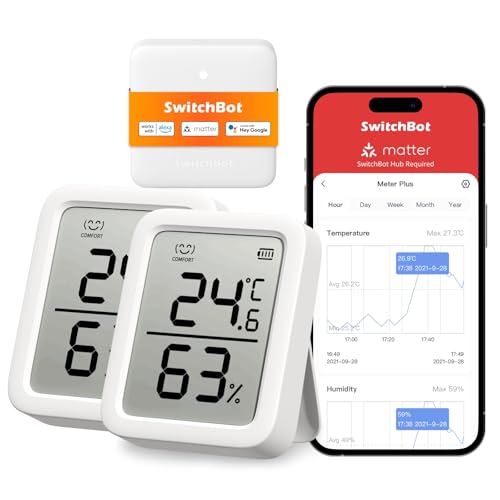
- More Accurate Readings – Our indoor thermometer includes a built-in Swiss-made sensor that gives you more accurate te…
- Includes an Even Bigger Screen – You can now see your data even clearer with a 3-inch bold display, making it easier…
- Exportable Data – 394ft connecting distance (no obstacles) allows you to quickly and clearly view the temperature and…
Home Assistant is more flexible because it can mix brands and act on sensor data locally, even when the internet is down. If you go that way, a stable mesh matters — dropouts are common enough that we wrote a guide on Zigbee devices that keep dropping off Home Assistant.
Any fan that needs new wiring, a new circuit, or a vent cut through a wall is a job for a licensed electrician where local code requires one. Plug-in fans on an existing outlet are fine to handle yourself.
When monitoring is not the answer
Sensors tell you about a problem; they do not solve one. If your closet already runs hot with the door open, more data will only confirm it. Passive venting and a decent fan should come first, and our home server fan and cooling kit picks are a better starting point than another sensor.
Cloud-dependent sensors are a poor fit if your alerting needs to survive an ISP outage — Zigbee into a local hub is the stronger choice there. In a genuinely hot climate with a sealed closet, airflow alone may not hold the line, which is where rack air conditioning enters the conversation.
What to buy
Running Home Assistant with a Zigbee coordinator already? The Aqara three-pack covers intake, exhaust and top of rack with one battery type, and the readings can stay local. Just note that Aqara only officially supports its own hubs, so the fully supported route is an Aqara hub.
No smart home platform and no interest in building one? The Govee H5179 is the shortest path from box to phone alert, since it connects over Wi-Fi without a hub, though remember the thresholds are set over Bluetooth at the device.
For a hub-and-sensor kit in one purchase, the SwitchBot bundle gives you two meters with large displays plus the Hub Mini, covering both the at-a-glance check and remote push notifications. If the space is a garage or shed where damp matters as much as heat, the Inkbird IBS-TH2 with its IPX4 rating and wide -40 to 140 °F range is the more durable pick.
How these picks were chosen: HomeNode compares products using manufacturer specifications, current Amazon listing details and published owner feedback. Products are not tested in-house, and listings change often, so confirm current specifications on the product page before buying.
Affiliate disclosure: As an Amazon Associate, HomeNode earns from qualifying purchases at no additional cost to you.