
See also: Best Portable SSD 2026: Samsung T7 Shield vs SanDisk Extreme Pro vs WD My Passport. See also: Home Server Wont Boot? 2026 Complete Troubleshooting Guide (PSU, RAM, Boot Drive, CMOS). See also: How to Build a Raspberry Pi NAS 2026: Complete Storage Setup Guide. See also: How to Set Up Pi-hole on Raspberry Pi 2026: Complete Ad-Blocking Guide. See also: Robot Vacuums With Real Local API / Home Server Integration (2026).
A refurb Dell R730 runs more VMs than a far pricier new Minisforum MS-01.
Enterprise servers that came off a 5-year lease are the best cost-per-core deal in home lab. The trade-off is power draw, noise, and rack space. This guide covers the refurbished server tiers that actually make sense in 2026, from budget Lenovo Tiny micro form-factor boxes up to high-end Dell R740 rackmounts, with the specs that matter and the pitfalls to avoid.
In this guide (jump ahead)
Disclosure: affiliate links below. As an Amazon Associate, HomeNode earns from qualifying purchases at no additional cost to you.
The three refurb enterprise server tiers
- Micro form-factor tiny (MFF) — Lenovo ThinkCentre M720q/M920q Tiny, HP EliteDesk 800 G6 Mini, Dell OptiPlex 7080 Micro. $150-300. 8-9th gen Intel, 32-64 GB RAM, single M.2. Under 15W idle. Quiet enough for a bedroom shelf.
- Rack-mount 1U / 2U — Dell PowerEdge R630/R730/R740, HP ProLiant DL360/DL380 Gen9/Gen10, Supermicro. $300-800. Dual Xeon E5-2600 v3/v4 or Scalable Gen1/Gen2, 128-512 GB ECC, redundant PSU, IPMI/iDRAC/iLO. 80-150W idle, needs a rack and cannot live in a bedroom.
- Tower workstation — Dell Precision 7810/7920, HP Z840/Z8 G4. $400-900. Similar Xeon guts to rackmount but in a bedroom-safe tower form factor. Slower fan ramp, better thermals. GPU-ready.
Fastest way to pick
| Scenario | Pick |
|---|---|
| Quiet home lab under desk | Lenovo M720q/M920q Tiny or HP EliteDesk 800 G6 Mini. Refurb-tier goldmine. Ryzen-tier alternative: Lenovo M75q Gen2 Tiny. |
| Cheap virtualization workhorse | Dell PowerEdge R730 (dual Xeon E5-2680 v4, 128 GB, 8x LFF bays). Ridiculous cost-per-core. Loud and hot. |
| Modern rackmount | Dell PowerEdge R740 (dual Xeon Gen1/Gen2, 128-256 GB, more efficient than R730). Newer platform, better thermals, PCIe Gen3 with support for modern GPUs. |
| Quiet tower workstation | Dell Precision 7810 or 7920. Xeon guts in a form factor you can actually keep in your office. |
| NAS-first refurb | Dell PowerEdge T340 or HP ProLiant ML110. Tower form, tolerates hard drive bays, quiet enough for a basement corner. |
The specs that actually matter for home lab refurb
- CPU generation — Xeon E5-2600 v3 (Haswell) is dated but cheap. v4 (Broadwell) is the sweet spot for the R730 tier. Xeon Scalable Gen1 (Skylake-SP) marks the R740 tier where AVX-512 and DDR4-2666 unlock modern workloads. Newer = more efficient per watt.
- ECC memory — the reason to buy enterprise over consumer. ZFS on ECC gets you real corruption detection. Cheap DDR4 ECC on eBay is $40 for 32 GB modules. Do not accept a refurb with only 16-32 GB when 128 GB is $150 more.
- Storage bays — LFF (3.5-inch, 8-12 bays) is what you want for a NAS-shaped host. SFF (2.5-inch, 16-24 bays) is what you want for pure VM storage on SSDs. Mixed backplanes exist but are rarer.
- Power supply redundancy — refurbs with dual PSU are $50-100 more but let you pull one for maintenance. Not required but nice.
- IPMI / iDRAC / iLO — out-of-band management. Web UI to power the server on/off, mount ISOs remotely, watch the console. This is what “enterprise” buys you. Not all refurbs come with the license enabled — verify before buying.
- Fan noise — a Dell R730 at idle can be 60 dB. A Lenovo Tiny is 30 dB. If the server lives in your office, tower or MFF only. If it lives in a garage or basement, rack is fine.
- Idle power draw — the hidden cost. Dell R730 idles at 120-150W. $150/year in electricity in most North American markets. Lenovo Tiny idles at 10-15W. $15/year. Compare 5-year TCO, not just purchase price.
Best refurbished server by role
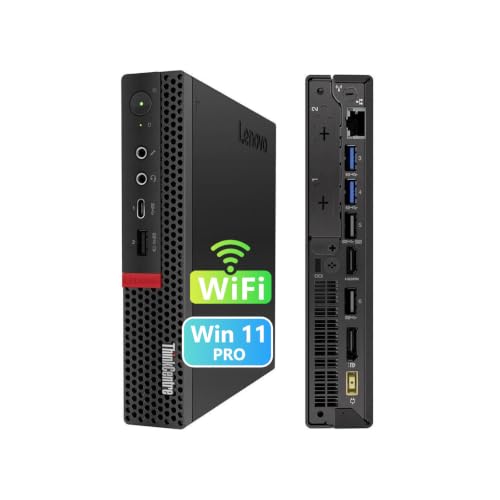
Best MFF quiet lab: Lenovo ThinkCentre M720q or M920q Tiny
The under-$300 refurb goldmine. 8th or 9th gen Intel Core i5/i7 (M720q) or 8th gen (M920q), single M.2 NVMe slot, single 2.5-inch SATA, up to 64 GB DDR4 SO-DIMM. Runs Proxmox with 5-8 VMs comfortably. Idles at 10-15W. Quiet enough to sit next to a monitor.
Trade-offs: no dual NIC, no expansion slot, no ECC memory. But as a refurb, it is the highest-value home-lab-node purchase available. Cluster three of them and you have a proper Proxmox HA cluster in a shoebox.
Best HP MFF alternative: HP EliteDesk 800 G6 Mini and Dell OptiPlex 7080 Micro
Same category as the Lenovo Tiny with slightly different quirks. HP EliteDesk 800 G6 Mini has better remote management (some units include DASH). Dell OptiPlex 7080 Micro has slightly more accessible internals for RAM/SSD upgrades. Same $150-300 refurb tier.
- HP EliteDesk 800 G6 Mini (refurb)
- Dell OptiPlex 7080 Micro (refurb)
- HP EliteDesk 800 G4 Mini (budget alt)
Best cheap-cores rackmount: Dell PowerEdge R730
The refurb rackmount king. Dual Xeon E5-2680 v4 (14 cores each, 28 cores/56 threads total). 128-256 GB DDR4 ECC. Eight LFF or 24 SFF bays. Dual redundant PSU. iDRAC 8 Enterprise for out-of-band management. Pricing depends heavily on config.
What you accept: 120-150W idle draw, 60 dB fan noise, and a chassis that fills a 2U rack slot. What you get: obscene compute-per-dollar. Run a 30-VM Proxmox cluster on a single R730 and still have headroom.
Best modern rackmount: Dell PowerEdge R740 and HP ProLiant DL380 Gen10
The $500-800 tier steps up to Xeon Scalable Gen1/Gen2 (Silver 4110/4210, Gold 6130/6230). Better perf-per-watt than the R730 era, DDR4-2666 memory, and PCIe Gen3 with real support for modern GPU passthrough. Same enterprise features (IPMI, redundant PSU, hot-swap bays). Fan noise similar to R730 at idle but often quieter under load thanks to better thermals.
Best tower workstation: Dell Precision 7810 or 7920
Xeon E5 v3/v4 (7810) or Xeon Scalable (7920) in a tower form factor. Quiet enough for a home office — typically 35-45 dB idle vs 60+ for a rackmount. GPU-ready with proper cooling. Great for a home lab that doubles as a video editing or ML workstation.
Trade-offs: fewer drive bays (usually 4-8) than a rackmount R730. Slightly higher idle draw than a MFF tiny (60-80W) but way less than a rackmount.
Best NAS-first refurb: Dell PowerEdge T340 or HP ProLiant ML110
For a home lab that is 60% NAS and 40% VM host, a tower server with LFF bays is often the right shape. Dell T340 and HP ML110 are single-socket Xeon E-2100/E-2200, 4-8 LFF bays, iDRAC/iLO for management, and tower-quiet fans. Quieter than a rackmount R730 and way easier to service.
Common mistakes to avoid
- Buying a rackmount for a home office. 60 dB fan noise is not “background.” Get a tower or MFF for the office; rackmount lives in a basement, garage, or actual rack in a mechanical closet.
- Ignoring idle power draw. A Dell R730 at 130W idle is $150/year in electricity. A Lenovo Tiny at 12W is $14/year. Over 5 years, that gap covers a second Tiny.
- Not verifying iDRAC/iLO license. Enterprise means out-of-band management. If the refurb seller did not include an Enterprise license, you have a paperweight for remote work.
- Accepting minimal RAM. DDR4 ECC is cheap on the used market. Insist on at least 64 GB, ideally 128 GB, at purchase — the seller’s markup is way less than eBay module prices.
- Assuming you need a rackmount. Three Lenovo Tinies cost less than one R730, draw 1/3 the power, and make no noise. For most home labs, MFF cluster is a better fit than one big box.
- Buying a v3 Xeon in 2026. Xeon E5-2600 v3 is Haswell, 2014-era. v4 (Broadwell) is $30 more and 25% faster with lower power. Always go v4 minimum for the R730 tier.
Frequently asked questions
How long will a refurb server last?
Enterprise gear was designed for 5-7 year primary service. A refurb usually has 3-5 more years of reliable life in it. Buy from sellers who tested and re-warrantied the unit (30-90 day warranty minimum).
Is a refurb server ECC memory guaranteed to be ECC?
If the vendor advertises ECC and you receive it, yes — ECC modules are physically different from non-ECC and the server will refuse to boot with the wrong type. Verify in the boot POST or via iDRAC/iLO after arrival.
What about Xeon E3 in old ML310 / T30 servers?
Single-socket, 4-core, no ECC on some models. Fine for a Pi-hole or Home Assistant host but underwhelming for a Proxmox cluster. If the deal is $100 or under, sure. Otherwise pass and get a Tiny.
Can I run modern GPUs in a Dell R730?
Full-height GPUs need a riser card and often a PCIe power splitter. Half-height low-profile GPUs (RTX A2000, T4) work well. Consumer GPUs (RTX 4060/4070) are physically possible but rarely worth the complexity in a 2U chassis. Use the R740 or Precision 7920 for GPU passthrough.
How do I quiet down a Dell R730?
ipmi-tool commands can override the automatic fan curve. Community scripts exist. Cuts noise from 60 dB to ~45 dB at idle. Void the warranty (irrelevant on a refurb) and monitor CPU temps.
Bottom line
The right refurbished server depends on where it will live and how many VMs you run. Home office quiet lab: Lenovo M720q/M920q Tiny cluster. Rack in a basement with cheap cores: Dell R730. Modern rackmount with better efficiency: Dell R740 or HP DL380 Gen10. Office-quiet workstation: Dell Precision 7810/7920. NAS-first tower: Dell T340 or HP ML110. Buy the noise profile that matches the room, and enterprise-grade compute-per-dollar becomes very hard to beat.
See also: Best DDR5 ECC RAM for Home Server 2026: AM5 UDIMM, Xeon RDIMM, and SODIMM Picks
More home lab picks like this? HomeNode covers networking, NAS, mini PCs, and self-hosting for the price-conscious home lab crowd. Bookmark the home page for the latest guides.
Related HomeNode guides
- Best USB-C Hub and Dock for Home Lab 2026: Anker, CalDigit, and Ugreen Picks for Server Room and Desk
- Best Portable AC for Server Room and Home Lab 2026: Sizing Guide + Recommendations
- Best Mini PC for Home Lab 2026: Proxmox, TrueNAS, and Home Assistant Picks by Role
- Best Home Server for Photo Backup 2026: Hardware Picks for Immich, PhotoPrism, and Nextcloud
Frequently asked questions
How were these products selected?
This guide is a research-based synthesis of product specs, brand reputation, current Amazon reviews, and category trends. It is not a hands-on review – use it to narrow options before you buy.
What price range should I expect?
Prices vary significantly across the categories above. Entry options start at the lower end of each tier listed, while premium picks can be several times more. Amazon pricing changes frequently, so confirm current numbers on the product listings.
Should I always buy the most expensive option?
Not necessarily. Premium products offer better materials, longer warranties, and higher-end features, but mid-tier picks meet the needs of most buyers. Match the pick to your actual use case rather than defaulting to the top of the price range.
How often is this guide updated?
This guide is refreshed as new products launch and older picks are discontinued. Amazon pricing and stock change daily – always confirm current price and availability on Amazon before purchase.
Where is the best place to buy?
Amazon is linked throughout this guide because it typically has broad selection, current pricing, and standardized return policies. Direct manufacturer sites and specialty retailers are also options depending on category and preference.
Shop the Amazon Storefront
Every mini PC, NAS, and networking pick from HomeNode – curated for home lab builders in one Amazon Storefront.
Try Amazon Prime free for 30 days – fast shipping on home lab gear plus Prime Video streaming
As an Amazon Associate and Amazon Influencer, we earn from qualifying purchases at no extra cost to you.