
AI-narrated version of this post using a synthetic voice. Great for accessibility or listening while busy.
QNAP sells more shapes of NAS than almost anyone else. That is the appeal and the complication. Walk into the catalogue cold and you will find ARM boxes meant for family photo storage sitting alongside Thunderbolt all-flash units built for film crews, with a dozen variations in between that differ by a single letter in the model code.
This guide is for someone who has already decided a network drive makes sense and now wants to know which QNAP fits. We looked at five models that cover most home and prosumer needs: the TS-233, the TS-264, the TS-464, the TS-473A and the TBS-h574TX NASbook. Each gets a plain answer on who it suits and who should look elsewhere.
We also cover QNAP’s two operating systems and the configuration habits that protect a NAS once it is online.
What QNAP is known for, and the trade-off
Breadth is the brand’s defining trait. Where some competitors offer one or two models per bay count, QNAP spreads across ARM, Intel and AMD silicon, and extends into Thunderbolt and all-flash chassis that few rivals bother with. If you want a specific combination of CPU class, network speed and drive type, QNAP probably builds it.
Expansion is the other strength. Several desktop models carry a PCIe slot that accepts 10GbE cards or SSD carriers, so a four-bay box can grow into something considerably faster two years after you buy it. Check the spec page for your exact model and revision, because slot availability is not uniform.
The trade-off is complexity. QTS exposes a lot of settings, the app ecosystem is large and uneven, and model names reward people who read spec sheets closely. Buyers who want the fewest decisions possible are usually happier with a narrower lineup; our Synology vs UGREEN vs QNAP comparison weighs that directly.
The lineup at a glance
| Model | Bays | Processor | Memory as sold | Notable connectivity |
|---|---|---|---|---|
| TS-233 | 2 | ARM Cortex-A55 quad-core 2.0GHz | 2 GB DDR4 | Entry-level desktop NAS |
| TS-264 | 2 | Intel quad-core, burst to 2.9 GHz | 8 GB | Dual 2.5GbE, dual M.2 PCIe Gen3x2, USB 3.2 Gen 2 |
| TS-464 | 4 | Intel N5105/N5095 4-core/4-thread, burst to 2.9 GHz | 8 GB DDR4 | Dual 2.5GbE, dual M.2 PCIe Gen3x2, USB 3.2 Gen 2 |
| TS-473A | 4 | AMD Ryzen V1500B quad-core 2.2 GHz | 8 GB DDR4, up to 64GB | Dual 2.5GbE, dual M.2 PCIe Gen 3, USB 3.2 Gen 2 Type-A and Type-C |
| TBS-h574TX | 5 (E1.S NVMe) | Intel Core i5-1235U, 10-core/12-thread, Iris Xe | 16 GB | Dual Thunderbolt 4, 10GbE, 2.5GbE, HDMI |
The five models in detail
TS-233: the two-bay starting point
An ARM Cortex-A55 quad-core at 2.0GHz with 2 GB of DDR4 puts the TS-233 firmly in file-server territory. It handles centralised photo, music and video storage, Time Machine backups from Macs and NetBak Replicator backups from Windows machines, plus snapshot protection against ransomware encryption.
Skip it if you plan to run containers, virtual machines or heavy transcoding. The 2 GB of memory is the binding constraint, and ARM NAS models typically do not offer the same app coverage as x86 ones. It appears in our best 2-bay NAS roundup alongside its closest rivals.
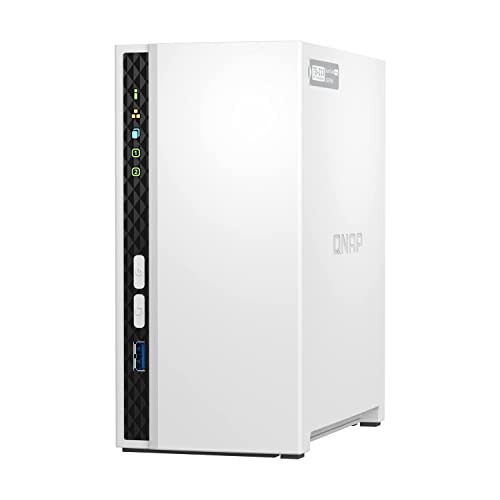
- ARM Cortex-A55 quad-core 2.0GHz processor with 2 GB DDR4 RAM
- Budget-friendly Home NAS for file storage and multimedia streaming
- Centrally store and organize personal or family photos, music, and videos
TS-264: two bays with real headroom
This is the TS-233’s story with the limits removed. An Intel quad-core bursting to 2.9 GHz, 8GB of RAM, dual 2.5GbE ports and two M.2 PCIe Gen3x2 NVMe slots for cache or separate SSD storage pools make it a credible Docker and media host in a small footprint.
Two bays still means two bays. A mirror of two drives gives you half the raw capacity and no room to add a third disk later, so buyers who expect their library to double should start with four.

- Intel Quad-core CPU burst up to 2.9 GHz with 8GB RAM
- Dual 2.5GbE (2.5G/1G/100M) ports accelerates file sharing across teams and devices or streamline large file transfers
- Dual M.2 PCIe Gen3x2 NVMe SSD slots enable cache acceleration or SSD storage pools for improved performance
TS-464: the default four-bay choice
Same core feature set as the TS-264, with four bays and an Intel N5105 or N5095 depending on the unit. The dual 2.5GbE ports and dual M.2 slots carry over, and USB 3.2 Gen 2 ports at up to 10Gb/s handle external expansion enclosures.
Four bays also unlocks sensible parity layouts, which is where our guide to choosing a RAID level for a home NAS earns its keep. It sits against its direct competitors in the four-bay enclosure comparison.

- Quad-core Intel N5105/N5095 4-core/4-thread burst up to 2.9 GHz with 8GB DDR4 RAM
- Dual 2.5GbE (2.5G/1G/100M) ports accelerates file sharing across teams and devices or streamline large file transfers
- Dual M.2 PCIe Gen3x2 NVMe SSD slots enable cache acceleration or SSD storage pools for improved performance
TS-473A: more CPU, more memory ceiling
The AMD Ryzen V1500B runs at a steady 2.2 GHz rather than relying on burst clocks, and memory goes up to 64GB from the 8GB it ships with. That headroom is the point: ZFS, several VMs or a stack of containers all want RAM more than clock speed. Boxafe adds Google Workspace and Microsoft 365 account backup.
Choose something simpler if your workload is file sharing and photo backup — see our NAS RAM upgrade guide for compatible kits if you do go this route.

- Quad-core AMD Ryzen V1000 series V1500B 2.2 GHz processor and 8GB DDR4 RAM (up to 64GB)
- Dual M.2 PCIe Gen 3 NVMe SSD slots enable cache acceleration or SSD storage pools for improved performance.
- Dual 2.5GbE (2.5G/1G/100M) ports accelerates file sharing across teams and devices or gaming storage applications
TBS-h574TX NASbook: for video teams
A different category entirely. Five hot-swappable E1.S NVMe bays, dual Thunderbolt 4 ports, 10GbE and 2.5GbE, an Intel Core i5-1235U with Iris Xe graphics and HDMI output, all in a portable chassis aimed at DIT carts and on-location shoots. It runs QuTS hero, bringing ZFS snapshots, self-healing and immutability to the media on set.
Everyone else should pass. All-flash capacity economics do not suit bulk archives, and a spinning-disk tower stores far more per bay.

- Portable Field Studio: compact Thunderbolt 4 all-flash NASbook for DIT carts, on-location shoots, small studios, and…
- Hot-Swappable NVMe Workflow: 5 E1.S NVMe bays support hot swapping and optional M.2 NVMe SSD use with adapters, helpi…
- Direct 4K/8K Editing: dual Thunderbolt 4 ports plus 10GbE and 2.5GbE enable Mac and Windows creators to edit, transfe…
QTS, QuTS hero and the security settings to change first
QTS is the standard operating system: mature, app-rich, built on ext4-style volumes. QuTS hero swaps the storage layer for ZFS, adding checksummed self-healing, inline deduplication and compression, and far cheaper snapshots. ZFS wants considerably more memory, and QuTS hero is not offered on every model, so confirm availability for the exact unit before buying.
On security, three habits matter. Keep firmware current, because QNAP devices have been targeted by ransomware in past years and those attacks typically exploited known, patched flaws. Disable remote-access services you are not using, including UPnP port forwarding and any cloud relay you left enabled during setup.
Never expose the admin interface directly to the internet. Reach it over a VPN instead, change the default admin account, and enable two-step verification. Snapshots help too, since an encrypted share can be rolled back if the snapshot store itself stays protected.
Which one for your situation
- Family file and photo storage, nothing exotic: TS-233.
- Small footprint, but containers and faster networking matter: TS-264.
- General-purpose home server with room to grow: TS-464.
- VMs, ZFS or a long ownership horizon: TS-473A.
- Editing 4K or 8K footage on location: TBS-h574TX.
Some readers should look outside the brand. Those who want the simplest possible setup experience may prefer the approach in our Synology buyer’s guide, and anyone comfortable with hardware assembly will get more compute per bay from a DIY ITX NAS build.
FAQ
Does the TS-233 run QuTS hero?
QuTS hero availability depends on the model and its memory. With 2 GB of DDR4 and an ARM processor, the TS-233 is positioned as a QTS file-storage device; check QNAP’s spec page for current OS support before assuming otherwise.
Difference between the TS-264 and TS-464
Bay count, mainly. Both list an Intel quad-core bursting to 2.9 GHz, 8GB of RAM, dual 2.5GbE and two M.2 PCIe Gen3x2 slots. The TS-464 has four drive bays instead of two.
M.2 slots as cache or as storage
Both options exist on the TS-264, TS-464 and TS-473A. Cache accelerates reads or writes against the spinning disks; a dedicated SSD pool keeps fast data permanently separate.
How these picks were chosen: HomeNode compares products using manufacturer specifications, current Amazon listing details and published owner feedback. Products are not tested in-house, and listings change often, so confirm current specifications on the product page before buying.
Affiliate disclosure: As an Amazon Associate, HomeNode earns from qualifying purchases at no additional cost to you.