
See also: Best Home Lab GPU for AI/ML 2026: NVIDIA RTX, Intel Arc, and Edge Accelerator Picks. See also: Best Kitchen Tech Gifts Under $100 for Home Cooks (2026 Christmas Guide). See also: Best Networking Gifts Under $50 in 2026: Stocking Stuffers for the Home Lab Enthusiast.
For every APC tier side by side, see the APC UPS buyer’s guide (Back-UPS, Back-UPS Pro and Smart-UPS).
The $25 power strip in the back of your rack is the reason a random breaker trip took down your whole lab.
A proper rack PDU (Power Distribution Unit) gives clean outlet spacing, C13/C14 IEC inlets that match rack UPS outputs, energy monitoring for capacity planning, and often remote power cycling of individual outlets. This guide covers the PDUs that make sense at home lab scale in 2026 — from $40 basic 0U strips up to $300 switched PDUs with per-outlet SNMP control — and the specs that matter.
In this guide (jump ahead)
Disclosure: affiliate links below. As an Amazon Associate, HomeNode earns from qualifying purchases at no additional cost to you.
The three PDU categories
- Basic PDU ($30-80) — unmanaged strip with proper C13 outlets, surge suppression, and rack mounting. No monitoring, no switching. Right for the vast majority of home labs.
- Metered PDU ($100-200) — adds real-time total-current and per-outlet power monitoring via LCD or web UI. Right for capacity planning and knowing exactly what the rack is drawing.
- Switched PDU ($180-350) — adds remote power cycling of individual outlets via web UI, SNMP, or SSH. Right when you need to reboot a hung Proxmox host without walking to the rack.
Fastest way to pick
| Scenario | Pick |
|---|---|
| Best basic 0U vertical | Tripp Lite PDUV20 or CyberPower PDU30SWHVIEC12ATNET. 12+ C13 outlets in a 0U vertical rear-mount form factor. |
| Best basic 1U horizontal | Tripp Lite PDU1230 or APC AP7900B. 6-8 C13 outlets, 1U horizontal. Right for smaller labs. |
| Best metered | APC AP7830 Metered Rack PDU or Tripp Lite PDUMV20HVNETLX. Real-time current display, sometimes network-manageable. |
| Best switched | APC AP7902B Switched Rack PDU (8 C13) or Tripp Lite PDUMH20NET. Per-outlet remote power cycling. |
| Best pro-tier | Raritan PX3-1435R or APC AP8853 Rack PDU 2G. Metered + switched + environmental sensors + full SNMP. |
| Best budget starter | Tripp Lite PS610HGRA or Cyberpower CPS-1220RMS. Basic rack-mount, C13 IEC outlets, not fancy. |
The specs that actually matter
- Outlet type: C13 vs NEMA — C13 IEC outlets match the C14 cables that come with every server, UPS, switch, and rack-mount device. NEMA 5-15R (standard US outlets) forces adapter cables. For a rack PDU, insist on C13 outlets. Rear PDUs may have C19 outlets for high-draw devices (larger UPS units, some servers).
- Total capacity (amps) — a standard US 15A circuit gives 12A continuous (80% derating). A 20A circuit gives 16A continuous. Match your PDU rating to your building circuit. A 20A PDU on a 15A circuit will trip the breaker before the PDU shows a warning.
- Input type: C14 vs NEMA plug — C14-inlet PDUs plug directly into a UPS output. NEMA-plug PDUs go to a wall outlet. If you have a rack UPS, C14 input is what you want.
- Outlet spacing and orientation — wide 90-degree outlet spacing accommodates 90-degree power adapters (some Cisco, some pfSense boxes). Cheap PDUs have tight spacing that blocks half the outlets when a fat adapter is plugged in.
- Form factor: 0U vertical vs 1U horizontal — 0U vertical mounts on the rack’s rear posts and saves a U slot. 1U horizontal takes a U but is easier to access from the front. For a rack with limited U, 0U wins.
- Network manageability (SNMP + web UI) — matters for switched and metered units. Look for SNMP v3 support, TLS-secured web UI, and syslog output. NUT (Network UPS Tools) integration is a plus.
- Environmental sensors — premium PDUs support temperature and humidity probes. Nice for a hot-summer basement lab. Not essential for most.
Best rack PDU by category
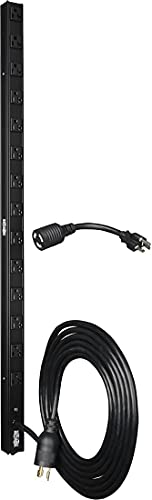
Best basic 0U vertical: Tripp Lite PDUV20 and CyberPower PDU30SWHVIEC12ATNET
0U vertical PDUs mount on the rear posts of a rack cabinet. Tripp Lite PDUV20 has 12 C13 outlets in a 0U form factor with wide spacing. CyberPower PDU30SWHVIEC12ATNET is a similar 12-outlet basic PDU with a slightly heavier build.
Where they win: don’t consume U slots. Where they rank lower than metered: no monitoring. Right pick if you know your total draw and don’t need per-outlet control.
- Tripp Lite PDUV20 (12x C13, 0U)
- CyberPower PDU30SWHVIEC12ATNET
- Tripp Lite PDUMV20HVNETLX (metered upgrade)
Best basic 1U horizontal: Tripp Lite PDU1230 and APC AP7900B
1U horizontal PDUs mount in a rack rail like a 1U server. Tripp Lite PDU1230 has 6 C13 + 2 C19 outlets in 1U. APC AP7900B has 8 C13 outlets and is the mainstream APC entry-level rack PDU. Both fit smaller racks where a 0U vertical would collide with server rails.
Best metered: APC AP7830 Metered Rack PDU
Metered PDUs show total current draw on an LCD display, and premium ones publish per-outlet power via SNMP. APC AP7830 is a 1U horizontal metered PDU with 8 C13 outlets and a local LCD for total-current display. Tripp Lite PDUMV20HVNETLX adds network manageability with web UI + SNMP.
Where they win: capacity planning. Knowing your rack is drawing 480W of a 1200W budget lets you add another server safely. Where they rank lower than switched: cannot remotely power-cycle a hung device.
Best switched: APC AP7902B and Tripp Lite PDUMH20NET
Switched PDUs let you remotely power-cycle individual outlets. APC AP7902B is the standard home lab switched PDU: 8 C13 outlets, network manageable via web UI + SNMP v3 + SSH. Tripp Lite PDUMH20NET is the Tripp Lite equivalent with slightly better modern browser support.
Where they win: rebooting a hung Proxmox host at 2 AM without leaving bed. Where they rank lower: significant premium over a basic PDU. Right pick when you have gear that occasionally needs a hard power-cycle.
Best pro-tier: Raritan PX3-1435R and APC AP8853
The $300-500 tier. Raritan PX3-1435R offers metered + switched + environmental sensor support (temperature, humidity, contact closure) + full SNMP v3 + REST API. APC AP8853 is the equivalent APC unit. Both are used in small data center deployments and are overkill for most home labs — but well-priced on the used enterprise market.
Best budget starter: Tripp Lite PS610HGRA and CyberPower CPS-1220RMS
The budget tier. Tripp Lite PS610HGRA is a basic 1U rack strip with 6 NEMA outlets. Add an inexpensive IEC-to-NEMA adapter cable set for C13-capable devices. Fine for a first rack. CyberPower CPS-1220RMS is a similar basic 1U at slight upgrade in build quality.
Where they rank lower: NEMA outlets are inconvenient for a rack full of IEC-cabled gear. Adapters clutter the back of the rack. Where they win: cheap.
Common mistakes to avoid
- Using a consumer surge protector as a rack PDU. Consumer strips have thin cables, no C13 IEC outlets, no proper rack mounting, and often no ampacity ratings. They belong under desks, not in racks.
- Buying a 30A PDU on a 15A circuit. PDU capacity is the maximum the strip can deliver, but a 15A wall circuit trips at 12A continuous. Match to your building circuit.
- Skipping the C14 input for a UPS-fed rack. NEMA-plug PDUs cannot cleanly plug into a UPS output. C14 input is what you want when the PDU sits downstream of a rack UPS.
- Ignoring outlet spacing. Wall-wart power adapters (thick 90-degree bricks) block adjacent outlets on tight-spaced PDUs. Read the outlet spacing spec before buying.
- Assuming switched = enterprise-only. $200 switched PDUs exist and pay for themselves the first time you can reboot a hung host without leaving the couch.
- Not tracking total draw. Even a basic metered PDU with an LCD gives you the number. Without it, you are guessing.
Frequently asked questions
Do I need a metered or switched PDU?
For a modest 10-15 device home lab, basic is fine. For 20+ devices, metered helps with capacity planning. For any lab where a device occasionally hangs, switched pays for itself.
Can I mix a NEMA plug PDU with a C14-inlet UPS?
Yes with an adapter cable (C14-to-NEMA 5-15R), but you lose clean cable management. Match PDU input to UPS output for cleanest wiring.
Do PDUs provide surge protection?
Basic PDUs usually do. If your PDU is downstream of a UPS, the UPS already provides surge protection and the PDU surge protection is redundant. Both is fine.
How much SNMP does a switched PDU actually give me?
Modern switched PDUs expose current draw, per-outlet state, and events (outlet on/off/tripped) via SNMP v3. Integrates with LibreNMS, Zabbix, and Prometheus SNMP exporter. Fully monitorable.
Can I use a rack PDU without a rack?
Yes but you lose the mounting. 0U vertical units need rack rear posts to mount to. 1U horizontal can sit on a shelf but takes up a whole shelf slot.
Bottom line
The right rack PDU depends on lab size and how much monitoring/control you need. Best basic 0U: Tripp Lite PDUV20 or CyberPower PDU30SWHVIEC12ATNET. Best basic 1U: Tripp Lite PDU1230 or APC AP7900B. Best metered: APC AP7830 or Tripp Lite PDUMV20HVNETLX. Best switched: APC AP7902B or Tripp Lite PDUMH20NET. Best pro-tier: Raritan PX3 series or APC AP8853. Match rated amps to your building circuit, insist on C13 outlets, and any of these becomes a permanent fixture in the rack.
See also: Best Father’s Day Tech Gifts $100-$250 in 2026: The Premium Tier
More home lab picks like this? HomeNode covers networking, NAS, mini PCs, and self-hosting for the price-conscious home lab crowd. Bookmark the home page for the latest guides.
Related HomeNode guides
- Best Home Lab Surge Protector and Power Strip 2026: Rack PDU, High-Joule, USB, and Under-Desk Picks
- Best Rack-Mount UPS for Home Lab 2026: APC, CyberPower, and Eaton Picks by VA
- Best Home Lab Rack Cabinet 2026: 12U, 18U, and 24U Picks by Depth and Weight Capacity
- Best Rack Cable Management Kit Under $100 2026: Complete Home Lab Setup
Frequently asked questions
How were these products selected?
This guide is a research-based synthesis of product specs, brand reputation, current Amazon reviews, and category trends. It is not a hands-on review – use it to narrow options before you buy.
What price range should I expect?
Prices vary significantly across the categories above. Entry options start at the lower end of each tier listed, while premium picks can be several times more. Amazon pricing changes frequently, so confirm current numbers on the product listings.
Should I always buy the most expensive option?
Not necessarily. Premium products offer better materials, longer warranties, and higher-end features, but mid-tier picks meet the needs of most buyers. Match the pick to your actual use case rather than defaulting to the top of the price range.
How often is this guide updated?
This guide is refreshed as new products launch and older picks are discontinued. Amazon pricing and stock change daily – always confirm current price and availability on Amazon before purchase.
Where is the best place to buy?
Amazon is linked throughout this guide because it typically has broad selection, current pricing, and standardized return policies. Direct manufacturer sites and specialty retailers are also options depending on category and preference.
Shop the Amazon Storefront
Every mini PC, NAS, and networking pick from HomeNode – curated for home lab builders in one Amazon Storefront.
Try Amazon Prime free for 30 days – fast shipping on home lab gear plus Prime Video streaming
As an Amazon Associate and Amazon Influencer, we earn from qualifying purchases at no extra cost to you.