
See also: Best Rack Cable Management Kit Under $100 2026: Complete Home Lab Setup. See also: Home Network Troubleshooting Toolkit — 7 Essential Tools Every Home Lab Owner Needs. See also: Best High-Channel PoE NVR Security Camera Systems for a Home Lab (2026).
One PoE injector costs $15 and one PoE switch costs $200. Know when each makes sense.
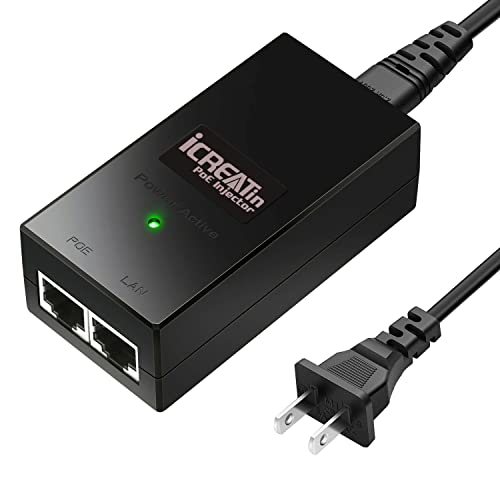
PoE injectors add Power-over-Ethernet to a single device without buying an entire PoE switch. For one camera or one access point, an injector is 90 percent cheaper. For 3+ devices, a PoE switch wins. This guide ranks the 2026 injector lineup by PoE class (802.3af, at, and bt), wattage, and quality of the ground isolation.
In this guide (jump ahead)
Disclosure: affiliate links below. As an Amazon Associate, HomeNode earns from qualifying purchases at no additional cost to you.
Safety note: Laws on recording video and audio vary by location, so check the rules where you live before you install cameras.
The PoE injector categories
- 802.3af injector ($10-25) — TP-Link TL-PoE150S, Ubiquiti POE-24, generic. 15.4W per port. For older cameras, VoIP phones, most access points.
- 802.3at PoE+ injector ($20-40) — Ubiquiti U-POE-at, TRENDnet TPE-115GI. 30W per port. For newer APs, PTZ cameras, dual-band devices.
- 802.3bt PoE++ injector ($40-90) — Ubiquiti U-POE-bt, Microchip. 60-90W per port. For high-power APs, LED lighting, small routers.
- Passive 24V or 48V ($10-25) — Ubiquiti POE-24-24W, MikroTik. Non-standard voltage. Only works with specific Ubiquiti and MikroTik devices.
Fastest way to pick
| Scenario | Pick |
|---|---|
| Best 802.3af injector | TP-Link TL-PoE150S. 15.4W 802.3af. Works with the vast majority of PoE cameras and access points. |
| Best 802.3at PoE+ | Ubiquiti U-POE-at. 30W PoE+. Works with UniFi APs and third-party 802.3at devices. |
| Best 802.3bt PoE++ | Ubiquiti U-POE-bt. 60W PoE++. For UniFi U7 Pro, WiFi 7 APs, PTZ cameras with heaters, small routers. |
| Best passive 24V | Ubiquiti POE-24-24W. For older Ubiquiti Airmax, EdgeRouter, some MikroTik devices. Do not confuse with 802.3af. |
PoE standards without the confusion
Three IEEE PoE standards matter. 802.3af (PoE) delivers 15.4W and is the oldest. 802.3at (PoE+) delivers 30W. 802.3bt (PoE++, Type 3 and 4) delivers 60W or 90W. A PoE++ injector powers everything a PoE+ device needs and everything a PoE device needs, so if you buy one injector for future flexibility, buy PoE++. Passive PoE (Ubiquiti 24V, MikroTik 24V and 48V) is different from all three IEEE standards and only works with specific equipment.
See also: Best 24-Port PoE Switch for Home Lab 2026: UniFi, TP-Link Omada, and MikroTik Compared
When to use an injector vs a PoE switch
For 1-2 PoE devices in a home lab, an injector is 90 percent cheaper than a PoE switch. For 3+ devices, a PoE switch wins on cost per port, cable management, and monitoring. The crossover is around 3 devices — three injectors at $25 each equals $75, which buys a 4-port PoE switch on sale. If you’re planning to grow, buy the switch.
See also: Best Managed Switch for Home Lab 2026: VLANs, LAG, PoE, and 2.5GbE Picks by Use Case
- TP-Link TL-PoE150S 802.3af Injector — Cheapest reliable 802.3af injector. For one PoE camera or one AP.
- Ubiquiti U-POE-at 802.3at Injector — 30W PoE+. Standard pick for UniFi AP Pro and similar.
- Ubiquiti U-POE-bt 802.3bt Injector — 60W PoE++. For high-power devices. Future-proof pick.
Injector build quality matters for 24/7 devices
PoE injectors run continuously and heat up. Cheap generics may be less durable under continuous use, while established brands such as Ubiquiti, TRENDnet, TP-Link, and Cisco Meraki are generally a safer bet. For always-on devices (security cameras, home network access points), buy quality. For occasional-use lab gear, generic is fine.
See also: Best Robot Vacuum for Pet Hair Under $500 in 2026
- TRENDnet TPE-115GI 802.3at Injector — Metal case, better heat dissipation than TP-Link.
Passive PoE: only if the device requires it
Older Ubiquiti Airmax radios, EdgeRouter X, and some MikroTik devices use non-standard passive PoE (24V or 48V DC over Ethernet pairs). Passive PoE injectors are NOT IEEE standards-compliant and can damage 802.3af-compatible devices if plugged in by mistake. Buy passive PoE only if your device explicitly requires it. Label the injectors clearly.
- Ubiquiti POE-24-24W Passive PoE Injector — 24V passive PoE for Airmax and EdgeRouter X. Do not use with 802.3af devices.
- MikroTik 48V Passive PoE Injector — For MikroTik devices requiring 48V passive PoE.
Which injector for you
One camera, one AP, or one VoIP phone: TP-Link TL-PoE150S 802.3af. UniFi AP-AC or AP Pro: Ubiquiti U-POE-at. WiFi 7 AP, PTZ camera with heater, or small router: Ubiquiti U-POE-bt. Legacy Airmax or EdgeRouter X: Ubiquiti POE-24-24W. Three or more PoE devices: skip injectors, buy a small PoE switch.
Related HomeNode guides
- Best PoE Camera for Summer Vacation Security 2026: Bullet, Dome, PTZ, and NVR Kit Picks
- Best Network Cable Tester 2026: NOYAFA, Klein Scout Pro 3, and PoE Picks for Home Lab
- Best 24-Port PoE Switch for Home Lab 2026: UniFi, TP-Link Omada, and MikroTik Compared
- Best Frigate NVR Complete Hardware Setup 2026: Mini PC + Coral + Cameras + Storage Guide
Frequently asked questions
How were these products selected?
This guide is a research-based synthesis of product specs, brand reputation, current Amazon reviews, and category trends. It is not a hands-on review – use it to narrow options before you buy.
What price range should I expect?
Prices vary significantly across the categories above. Entry options start at the lower end of each tier listed, while premium picks can be several times more. Amazon pricing changes frequently, so confirm current numbers on the product listings.
Should I always buy the most expensive option?
Not necessarily. Premium products offer better materials, longer warranties, and higher-end features, but mid-tier picks meet the needs of most buyers. Match the pick to your actual use case rather than defaulting to the top of the price range.
How often is this guide updated?
This guide is refreshed as new products launch and older picks are discontinued. Amazon pricing and stock change daily – always confirm current price and availability on Amazon before purchase.
Where is the best place to buy?
Amazon is linked throughout this guide because it typically has broad selection, current pricing, and standardized return policies. Direct manufacturer sites and specialty retailers are also options depending on category and preference.
Complete Home Lab Networking Kit Under $500 on Amazon
A full home lab networking stack for under $500 — Wi-Fi 6 mesh, managed PoE switch, cables, UPS, and USB-C ethernet adapters — curated in one Amazon Idea List. Perfect for first-time home lab builders.
Recommended Picks (Amazon US)
As an Amazon Associate, HomeNode earns from qualifying purchases at no extra cost to you.
- TP-Link TL-POE160S 802.3at Gigabit PoE+ Injector
- TRENDnet TPE-115GI Gigabit PoE+ Injector
- NETGEAR GS308LP 8-Port Gigabit PoE Switch
- Ubiquiti U-POE-at 802.3at Gigabit Injector
Shop the Amazon Storefront
Every mini PC, NAS, and networking pick from HomeNode – curated for home lab builders in one Amazon Storefront.
Try Amazon Prime free for 30 days – fast shipping on home lab gear plus Prime Video streaming
As an Amazon Associate and Amazon Influencer, we earn from qualifying purchases at no extra cost to you.
General information only, not professional advice. Details can change or contain errors, so check with the manufacturer or an official source before you rely on them. Use of this site is subject to our Disclaimer and Terms of Service.