
Affiliate disclosure: As an Amazon Associate, HomeNode earns from qualifying purchases at no additional cost to you. Product availability subject to change.
Wi-Fi 6E mesh systems are still excellent hardware, and for most homes they remain the better value. Wi-Fi 7 exists at the top of the market for a specific reason: households with genuinely demanding wireless needs – multiple 4K/8K streams, competitive gaming over Wi-Fi, dozens of connected devices, or a home office that can’t tolerate wireless congestion – where the new standard’s higher throughput and lower latency show up as a real, felt difference rather than a spec sheet number nobody notices day to day.
Our outdoor mesh Wi-Fi guide and standalone access point guide cover two different corners of this space – extending coverage outdoors, and building a wired-backhaul access point network from scratch. This guide covers a third: indoor whole-home mesh at the current top tier of the wireless standard, for households replacing an aging router or mesh system rather than extending or rebuilding their network from the ground up.
The Router Replacement Question
Most households buying into mesh Wi-Fi already have an ISP-provided router or gateway handling the internet connection, and it’s worth deciding upfront whether the mesh system will replace that device entirely or run behind it in a simpler access-point-only mode. Running a mesh system in full router mode replaces your ISP’s device’s routing and DHCP duties outright, which is usually the better setup for performance and feature access but means losing whatever ISP-specific features (some bundled security cameras or phone service) ran through that device. Running in access-point mode behind the existing router is simpler to set up and avoids double-NAT networking headaches, but caps the mesh system’s own advanced features since it’s no longer in full control of the network. Check your specific ISP equipment’s documented bridge-mode support before deciding, since some ISP-provided gateways make full replacement straightforward and others actively resist it.
What Wi-Fi 7 Actually Changes
Three technical improvements separate Wi-Fi 7 from the 6E generation, and they matter in different amounts depending on your situation. Multi-Link Operation lets a device use multiple bands simultaneously instead of picking one, which cuts latency and improves reliability in congested environments – genuinely useful in a dense apartment building or a home with 40+ connected devices. Wider 320MHz channels on the 6GHz band roughly double the maximum theoretical throughput over 6E’s 160MHz ceiling, though you’ll only see that in practice with a Wi-Fi 7 client device and minimal interference. And improved QAM modulation squeezes more data per transmission under good signal conditions. None of this helps if your bottleneck is actually your internet connection speed rather than your wireless network – check that first before assuming a mesh upgrade is the fix.
Who This Tier Is Actually For
This is worth the premium over Wi-Fi 6E if you have (or are getting) multi-gigabit internet service and want your wireless network capable of actually using it, if you have a genuinely device-dense household, or if you’re running latency-sensitive traffic like competitive online gaming over Wi-Fi rather than Ethernet. Skip it if your internet service tops out under a gigabit and your current network mostly just works – a well-placed Wi-Fi 6E mesh system remains the better dollar-for-dollar buy, and Wi-Fi 7’s biggest advantages need both ends of the connection (router and device) supporting the standard to fully show up.
Comparison: The Wi-Fi 7 Mesh Tier
| System | Band config | Coverage (per node) | Backhaul | Price Tier (3-pack) |
|---|---|---|---|---|
| TP-Link Deco BE85 | Quad-band, 320MHz 6GHz | Up to 2,900 sq ft/node | Dedicated 10G wired or wireless | High-end |
| Netgear Orbi 970 Series | Quad-band | Up to 3,000 sq ft/node | Dedicated wireless backhaul band | Premium |
| ASUS ZenWiFi BT10 | Tri-band | Up to 2,700 sq ft/node | Wired or wireless backhaul | Mid-range |
| TP-Link Deco BE63 | Tri-band, more affordable BE line | Up to 2,500 sq ft/node | Wired or wireless backhaul | Budget |
| Eero Max 7 | Tri-band | Up to 2,500 sq ft/node | Wired or wireless backhaul | Premium (2-pack) |
The Picks
TP-Link Deco BE85 is the strongest all-around pick in this tier – a dedicated quad-band design with a proper 10G wired backhaul option for households with the networking gear to use it, at a price that undercuts Netgear and Eero’s flagship offerings while matching most of their coverage claims.

- 【Ultimate BE22000 Tri-Band Wi-Fi 7 Speeds】Deco 7 Elite BE85 is designed with the latest Wi-Fi 7 technology, featuring Multi-Lin…
- 【Pro-Grade Dual 10G WAN/LAN Ports】Equipped with two 10G WAN/LAN ports—one RJ45 port and one SFPplus Fiber/RJ45 Ethernet combo p…
- 【Simultaneous Wireless plus Wired Backhaul】Through TP-Link’s self-developed technology, Deco 7 Elite BE85 can connect to wirele…
Netgear Orbi 970 Series leans into Orbi’s long-standing strength: a dedicated wireless backhaul band that keeps mesh node-to-node traffic off the bands your devices are using, which shows up as more consistent performance in larger homes without running Ethernet to every node.

- ðªðð¢ðð-ðð¢ð ð ðð¢ð©ðð¥ððð ðªðð§ð ð¡ð¢ ðððð ðð¢ð¡ð…
- ðð©ðð¥ð¬ð¢ð¡ð ð¢ð¡ððð¡ð ðð§ ð¢ð¡ðð, ð¡ð¢ ð¦ðð¢ðªðð¢ðªð¡ð…
- ð¡ðð«ð§-ððð¡ ðªððð ð³ – Up to 27 Gbps, 2.4X faster than WiFi 6, for lag-free 8K streaming, gaming…
ASUS ZenWiFi BT10 is the value entry into genuine Wi-Fi 7 hardware – tri-band rather than quad-band, which trims some theoretical ceiling, but real-world performance for most households won’t feel the difference, and the price gap versus the flagship tier is substantial.

- Powerful WiFi 7 mesh with superior tri-band connectivity future proofs your smart home with blazing fast speeds up to 18 Gbps a…
- Ultimate AiMesh powered by AI delivers robust backhaul connections, seamless connectivity for all devices, and a feature-rich w…
- Smart Home Master offers effortless network segmentation with up to three SSIDs for easy IoT device setup and management, insta…
TP-Link Deco BE63 goes further on price while staying genuinely Wi-Fi 7, the right call for someone who wants the standard’s latency and Multi-Link Operation improvements without paying flagship pricing for coverage or throughput a mid-size home won’t fully use.

- ð ðððð®ð«ð-ðð¢ðð¡ ðð¢-ð ð¢ ðð®ð¢ð¥ð ðð¨ ððð¬ð: Get expansive w…
- ð©ð®ðð ð ð²ððµ ðð¼ðð²ð¿ð®ð´ð² & ðð²ðð¶ð°ð² ðð®ð½ð®ð°ð¶ðð:…
- ððððððð ðð«ð¢-ððð§ð ðð¢-ð ð¢ ð ðð©ðððð¬: Delivers up to 5,18…
Eero Max 7 costs more per node than most competitors here, and the trade is Eero’s app and automatic-everything setup experience, which remains the smoothest in the category for households that want to set it up once and never open a settings menu again.
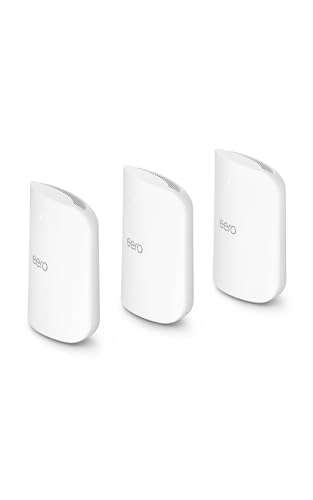
- THE SPEED OF EERO MAX 7 – With two 10 Gigabit Ethernet ports, you can enjoy wired speeds up to 9.4 Gbps, wireless speeds up to…
- THE POWER OF WI-FI 7 TECHNOLOGY – Wi-Fi 7 technology can provide more than twice the speed of Wi-Fi 6, so you can enjoy greater…
- OUR SOFTWARE MAKES ALL THE DIFFERENCE – Our patented TrueMesh software, combined with TrueRoam and TrueChannel, proactively kee…
Wired Backhaul Still Wins
Every system on this list supports wireless mesh backhaul, and every one of them performs meaningfully better with wired backhaul between nodes where you can run it. If your home lab already has structured Ethernet or you’re willing to run a cable to even one additional mesh point, do it – wireless backhaul, even Wi-Fi 7’s improved version, still eats into the bandwidth available to your actual devices. This matters more at this price tier than the last one, since you’re paying specifically for throughput that a wireless backhaul link can quietly cannibalize.
Internet Speed vs. Wireless Speed: Check Which One Is Actually Limiting You
It’s worth ruling out the simpler explanation before spending at this tier: if your internet service itself tops out at, say, 500Mbps, no mesh upgrade – Wi-Fi 6E or Wi-Fi 7 – will make your connection faster than that ceiling, because the bottleneck is upstream of the wireless network entirely. Wi-Fi 7’s real advantages show up in local network speed (a phone talking to a NAS, a laptop talking to a media server) and in congestion handling on a device-dense network, not necessarily in raw internet throughput if your ISP plan is the actual limiting factor. Run a speed test both over Wi-Fi and with a device wired directly into your router before assuming a mesh upgrade will fix a slow-feeling connection – the two problems have different fixes, and buying premium mesh hardware to solve an ISP-side bottleneck is a common and avoidable overspend.
Client Devices Need Wi-Fi 7 Too
None of this hardware’s headline numbers show up on a device that doesn’t itself support Wi-Fi 7 – an older laptop, phone, or smart home gadget connects at whatever standard it supports, typically Wi-Fi 6 or 6E, and simply doesn’t benefit from Multi-Link Operation or the wider 320MHz channels. This isn’t a flaw in the mesh system; it’s just how backward compatibility works. Before paying the Wi-Fi 7 premium, take stock of how many devices in the household actually support the standard today – flagship phones and laptops from the last year or two generally do, but plenty of smart home devices, older tablets, and budget electronics won’t for years yet. A mesh system serving mostly Wi-Fi 6E and older clients still benefits somewhat from Wi-Fi 7’s improved handling of a congested, device-dense network, but the biggest single-device speed gains only show up once you’re connecting with genuinely Wi-Fi 7-capable hardware on both ends.
Placement Still Matters More Than the Standard
Upgrading the wireless standard doesn’t fix bad node placement, and it’s easy to spend on flagship hardware while undermining it with the same placement mistakes that hurt a budget system just as much. Nodes need line of sight or minimal wall interference to each other for wireless backhaul to perform well, and central, elevated placement beats a corner or a closet every time regardless of which generation of Wi-Fi hardware is involved. Run each vendor’s app-based placement or signal-strength tool during setup rather than guessing based on floor plan alone, and be willing to relocate a node if the app flags a weak link – a wrongly placed Wi-Fi 7 node performs worse than a well-placed Wi-Fi 6E one, standard notwithstanding.
The Practical Recommendation
For most households actually ready to spend at this tier, the TP-Link Deco BE85 is the best balance of price, coverage, and wired-backhaul flexibility. Choose the Orbi 970 if your home is large enough that dedicated wireless backhaul bandwidth matters more than saving a few hundred dollars. If you want to try Wi-Fi 7 without committing flagship money, the ASUS ZenWiFi BT10 or TP-Link Deco BE63 both deliver the standard’s real advantages at a meaningfully lower price – and for most homes, that’s the smarter place to start before considering the true top-tier options.