
AI-narrated version of this post using a synthetic voice. Great for accessibility or listening while busy.
Affiliate disclosure: As an Amazon Associate, HomeNode earns from qualifying purchases at no additional cost to you. Product availability subject to change.
Smart detection on a security camera used to mean one of two things: pay a monthly cloud subscription so the manufacturer’s servers could run AI detection on your footage, or build a Frigate NVR setup yourself with a Coral accelerator and a mini PC. Over the past year, a third option has become genuinely viable – standalone cameras with AI silicon built directly into the camera body, running person, vehicle, animal, and increasingly package detection entirely on-device, with zero cloud dependency and zero subscription fee for the core detection features.
Our PoE NVR systems guide and Frigate hardware guide both cover ways to get local, subscription-free detection – but both require a separate recorder or a DIY build. This guide covers something different: individual cameras that do the AI detection themselves, with no additional hardware or software project required, which is a genuinely new product category rather than a repackaging of NVR or DIY approaches that already existed.
Who This Category Is Actually For
This is the right fit if you want real smart detection – not just generic motion alerts – without paying an ongoing subscription and without the time investment of building a Frigate setup. It’s also a good fit for anyone who wants detection to keep working during an internet outage, since on-device processing doesn’t depend on a live connection to function. It’s not the right category if you’re covering a large property and want centralized recording and management across many cameras from one interface – that’s still the NVR guide’s territory, since standalone smart cameras generally manage themselves individually or through a lighter companion app rather than a full NVR console.
What Actually Changed to Make This Possible
The shift is mostly about camera-grade AI accelerator chips getting cheap and power-efficient enough to fit inside a battery or solar-powered camera body, something that wasn’t practical even three years ago. Modern edge computing lets a camera process facial recognition, package detection, and animal tracking locally without needing a cloud server round-trip, and the practical benefit shows up immediately in how the camera behaves: notification alerts arrive in milliseconds rather than the several-second delay typical of cloud-processed alerts, and detection keeps working even if the home’s internet connection drops, which is exactly when you’d most want a security camera to still function.
Comparison: The New Standalone On-Device AI Cameras
| Camera | Detection Method | Power | Subscription Required | Price Tier |
|---|---|---|---|---|
| Reolink TrackFlex Floodlight WiFi | On-device AI + auto-tracking, local clip matching | Wired/floodlight | No (core detection free) | Mid-range |
| Aosu SolarCam T2 Ultra | Heat sensor + radar + on-device AI, 4K | Solar | No | High-end |
| Eufy SoloCam S340 | On-device AI person/vehicle/pet detection | Solar/battery | No | Mid-range |
| UniFi Protect G6 Bullet | On-device AI, integrates with local UniFi Protect app | Wired (PoE) | No | Mid-range |
| Eufy Video Doorbell E340 | Dual-camera on-device AI, package detection | Wired/battery | No | Mid-range |
| SYMYNELEC 2K Solar (2-pack) | PIR heat sensor + on-camera person filtering | Solar/battery | No | Budget (2-pack) |
The Picks
Reolink TrackFlex Floodlight WiFi launched at the start of 2026 as one of the clearest examples of this category done well – it runs on-device AI to find matching clips of a specific event on its own, without sending footage to the cloud to do it, while also functioning as a floodlight for the area it covers.

- What’s in the bundle?
- 2 x TrackFlex Floodlight WiFi
- 1 x Home Hub Pro (2TB HDD Included)
Aosu SolarCam T2 Ultra debuted as Aosu’s flagship at CES 2026, and it’s a genuinely different approach to detection accuracy – it combines heat sensing, radar, and on-device AI simultaneously, specifically to distinguish a person from a pet or a tree branch moving in the wind, which is the single biggest source of false alerts on cheaper motion-based cameras.
Eufy SoloCam S340 builds on Eufy’s long-standing local-storage-first approach with solid on-device person, vehicle, and pet detection, and it’s a strong pick specifically for a solar-powered install where running a cable to the mounting position isn’t practical.

UniFi Protect G6 Bullet is the pick for anyone already invested in Ubiquiti’s ecosystem – its on-device detection integrates cleanly with the local UniFi Protect app most Unifi households already run, keeping the entire system, cameras and management console both, off the cloud.
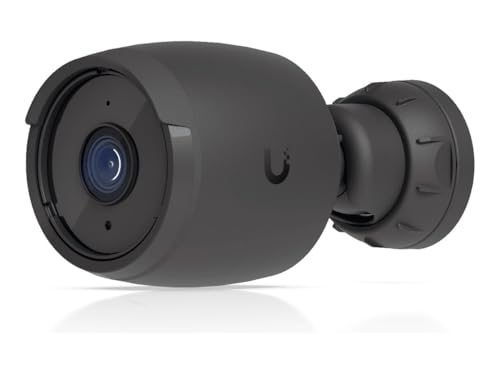
- All-weather 4K PoE camera with a 1/1.8″ 8MP image sensor, Multi-TOPS AI Engine, and long-range IR night vision. Weatherproofing…
- Sensor: 1/1.8” 8MP. Lens: Fixed focal length. Field of View (FoV): Horizontal (H): 109.9° Vertical (V): 56.7° Diagonal (D): 134…
- Smart Detections: Includes Face Recognition, License Plate Recognition, and general People, Vehicle, and Animal detections. Max…
Eufy Video Doorbell E340 applies the same on-device AI approach to the doorbell form factor specifically, with dual cameras that together improve package detection at the door – a scenario where a single wide-angle lens often misses the actual porch floor where packages get left.

SYMYNELEC 2K Solar Security Cameras (2-pack) are the budget pick, and a different class of camera from the five above. There is no neural-network object recognition here – instead a PIR heat sensor wakes the camera and on-camera filtering decides whether the heat source is a person before it sends an alert, which cuts out most branch-and-headlight false alarms at a fraction of the price. You get two 2K cameras with colour night vision, a 5,200 mAh battery and a solar panel each, a siren and two-way audio, and recordings saved to a microSD card (up to 256 GB, not included) with no mandatory subscription. The trade-offs: 2.4 GHz Wi-Fi only, everything runs through SYMYNELEC’s own app, and it won’t tell a person from a vehicle or a pet the way the Eufy or UniFi models can.

The Honest Limitation: “No Subscription” Usually Means “No Subscription for the Basics”
Read the fine print on each of these before assuming everything is included forever. The core promise across this category – on-device person/vehicle/pet detection with no monthly fee – genuinely holds for all six picks here. Where subscriptions often creep back in is extended cloud backup, multi-camera timeline review across a whole system, or advanced features layered on top of the base detection. If cloud backup as a disaster-recovery safety net matters to you (in case the camera itself is stolen or destroyed), some of these brands still offer an optional paid tier for that specific feature – it’s worth checking current terms on the exact model before buying, since subscription structures shift faster than hardware specs.
Local Storage Still Needs a Plan
On-device AI detection doesn’t automatically mean unlimited local storage – most of these cameras still rely on a microSD card, a local hub, or in UniFi’s case a separate NVR device for actual footage storage, with the on-device AI only handling detection and event tagging. Check each camera’s specific storage approach before buying: some (Reolink, Eufy) use an SD card slot directly in the camera, while UniFi’s approach expects a separate Protect console or NVR to hold the recordings. Budget for a high-endurance microSD card rated for continuous write cycles if your chosen camera uses one – a standard consumer SD card wears out faster under a security camera’s write pattern than most people expect.
App Ecosystem Fragmentation Is the Trade-off for Buying Individual Cameras
Choosing standalone cameras from different brands to cover different parts of a property, rather than committing to a single NVR ecosystem, means accepting a real fragmentation cost: each brand’s app is a separate place to check footage, manage notifications, and review events, which adds up if you’re running Reolink, Eufy, and UniFi cameras all at once. Some of these brands support pushing events into a broader smart home platform (Google Home, Apple Home, or Home Assistant through community integrations) to at least centralize notifications even if full footage review still happens in each brand’s own app. If juggling multiple apps sounds like a dealbreaker, it’s worth weighting the buying decision toward fewer brands even if that means a slightly less optimal camera for one specific spot on the property.
False Positives Are Still the Real Test, Not the Marketing Copy
Every camera in this category advertises “AI-powered detection,” but the meaningful difference between a good implementation and a mediocre one is false-positive rate in real conditions – a camera that reliably tells a person apart from a swaying bush, a passing car’s headlights, or a curious raccoon. This is genuinely hard to evaluate from a spec sheet, which is why multi-sensor approaches like the Aosu SolarCam’s combination of heat, radar, and visual AI tend to outperform single-method detection in practice. If false alerts have been a persistent frustration with a previous camera, prioritize a multi-sensor model over one relying on visual AI alone, even if the single-sensor option is cheaper.
Weatherproofing and Where On-Device AI Actually Runs
On-device AI processing generates real heat inside a comparatively small, often outdoor-rated camera housing, and that’s a genuine engineering constraint worth understanding before mounting one somewhere extreme. Check each camera’s IP rating and operating temperature range specifically if you’re in a climate with harsh summers or genuinely cold winters, since a camera pushed outside its rated temperature range can throttle its own processing to manage heat, which in practice means slower or less accurate detection exactly when weather conditions are already reducing visibility. All six picks above carry outdoor weatherproofing ratings (the SYMYNELEC is IP65), but “outdoor rated” and “rated for extreme heat while running continuous AI inference” aren’t automatically the same claim – the spec sheet’s operating temperature range is the number that actually answers this.
Battery vs. Wired: What On-Device AI Costs in Power Draw
Running AI detection locally is more power-hungry than simply streaming video to the cloud and letting a remote server do the thinking, which is a real trade-off for the battery and solar-powered cameras on this list. Aosu and Eufy’s solar models are specifically engineered around this – larger solar panels and bigger batteries than earlier camera generations needed, to keep up with the extra draw from on-device inference running continuously rather than only during active streaming. A wired option like the UniFi G6 Bullet sidesteps the question entirely by drawing power over the PoE cable, which is worth factoring in if a specific mounting location makes running a cable feasible – it removes battery life and solar panel positioning from the list of things to think about.
The Practical Recommendation
For most households wanting a straightforward upgrade from a basic motion-alert camera, the Reolink TrackFlex Floodlight WiFi or Eufy SoloCam S340 cover the fundamentals well at a reasonable price. If false alerts have been a real problem in a high-traffic outdoor area – a street-facing yard, a spot with a lot of wildlife – the Aosu SolarCam T2 Ultra’s multi-sensor approach is worth the premium. UniFi households should stay in that ecosystem with the G6 Bullet rather than mixing brands, since the local app integration is a meaningful part of the value. And if package theft at the door is the specific problem being solved, the dual-camera Eufy Video Doorbell E340 is built around exactly that use case. On a tight budget, or to cover a shed, gate or side yard where you only care whether a person showed up, the SYMYNELEC 2-pack does the basics for about half the price of a single camera from the list.