
See also: MoCA vs Powerline: Wired Ethernet Without Running New Cable (2026).
AI-narrated version of this post using a synthetic voice. Great for accessibility or listening while busy.
Most home lab and smart home content – including a fair amount on this site – quietly assumes a homeowner’s freedom to drill into walls, run Ethernet through a basement, and mount a rack permanently in a spare room. Renters, apartment dwellers, and anyone under an HOA with strict rules don’t have that freedom, and the workarounds are different enough – no-drill mounting, removable adhesive instead of screws, battery power instead of permanent wiring – to deserve their own dedicated guide rather than a footnote on homeowner-focused posts.
Our home lab starter kit under $500 and smart home starter kit under $300 guides are both genuinely useful starting points, but neither addresses the specific constraints a lease or HOA imposes. This guide adapts both categories for that exact situation.
Who This Guide Is Actually For
This is written for anyone renting an apartment or house, living under an HOA with restrictions on visible modifications, or simply not wanting to make permanent changes to a space they don’t own outright. If you own your home and have no restrictions on drilling, running cable, or mounting hardware permanently, the standard homeowner-focused guides on this site will generally get you more capability per dollar – the renter-friendly approach here trades some capability and often some cost efficiency for reversibility, which only matters if reversibility is actually a constraint you’re operating under.
The Core Trade-off: Reversibility Costs Something
Every renter-friendly alternative on this list costs more, does slightly less, or both, compared to its permanent-installation equivalent – that’s the honest trade being made in exchange for a full security deposit back and a setup you can take with you when you move. Battery-powered locks cost more upfront than a wired smart lock and need periodic battery changes; adhesive mounts hold less weight and are less permanently secure than a screwed-in bracket; a compact NAS gives up some of the expansion room a full tower or rack unit offers. None of that makes this tier worse – it makes it correctly optimized for a different constraint than the homeowner tier, and worth choosing deliberately rather than settling for as a compromise.
Smart Locks Without Drilling
A battery-powered smart lock designed for no-drill installation typically retrofits onto an existing deadbolt without permanently altering the door itself, though how much of the original exterior hardware stays visible varies by model – some retrofit kits keep your existing exterior keyway entirely, while premium models with their own keypad, fingerprint, or face-recognition hardware replace more of the visible exterior assembly. Either way, no drilling into the door is required, which is the part that actually matters for lease compliance, since most leases restrict permanent modifications far more strictly than a reversible hardware swap. Confirm compatibility with your specific existing deadbolt style before buying, since not every retrofit lock fits every deadbolt shape, and check your lease’s specific language on lock changes – some explicitly require keeping a copy of any new lock’s key or a way to revert to the original hardware at move-out.

- 3D Face, Palm Vein, and Fingerprint for Every Family Member: Everyone accesss their way. You walk up for face recognition after…
- 12-Month DualPower Battery + Instant Auto-Lock: 10,000mAh battery lasts up to 12 months. CR123A backup: 500 emergency accesss,…
- WiFi Connected, No Hub, 7 Ways In: Connects directly to WiFi, no bridge needed. Manage access remotely, check who came home whe…
Cameras Without Wall Damage
Removable adhesive camera mounts, using the same command-strip-style adhesive common in renter-friendly wall hanging products, hold most compact home security cameras securely enough for typical use while leaving no screw holes and no wall damage on removal when applied and removed correctly. Weight capacity is the real limit here – a small camera is well within an adhesive mount’s rated capacity, but check the specific mount’s weight rating against your specific camera model, and always apply adhesive mounts to a clean, appropriate surface, not textured or freshly painted walls which reduce adhesive hold, to avoid a mount failing under the camera’s own weight.
Networking Without Running Cable
Wired Ethernet backbones are the gold standard for home lab and smart home network performance, but running cable through walls generally isn’t an option in a rental. A travel-friendly mesh WiFi router system solves the coverage problem wirelessly instead – multiple small nodes placed around an apartment providing overlapping coverage without a single cable run, and critically, packable and reusable at your next address rather than being a fixed investment tied to one unit’s specific wall cavities. The performance ceiling is lower than a wired setup, but for an apartment-sized space, a good mesh system covers the practical need without any construction.
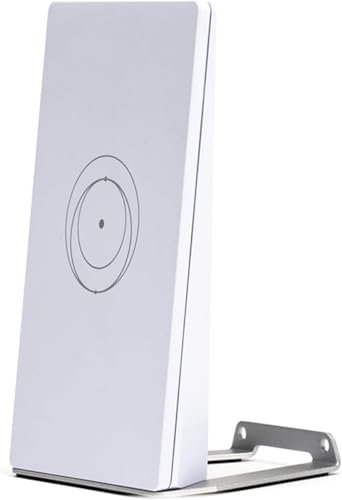
- DUAL BAND TECHNOLOGY: Features 2.4GHz and 5GHz bands for optimal performance, ensuring smooth streaming, gaming, and video call…
- COMPACT DESIGN: Travel-friendly size makes it perfect for portable use while maintaining full router functionality and reliable…
- UNIVERSAL COMPATIBILITY: Works smoothly with both Starlink systems and standard Internet Service Providers for flexible deploym…
Storage That Fits a Smaller Footprint (and Moves With You)
A full tower server or a rack-mounted NAS assumes dedicated floor space and often a fixed location most renters don’t have to spare – a compact NAS in a small desktop form factor gets most of the same self-hosting and file-server capability into a footprint that fits on a shelf or desk and moves easily at lease-end. Bay count and expansion room are the trade-offs versus a larger unit, so size the purchase to your actual near-term storage need rather than buying rack-tier capacity you don’t have room to house anyway.

- access 2.5Gb & 10Gb for Ultimate Speed: UGREEN 6-Port 2.5Gb Switch features 5 x 2.5Gb uplink ports and 1 x 10Gb SFP+ port, acce…
- One Touch, Three Modes: The ethernet splitter easily switch between Standard, Link Aggregation, and VLAN modes. In Link Aggrega…
- 10Gb SFP+ Port, Flexible Connectivity: Designed for high-speed backbone connections, the SFP+ port supports 1G/2.5G/10G optical…
Comparison: Renter-Friendly vs Standard Homeowner Setup
| Category | Renter-Friendly Approach | Standard Homeowner Approach | Trade-off |
|---|---|---|---|
| Smart lock | Battery, no-drill retrofit | Wired or drilled deadbolt replacement | Higher cost, periodic battery changes |
| Cameras | Removable adhesive mount | Screwed-in permanent mount | Lower weight capacity, less secure hold |
| Networking | Mesh WiFi, no cable runs | Wired Ethernet backbone | Lower ceiling on sustained throughput |
| Storage/compute | Compact desktop NAS | Rack-mounted or tower server | Less expansion room, lower max capacity |
What to Check in Your Lease Before Buying Anything
Leases vary widely in what they actually restrict, and it’s worth reading the specific language on modifications, security devices, and network equipment before buying rather than assuming any given device is automatically fine because it’s marketed as renter-friendly. Some leases explicitly prohibit changing locks under any circumstances, even reversibly, some HOAs restrict visible exterior devices like cameras regardless of mounting method, and some buildings have shared network infrastructure that complicates running your own router as the primary connection point. A five-minute lease review before ordering saves a return-shipping hassle and, more importantly, avoids a genuine lease violation.
Documenting the Original State Before You Modify Anything
Take photos of the original deadbolt, door hardware, and any wall surfaces before installing renter-friendly hardware, even hardware explicitly marketed as damage-free – this protects you at move-out if a landlord disputes the condition of something you modified and reverted, and it takes thirty seconds against a potential deposit dispute. This habit matters more than it sounds like it should; deposit disputes over minor modifications are common enough that documentation is cheap insurance against an argument you’d otherwise have no way to settle.
Power Backup Without Rewiring Anything
A renter can’t install a whole-home standby generator or a hardwired transfer switch, but a portable battery power station covers the same practical need for a home lab’s scale of power draw – enough capacity to keep a router, a compact NAS, and a few networking essentials running through a short outage, plugged into a normal wall outlet with no electrical work involved. Sizing matters here just as it does for a UPS: check the actual wattage of what you want to keep running during an outage against the unit’s rated output and battery capacity, since an undersized power station running a full home lab load will drain faster than expected and provide less real backup time than the spec sheet’s headline capacity number suggests on its own.
Shared Networks and Building-Provided Internet
Some apartment buildings provide bundled internet as part of rent, sometimes through a shared building-wide network rather than an individual ISP account, which changes what’s actually possible on the networking side. If your building’s internet comes through a shared network you don’t control, running your own router downstream of that connection is usually fine, but running your own separate access point broadcasting on the same channels as the building’s Wi-Fi can create interference problems for you and your neighbors alike. Check with building management about whether a personal router is permitted and, if it is, choose Wi-Fi channels deliberately (most modern mesh systems do this automatically) rather than assuming a wide-open RF environment the way a standalone house would have.
The Practical Recommendation
Start with the mesh WiFi system and a compact NAS – both deliver most of the practical capability of their homeowner-tier equivalents without touching your lease terms at all, and both pack up and move with you. Add a no-drill smart lock if keyless entry is a priority, but read your lease’s specific lock-change language first. Adhesive camera mounts are the right call for interior monitoring; for anything facing a shared exterior space, check your lease or HOA rules on visible security devices before mounting anything, since that’s the one category here where the reversibility of the mount doesn’t fully solve the compliance question.
Affiliate disclosure: As an Amazon Associate, HomeNode earns from qualifying purchases at no additional cost to you. Product availability subject to change.
One more practical note worth flagging before you buy: re-check current pricing and availability on any linked product, since Amazon listings and prices change more often than review content does, and a specific model mentioned above can be superseded by a newer revision within months of publication.