
AI-narrated version of this post using a synthetic voice. Great for accessibility or listening while busy.
Filling an eight-bay NAS with new enterprise drives is the single biggest line item in most home lab storage builds. Recertified and refurbished drives promise far more terabytes for the same outlay, and the listings are everywhere: data centre pulls, “renewed” enterprise models, zero-hour recertified units sold with a shortened warranty. The question is not whether they work. It is what happens when one of them does not.
This guide is for anyone building or expanding a home NAS who is weighing used capacity against new capacity. It assumes you already understand that drives fail, that RAID is not a backup, and that your tolerance for a rebuild at 2am is finite.
We compared manufacturer recertification against third-party refurbishment, what the warranty terms cover, which SMART attributes matter on arrival, and how to burn in a drive before trusting it with anything.
What “recertified” actually means
The word covers at least three different things, and sellers rarely distinguish between them clearly. Knowing which one you are buying changes everything about how much verification work you need to do on arrival.
Manufacturer recertified
These drives go back to Seagate, Western Digital or Toshiba, get tested against factory criteria, and are re-released with a reset SMART log and a new warranty period. Some are returns that were never faulty. Some had firmware updates applied. Some genuinely failed a test, were repaired, and passed on the second pass. The Seagate Exos X16 14TB renewed units, for example, are listed as manufacture recertified with zero hours usage and a two-year warranty.
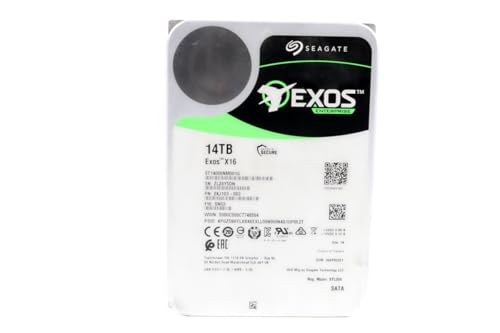
- Manufacture Recertified with Zero Hours Usage, 2 Year Warranty
Seller refurbished and data centre pulls
This is a broader category. A reseller buys retired drives in bulk, runs a surface scan, wipes them and resells with their own warranty. The drives are usually genuine enterprise models in good working order, but they carry real power-on hours and the seller sets the return terms. Verification falls entirely on you.
New old stock and OEM trays
Occasionally a listing is for an unused drive pulled from an OEM server build or sitting in a warehouse since launch. A Western Digital Ultrastar DC HC550 16TB in a bare OEM configuration is a different proposition from a recertified one, even though both arrive in an anti-static bag with no retail box.

- Capacity: 16TB
- Interface: SATA
- Form Factor: 3.5"
Warranty terms are the real difference
A new retail NAS drive like the Seagate IronWolf Pro 16TB carries a five-year limited warranty plus three years of Rescue Data Recovery Services, and the manufacturer honours it directly. Recertified drives typically carry a shorter term, and the obligation may sit with the seller rather than the manufacturer.
That distinction matters more than the length. A manufacturer warranty survives the seller going out of business; a seller warranty does not. Before buying, find out who processes an RMA, whether you pay shipping, and whether you receive a replacement or a refund. Advance replacement matters enormously when a degraded array is waiting on a drive.
Check the manufacturer’s serial number lookup tool before the return window closes. A drive that reports as out of warranty on day one needs to go back straight away.
Reading SMART data the day a drive arrives
Plug each drive in individually, ideally over SATA on a desktop rather than straight into the NAS, and dump the full SMART report with smartctl before doing anything else. You are looking for a short list of specific things.
- Power-on hours — a “zero hours” claim should read as near zero. Thousands of hours on a supposedly unused drive is a mislabelled listing.
- Reallocated sector count and pending sectors — anything above zero on a recertified drive means the surface already has known defects.
- Load cycle count and start/stop count — high values relative to power-on hours suggest aggressive head parking in a previous life.
- SMART error log — recertification often resets counters but not always the log. Read it.
- Helium level on sealed high-capacity drives, which should sit at its full value.
Record all of it. A day-one baseline is the only way to tell later whether a reallocated sector appeared under your watch or arrived with the drive.
Burn-in before you trust a single byte
Infant mortality is the main risk with any drive, new or recertified, and a proper burn-in forces most early failures to show up while the drive is still empty. The standard approach is badblocks in destructive write mode, running four passes of different patterns across the whole surface.
On an 18TB drive this takes days, not hours. Run the drives in parallel if your controller and power supply allow it, keep them cool and ventilated, and re-read SMART afterwards to compare against your baseline. Any new reallocated or pending sectors mean the drive goes back.
Do this on a system protected by a UPS battery backup. A power cut partway through a multi-day destructive write wastes a week. If a rack needs new circuits or permanent wiring, follow local electrical code and use a licensed electrician where your jurisdiction requires one.
Mixing recertified drives with parity and mirrors
Single-parity arrays and recertified drives are an uncomfortable pairing. A rebuild on a high-capacity array reads every sector of every remaining drive, which is exactly the workload most likely to expose a second weak drive. Dual parity or a mirrored layout gives you a margin that single parity does not, and the choice of RAID level deserves more thought here than in an all-new build.
Buying from more than one batch helps too. Drives manufactured in the same week and pulled from the same data centre rack have correlated wear, and correlated wear produces correlated failures.
| Option | Warranty holder | Expected power-on hours | Verification effort | Best role |
|---|---|---|---|---|
| New retail NAS drive | Manufacturer, longest term | Zero | Short SMART check | Primary array, irreplaceable data |
| Manufacturer recertified | Manufacturer, shortened term | Zero or near zero | Full burn-in advised | Bulk capacity in a dual-parity array |
| Seller refurbished / data centre pull | Seller | Thousands, varies widely | Full burn-in essential | Scratch volumes, media libraries, cold spares |
| New OEM / bare drive | Varies by channel, check serial | Zero | SMART check plus one burn-in pass | Secondary array or expansion shelf |
Which data belongs on recertified capacity
Split your storage by how painful reacquisition would be. Media you ripped yourself, Steam libraries, Usenet landing zones, timelapse footage and virtual machine scratch disks can all sit on recertified drives without losing sleep, because replacing them costs time rather than anything irreplaceable.
Photos, documents, scanned records and anything your household depends on belong on new drives with a full manufacturer warranty, backed up offsite regardless. The keep-versus-archive decision is the same exercise, just applied to hardware tiers rather than retention. If you run Time Machine backups to a NAS, treat that share as primary data, not scratch.

- Scalable hyperscale
- applications/cloud data centers
- Massive scale-out data centres
When new drives are the better call
Four-bay NAS owners get the least out of recertified drives. With fewer bays, every drive carries a larger share of the array, a rebuild hits the remaining drives harder, and the savings on three or four units rarely justify the extra exposure. Buy new, pick from a CMR-verified NAS drive shortlist, and spend the difference on a second backup target.
Recertified drives also suit you poorly if you lack a spare machine for burn-in. Time-limited error recovery is standard on NAS and enterprise drives, and rotational vibration sensors are standard on enterprise and pro-tier NAS models; for a busy multi-bay chassis, choose a drive with both.
The practical recommendation
For a large home lab array of eight bays or more running dual parity, manufacturer-recertified enterprise drives with a stated warranty are a reasonable buy. The Seagate Exos X16 renewed units fit that profile, and so do high-capacity Exos X18 drives when you want density per bay. Burn in every one, keep a baseline SMART report, and hold a cold spare.

- High Performance: All-CMR (conventional magnetic recording) portfolio enables consistent, industry-leading 24×7 perfo…
- Class-Leading Dependability: Up to 550TB/year workload rating, 2.5M hours MTBF, and 5-year limited warranty for unpar…
- Peace of Mind with Data Recovery: Complimentary 3 year Rescue Data Recovery Services for a hassle-free, zero-cost dat…
For a four-bay box holding the household’s only copy of anything, buy the IronWolf Pro or an equivalent new NAS drive and accept the smaller capacity. Verified recertified capacity plus a disciplined backup routine beats new drives with no backup, every time.
How these picks were chosen: HomeNode compares products using manufacturer specifications, current Amazon listing details and published owner feedback. Products are not tested in-house, and listings change often, so confirm current specifications on the product page before buying.
Affiliate disclosure: As an Amazon Associate, HomeNode earns from qualifying purchases at no additional cost to you.