
AI-narrated version of this post using a synthetic voice. Great for accessibility or listening while busy.
Picking a Raspberry Pi used to be simple because there was essentially one board worth buying. That is no longer true. The current range spans a 512MB wireless board the size of a stick of gum, a desktop machine built into a mechanical keyboard, and an industrial compute module meant to be soldered onto someone else’s carrier board.
This guide is for people building something specific at home: a DNS ad blocker, a Home Assistant box, a small Docker host, a camera project with local object detection, or a cluster for learning Kubernetes. The question is not which Pi is best in the abstract. It is which one matches the job, and what you will need to buy alongside it.
No prices appear here. What follows is spec-sheet reasoning, the trade-offs between models, and the accessories that change whether a Pi feels quick or frustrating.
What Raspberry Pi is known for, and the trade-off
Raspberry Pi’s advantage is not raw speed. It is the 40-pin GPIO header, a decade of documentation, and the fact that almost every tutorial you find for a home project assumes a Pi. When something breaks at 11pm, someone has already posted the fix.
The trade-off is performance per watt against performance full stop. An Arm Cortex-A76 at 2.4GHz handles containers and services comfortably, but it will not match a modern x86 chip on heavy transcoding, large databases or anything that wants AVX instructions. You also buy into a hardware ecosystem: power supply, cooling and often an M.2 adapter are separate purchases.
The 2026 lineup at a glance
Five products cover almost every home use case. The table below compares them on the attributes that actually decide the purchase.
| Model | Processor | Memory | Storage | Suits |
|---|---|---|---|---|
| Raspberry Pi 5 8GB | Quad-core Cortex-A76 at 2.4GHz | 8GB | microSD, or NVMe via PCIe FPC connector | General home lab, containers, Home Assistant |
| Raspberry Pi 500+ | Quad-core Cortex-A76 at 2.4GHz | 16GB LPDDR4X-4267 | 256GB SSD pre-installed, plus microSD slot | Desktop use, teaching, tinkering without a case build |
| Raspberry Pi Zero 2 W | Quad-core Cortex-A53 at 1GHz | 512MB | microSD | Single-purpose sensors, small always-on jobs |
| Compute Module 5 | Quad-core BCM2712 at 2.4GHz | 8GB DDR4 | 16GB onboard eMMC | Carrier boards, embedded builds, clusters |
| AI HAT+ (26 TOPS) | Hailo accelerator over PCIe | n/a | n/a | Local vision inference on a Pi 5 |
Raspberry Pi 5: the default answer for most builds
If you are unsure, buy a Pi 5. It has dual micro HDMI outputs capable of 4Kp60, USB 3.0, and an FPC connector that exposes PCIe for NVMe storage. That last detail is the single biggest change from older boards.

- Raspberry Pi 5 with 8GB RAM: Model SC1112 featuring a quad-core ARM Cortex-A76 processor running at 2.4GHz. Enhanced…
Which RAM tier you need
Lighter services do not need much. Pi-hole, Unbound, a Zigbee coordinator and a couple of small daemons will sit happily in a few hundred megabytes, so smaller tiers are fine if the board has one job. Our Pi-hole setup walkthrough covers that kind of single-service build.
8GB is the sensible default once you start stacking containers, running Home Assistant with add-ons, or using the board as a light desktop. Memory is soldered. You cannot change your mind later, which is the main argument for buying more than you think you need.
The power supply and cooler are not optional extras
The Pi 5 draws meaningfully more than a Pi 4, particularly when USB peripherals and an NVMe drive are attached. An official 27W USB-C supply negotiates the higher current the board asks for; generic chargers often cannot, and the board responds by limiting USB power. Undervoltage warnings and random reboots usually trace back to this.
Cooling matters too. Without a heatsink or the active cooler, sustained workloads will throttle. Any mains wiring or new outlet work for a rack or cupboard install should follow local electrical code, and in many regions requires a licensed electrician.
NVMe via M.2 HAT versus microSD
microSD cards remain the cheapest way to boot, and they are fine for appliances that mostly read. Databases that write constantly — Home Assistant recorder, Frigate, InfluxDB — wear cards out. If you stay on SD, use a high-endurance card; our microSD comparison explains what the endurance ratings mean.
An M.2 HAT plus an NVMe drive is the better long-term answer for anything that logs. Check the HAT’s supported drive lengths and whether your case has clearance before ordering.
Adding local AI with the AI HAT+
The AI HAT+ attaches over PCIe and brings a Hailo accelerator rated at 26 TOPS, in a 65 x 56.5mm board. For person and vehicle detection on a few camera streams, it moves inference off the CPU entirely. It is specified for 0°C to +50°C, so a hot loft is the wrong home for it.

- HIGH PERFORMANCE: Features 26 TOPS (Trillion Operations Per Second) AI acceleration capability through the Hailo AI A…
- COMPATIBILITY: Specifically designed for the Raspberry Pi 5, connecting via PCIe interface for optimal data transfer…
- COMPACT DESIGN: Measures 65mm x 56.5mm, offering a space-efficient solution while maintaining full functionality as a…
If you are weighing it against other options, our AI HAT+ versus AI Camera and Coral comparison goes deeper on where each one fits.
Board only or starter kit?
A bare board is just the board. Kits typically bundle the power supply, a case with cooling, micro HDMI cables and a preloaded card. Buy the kit if this is your first Pi; buy bare if you already have spares and know which case you want.
The Pi 500+, Zero 2 W and Compute Module 5
Raspberry Pi 500+
This is a Pi built into an 84-key mechanical keyboard with Gateron KS-33 Blue low-profile switches and RGB lighting. It ships with 16GB of LPDDR4X-4267 and a 256GB SSD already running Raspberry Pi OS, plus dual-band Wi-Fi, Bluetooth 5.0, Gigabit Ethernet, three USB ports and the 40-pin GPIO header.
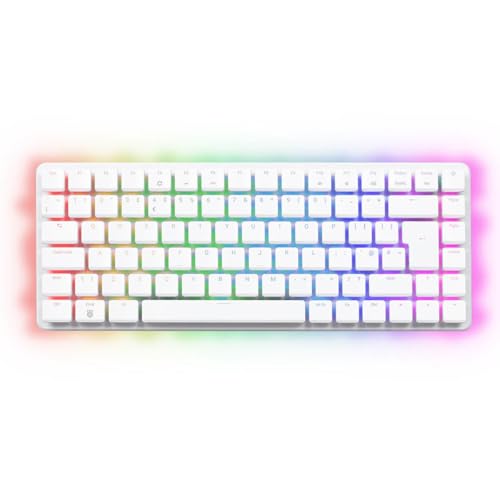
- POWERFUL PERFORMANCE: Features a 2.4GHz quad-core 64-bit ARM Cortex-A76 processor with 16GB LPDDR4X-4267 RAM and a fa…
- PREMIUM MECHANICAL KEYBOARD: Built-in 84-key mechanical keyboard with Gateron KS-33 Blue low-profile switches and cus…
- DUAL 4K DISPLAY OUTPUT: Equipped with 2 micro HDMI ports supporting up to dual 4Kp60 resolution, H.265 4Kp60 decode…
It suits a second desk machine, a classroom setup, or anyone who wants a working computer out of the box with no case hunting. Skip it if the Pi will live headless in a cupboard, where you are paying for a keyboard you will never touch.
Raspberry Pi Zero 2 W
A quad-core Cortex-A53 at 1GHz with 512MB of RAM, Wi-Fi and Bluetooth. That memory ceiling rules out container stacks, but it is plenty for a sensor node, a print server, a network-connected display or an MQTT bridge.

- New 2021 Pi Zero 2 W Model
- Fast Ship
- Broadcom BCM2710A1, quad-core 64-bit SoC (Arm Cortex-A53 @ 1GHz)
Choose it when low power draw and small size matter more than headroom. Skip it if there is any chance the project grows.
Compute Module 5
The CM5 packs the same BCM2712 at 2.4GHz with 8GB DDR4 and 16GB eMMC into 55 x 40 x 4.7mm, rated from -20°C to +85°C. It needs a carrier board, which is the point: you choose exactly which interfaces get exposed. Our CM5 versus Pi 5 comparison covers the decision in detail.

- POWERFUL PROCESSING: Features a quad-core ARM Cortex-A76 processor running at 2.4GHz with BCM2712 chipset for high-pe…
- MEMORY & STORAGE: Equipped with 8GB DDR4 RAM and 16GB onboard eMMC storage for reliable system performance and data h…
- CONNECTIVITY: Extensive interface support including USB 2.0, Ethernet, HDMI, GPIO, SPI, I2C, UART, PCIe, and MIPI int…
The software story, honestly
Raspberry Pi OS is well maintained and the 64-bit builds are mature. Ubuntu, DietPi, Home Assistant OS and most container images all have Arm64 builds now, so the old “it only runs on x86” problem has largely faded.
Largely, not entirely. Some commercial software still ships x86-only binaries, and a handful of self-hosted projects treat Arm as a second-class target with slower releases. Check your must-have applications for Arm64 images before committing.
Pi versus an N100 or N150 mini PC, and other questions
Would a mini PC serve me better?
Often, yes. An N100 or N150 box gives you x86 compatibility, quick-sync transcoding and usually NVMe plus more RAM in one purchase. The Pi wins on size, GPIO and the breadth of project documentation. Our Pi versus mini PC comparison works through the self-hosted AI case specifically.
Is a Pi 4 still worth considering?
For a single light service, yes. For NVMe boot, faster I/O and AI HAT support, the Pi 5 is the one to get.
Can one Pi run everything?
It can, and many people do exactly that. Splitting DNS onto a separate cheap board is worth it, though, because reboots of your main server then stop taking the household’s internet with them.
Which one to buy
For a first home lab board or a Home Assistant install, buy the Raspberry Pi 5 8GB with the official 27W supply, the active cooler and an M.2 HAT with an NVMe drive. That combination removes the three things people complain about most. The Home Assistant hardware guide compares it against the purpose-built alternatives.
Add the AI HAT+ only when cameras are involved. Choose the Pi 500+ if you want a desktop rather than a project box, the Zero 2 W for tiny always-on tasks, and the Compute Module 5 when you are designing hardware around it rather than plugging things into it.
How these picks were chosen: HomeNode compares products using manufacturer specifications, current Amazon listing details and published owner feedback. Products are not tested in-house, and listings change often, so confirm current specifications on the product page before buying.
Affiliate disclosure: As an Amazon Associate, HomeNode earns from qualifying purchases at no additional cost to you.