
Affiliate disclosure: As an Amazon Associate, HomeNode earns from qualifying purchases at no additional cost to you.
Short answer: For a living-room emulation box that handles GameCube, Wii, PS2 and the harder modern systems, the Beelink SER8 Mini PC with Radeon 780M graphics is the pick for most people, and the MINISFORUM UM890 Pro suits anyone who wants more memory, dual 2.5G LAN and an OCuLink port for later expansion. If your library stops at the PS1, Dreamcast and 16-bit era, the Beelink EQ14 with Intel N150 is a smaller, quieter box that does the job. Pair whichever you choose with the 8Bitdo Ultimate 2C Wireless Controller.
This guide is for someone buying a retro gaming machine as a gift, or building one for their own TV cabinet, and who has hit the ceiling of a Raspberry Pi. Pi boards are excellent up to a point. Past that point you need x86 and real integrated graphics.
Everything below assumes you will only use game files dumped from discs and cartridges you own, plus BIOS files from your own consoles. That is the legal line.
Why a mini PC instead of a Raspberry Pi
A Pi 5 is genuinely good through the fifth console generation: arcade, NES, SNES, Genesis, PlayStation, N64 with some per-game fiddling, and PSP in many cases. Dreamcast works. Beyond that the wall arrives quickly.
GameCube and Wii emulation in Dolphin, PS2 in PCSX2, and anything Switch-era lean hard on single-thread CPU speed plus a graphics driver stack that can compile shaders fast. An x86 mini PC with a modern Radeon or Intel iGPU runs the same desktop driver code these emulators are developed against, which matters more than raw numbers.
Mini PCs also bring USB4 or USB 3.2 ports for external drives, dual M.2 slots for a large ROM library, and a Windows option if you want LaunchBox or PC games alongside emulation. If you want to see where the Pi still wins, our Raspberry Pi retro gaming kits guide covers the all-in-one bundles.
Integrated graphics tiers, explained by what they emulate
Radeon 780M class
This is the comfortable tier. The Beelink SER8 pairs a Ryzen 7 8745HS (8 cores, 16 threads, up to 4.9GHz) with Radeon 780M graphics running 12 cores at 2600MHz; the MINISFORUM UM890 Pro uses a Ryzen 9 8945HS up to 5.2GHz with the same 780M family clocked up to 2800MHz. Both have enough CPU headroom that GameCube, Wii, PS2 and Wii U are realistic targets, with internal resolution scaling available rather than a struggle to hit native.

- Blazing-Fast Performance for Gaming & Productivity】 Beelink Mini pc Powered by the AMD Ryzen 7 8745HS processor (8 co…
- 【Massive scalability: dual DDR5 and dual PCIe 4.0 SSD】The mini PC has two SO‑DIMM slots supporting up to 256GB DDR5 5…
- 【Triple 4K Display Output & Cutting‑Edge Connectivity】SER8 8745HS mini computer Connect up to three 4K 120Hz monitors…
Radeon 680M class: a lower-cost middle step
Between the 780M machines and the N150 sits the previous-generation Radeon 680M. The ACEMAGIC M1 pairs it with a Ryzen 7 7736U (8 cores, 16 threads), and ACEMAGIC’s listing specifies 24GB of LPDDR5 memory, a 512GB SSD and support for three 4K displays.
The 680M is a generation older than the 780M, so expect it to sit below the SER8 and UM890 Pro on the heavier GameCube and PS2 titles, while still being a clear step up from the N150’s Intel graphics for those systems. LPDDR5 is normally soldered, so treat the 24GB as fixed rather than upgradeable.

- Ryzen 7 7736U, 8 cores / 16 threads
- Radeon 680M integrated graphics
- 24GB LPDDR5 and 512GB SSD as listed; triple 4K display support
Intel N-series
The Beelink EQ14 uses the Intel N150 (Twin Lake) with Intel Graphics at 24 execution units and 1000MHz, boosting to 3.6GHz with 6MB cache. That silicon is aimed at light office work and 4K video playback. For arcade boards, 8- and 16-bit consoles, PS1, Saturn, Dreamcast and a good share of PSP it is capable and it sips power. Dolphin and PCSX2 at scaled resolutions are asking the wrong question of the hardware.
Memory and storage
Emulators like RAM, and shader caches grow. The SER8 ships with 16GB DDR5 and a 512GB SSD, expandable through two SO-DIMM slots to 256GB DDR5 5600MHz and two PCIe 4.0 x4 M.2 2280 slots up to 8TB. The UM890 Pro starts at 32GB DDR5 and 1TB, expandable to 96GB, with two M.2 slots also reaching 8TB.
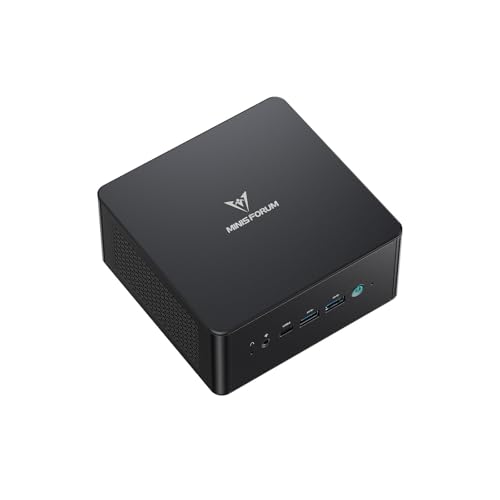
- 【Powerful Ryzen 9 8945HS】MINISFORUM UM890 Pro is equipped with a new-generation AMD AI Ryzen 9 8945HS processor, with…
- 【Large Memory & Storage Support】UM890 Pro is equipped with DDR5 32GB RAM,a SODIMM slot, and can be expanded up to 96…
- 【Quad-Screen Display】Mini Pc Ryzen 9 8945HS UM890 Pro is equipped with HDMI 2.1, DP 1.4 , and 2 x USB4, supporting ma…
| Model | CPU | Graphics | Memory / storage as listed | Best suited to |
|---|---|---|---|---|
| Beelink SER8 | Ryzen 7 8745HS, 8C/16T, up to 4.9GHz | Radeon 780M, 12 cores, 2600MHz | 16GB DDR5, 512GB SSD | GameCube, Wii, PS2 and up in a 0.814L chassis |
| MINISFORUM UM890 Pro | Ryzen 9 8945HS, 8C/16T, up to 5.2GHz | Radeon 780M, up to 2800MHz | 32GB DDR5, 1TB PCIe 4.0 SSD | Same plus OCuLink, dual 2.5G LAN, quad display |
| ACEMAGIC M1 | Ryzen 7 7736U, 8C/16T | Radeon 680M | 24GB LPDDR5, 512GB SSD | A lower-cost step below the 780M machines |
| Beelink EQ14 | Intel N150, up to 3.6GHz | Intel Graphics, 24 EUs, 1000MHz | 16GB DDR4, 500GB SSD | Arcade through Dreamcast, low power, built-in PSU |
| 8Bitdo Ultimate 2C | Controller | Hall effect sticks and triggers | 1000Hz polling on 2.4G and wired | Windows and Android front ends |
Batocera versus RetroBat and LaunchBox
Batocera is a Linux distribution built for emulation that boots straight into a controller-driven front end. It can be written to a USB stick and booted without touching the installed Windows drive, which makes it a low-risk way to try a machine. It handles controller mapping, artwork scraping and per-system emulator settings itself, and it owns the whole session: boot, play, shut down.
RetroBat brings the same EmulationStation-style interface to Windows, keeping your existing OS, driver updates and Steam library intact. LaunchBox goes further with Big Box mode and heavier customisation. The EQ14 arrives with Windows 11 Home pre-installed.
Choose Windows if the box will double as a media PC or occasional desktop. Choose Batocera if you want something that behaves like an appliance.
Controllers, TV setup and placement
The 8Bitdo Ultimate 2C works over 2.4G with a 1000Hz polling rate, or wired, and supports Windows and Android. Hall effect joysticks and triggers resist the stick drift that develops on worn potentiometer-based pads, and the remappable L4/R4 bumpers plus on-controller mapping mean no software install. Keep the 2.4G dongle on a front-facing USB port so the signal is not firing through a metal TV stand.

- Compatible with Windows and Android.
- 1000Hz Polling Rate (for 2.4G and wired connection)
- Hall Effect joysticks and Hall triggers. Wear-resistant metal joystick rings.
Bluetooth pads also work; the SER8 and EQ14 both list BT5.2. Bluetooth adds a little latency and pairing can be fussy from a cold boot, so 2.4G or wired is safer for fighting games and rhythm titles. Our roundup of Bluetooth controllers for retro gaming goes deeper on pairing quirks.
The SER8 outputs over HDMI 2.1, DisplayPort 1.4 and a full-featured USB4 port; the UM890 Pro offers HDMI 2.1, DP 1.4 and two USB4 ports. HDMI-CEC is not claimed by either manufacturer here, so plan on waking and shutting down the machine with the controller rather than the TV remote. Set the TV to Game mode on that input, which disables most post-processing.
Beelink states a vapor chamber design keeping the SER8 CPU below 80°C at 65W TDP, and the 135×135×44.7mm chassis weighs 0.75kg. The UM890 Pro uses two 8mm heat pipes with an offset blade fan plus a separate RAM and SSD heatsink fan. If you are running power to a new location or adding in-wall cabling, follow local electrical code and use a licensed electrician where your area requires one.
Trade-offs and who should choose something else
If your collection is entirely pre-2000 and you like tinkering, a Pi 5 kit asks less of your power budget and shelf space, and the case ecosystem is enormous. Our guide to Raspberry Pi retro gaming enclosures shows how far that can be taken.
If the machine needs to be a home server as well as a games box, priorities shift toward NIC count, drive bays and idle power. The mini PC home server guide covers that side, and the UM890 Pro’s dual 2.5G Ethernet and OCuLink port make it the more flexible of the two AMD machines for dual duty.
Our recommendation
Buy the Beelink SER8 if you want one box that covers the whole emulation range without thinking about it. The 780M class graphics and 4.9GHz boost clock separate a machine that plays Wii and PS2 comfortably from one that only plays older systems. If the 780M machines are over budget, the ACEMAGIC M1 with Radeon 680M is the middle step before dropping to an N150.
Buy the MINISFORUM UM890 Pro for the higher 5.2GHz boost, 32GB of memory out of the box, and expansion headroom through OCuLink and dual 2.5G LAN. Buy the Beelink EQ14 for a gift where nostalgia stops at the PlayStation era and small, quiet and low-power matter more than raw capability. Add the 8Bitdo Ultimate 2C in either case, then plan an SSD upgrade for the library you dump yourself.

- ✅【Beelink EQ14 – Intel N150 Processor 】Beelink EQ14 Mini PC has pre-installed with W11 home system, built-in Intel N1…
- ✅【Storage Expansion Options & 2.5G LAN ports】Beelink EQ14 N150 Mini PC built-in 16GB DDR4 RAM and 500GB M.2 NVMe SSD….
- ✅【Dual HDMI & Intel Graphics 24EUs 1000MHzs】Dual HDMI allows you to connect two monitors which increases work efficie…
Frequently asked questions
Can a mini PC really emulate GameCube and PS2?
The Radeon 780M tier found in the Beelink SER8 and MINISFORUM UM890 Pro, paired with eight-core Ryzen CPUs boosting to 4.9GHz and 5.2GHz respectively, is the class of hardware those emulators target. An Intel N150 machine like the EQ14 is better matched to arcade, 16-bit and PS1-era systems.
Is Windows required, or will Batocera boot on its own?
Batocera can be written to a USB stick and booted without altering the installed drive, which turns the mini PC into a dedicated console. Keep Windows and run RetroBat or LaunchBox instead if the same box will handle streaming or desktop tasks.
Is Bluetooth or a 2.4G dongle better for controllers?
The 8Bitdo Ultimate 2C’s 1000Hz polling rate applies to its 2.4G and wired connections, so those are the lower-latency choices. Bluetooth 5.2 is listed on the SER8 and EQ14 and works fine for less timing-critical games.
Where do game and BIOS files come from?
You must dump them yourself from discs, cartridges and consoles you own. Emulators deliberately ship without copyrighted BIOS or game data, and downloading those files is not legal regardless of whether you own the original.
How these picks were chosen: HomeNode compares products using manufacturer specifications, current Amazon listing details and published owner feedback. Products are not tested in-house, and listings change often, so confirm current specifications on the product page before buying.
Affiliate disclosure: As an Amazon Associate, HomeNode earns from qualifying purchases at no additional cost to you.