
Affiliate disclosure: As an Amazon Associate, HomeNode earns from qualifying purchases at no additional cost to you. Product availability subject to change. See also: Beelink Mini PC Buyer’s Guide 2026: EQ14 vs ME Mini vs SER8 vs SER9 Pro vs GTi14.
A repurposed old desktop used to be the default way into a Proxmox home lab – free hardware, but loud, power-hungry, and eventually failing on old capacitors. Modern mini PCs with efficient Intel N-series chips flip that trade: 15–25W of power draw instead of 100W+, silent or near-silent operation, and genuinely enough CPU and RAM to run a handful of VMs and containers comfortably. Here are three N-series picks worth considering depending on budget and how serious the home lab plans are, plus faster step-up machines for labs that have outgrown them.
| Best For | Pick | Why | |
|---|---|---|---|
| Entry-Level: Best for a First Proxmox Box | GMKtec G3S Mini PC, Intel N95, 8GB RAM, 256GB SSD | Intel N95 (4C/4T, up to 3.4GHz) – enough for a handful of light VMs or containers, not a heavy multi-VM cluster | View → |
| Mid-Range: Best Balance of Power and Price | Beelink Mini S12 PRO, Intel N100, 16GB RAM, 512GB SSD | 16GB DDR4 and a 512GB NVMe SSD, expandable up to 4TB, gives real headroom for running several VMs at once | View → |
| Serious Home Lab: Best for Dual-NIC Networking Roles | MeLE Quieter DL, Fanless, Dual 2.5GbE, 16GB RAM, 512GB SSD | Explicitly built for Proxmox VE, pfSense/OPNsense, and Home Assistant – not a repurposed office PC, a… | View → |
Entry-Level: Best for a First Proxmox Box
For a first home lab machine – a couple of lightweight VMs, Pi-hole, maybe a small Docker stack – a basic N95 mini PC is inexpensive enough to experiment on without much risk.

- Intel N95 (4C/4T, up to 3.4GHz) – enough for a handful of light VMs or containers, not a heavy multi-VM cluster
- 8GB RAM and 256GB M.2 SSD are on the smaller side, worth keeping in mind if plans grow beyond basic experimentation
- Gigabit Ethernet, WiFi 5, and dual 4K HDMI outputs for a genuinely capable general-purpose mini desktop too
Mid-Range: Best Balance of Power and Price
Doubling the RAM and storage over an entry-level box makes a real difference in how many VMs can run comfortably at once – this is the tier most home labs settle into once the basic setup outgrows the starter machine.

- 16GB DDR4 and a 512GB NVMe SSD, expandable up to 4TB, gives real headroom for running several VMs at once
- 2.5G Ethernet plus four 10Gbps USB 3.2 ports for fast external storage or network throughput
- WiFi 6 and Bluetooth 5.2 round out the connectivity for a genuinely capable home lab node
Serious Home Lab: Best for Dual-NIC Networking Roles
Running Proxmox alongside a pfSense/OPNsense firewall VM, or wanting real network segmentation between VLANs, needs more than one network port. A dual-NIC fanless mini PC is purpose-built for exactly that.
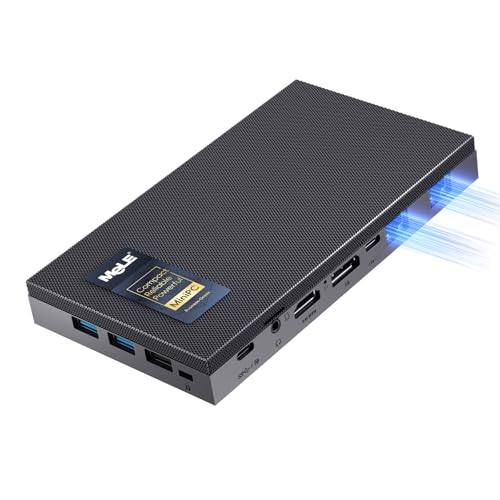
- Explicitly built for Proxmox VE, pfSense/OPNsense, and Home Assistant – not a repurposed office PC, a homelab-first design
- Dual native Intel I226-V 2.5GbE ports support VLANs and link aggregation for real network segmentation
- Fully fanless for 24/7 silent operation – no moving parts to eventually fail
Step-Up: When N-Series Runs Out of CPU
N95 and N100 chips are efficient but only four cores. Once a lab runs several always-on VMs at once – a Windows VM, a media server doing software transcodes, a small Kubernetes cluster – a 6-8 core Ryzen or a 12- to 14-core Intel H- or HX-series chip gives you three to four times the threads, at the cost of more power draw and fan noise under load.
- 12 cores / 16 threads (4 performance + 8 efficiency) – a big jump in how many VMs can do real work at the same time
- Intel platform, so Proxmox and the usual Linux drivers work without surprises
- 16GB is a reasonable start; check the listing for RAM upgrade limits before planning a large VM count
- 6 cores / 12 threads – three times the threads of an N100
- RAM upgrades to 64GB – the key spec for Proxmox, since memory runs out before CPU does
- ACEMAGIC lists Linux support; quiet fan rated under 30dB
- 8 cores / 16 threads of Zen 4, up to 4.9GHz
- 1TB PCIe 4.0 SSD plus a second M.2 slot for a separate VM storage drive; USB4 port
- LPDDR5 is soldered, so 16GB is permanent – pick this for CPU-heavy work, not a large VM count
KAMRUI’s Hyper H2 comes in two configurations that suit different labs. The Core 5 220H version ships with 24GB of RAM, the most memory out of the box among the step-up picks here. The Core i5-14500HX version has the most cores in this guide, 14 cores / 20 threads, and two RAM slots that take up to 64GB.

- Intel Core 5 220H, 12 cores / 16 threads, up to 4.9GHz – three times the threads of an N100
- 24GB RAM out of the box, the most of any step-up pick here; check the listing for RAM upgrade limits before planning a large VM count
- Dual M.2 slots (up to 4TB total), Gigabit Ethernet, Wi-Fi 6 and triple 4K display output

- 14 cores / 20 threads (6 performance + 8 efficiency), up to 4.9GHz, 55W HX-series chip – room for a busy multi-VM Proxmox host
- 16GB DDR4 in two slots, upgradeable to 64GB, plus a 512GB PCIe 4.0 SSD and dual M.2 slots (up to 4TB total) for a boot-plus-VM-storage split
- Single Gigabit Ethernet plus Wi-Fi 6; add a USB 2.5GbE adapter if you want separate management and VM networks
Before You Buy
RAM is the resource that runs out first in a Proxmox home lab, not CPU – an N95 or N100 chip handles far more concurrent light VMs than most people expect, but 8GB total RAM gets tight fast once you’re running more than two or three services. If budget allows, spending the extra on RAM capacity over CPU speed is usually the better trade for a general-purpose home lab node.