
Affiliate disclosure: As an Amazon Associate, HomeNode earns from qualifying purchases at no additional cost to you. Product availability subject to change.
Our UPS battery backup guide covers the standard tier: enough runtime to keep a NAS or server alive for a clean shutdown during a brief outage, typically five to twenty minutes depending on load. That’s the right tool for a short blip. It’s the wrong tool for a storm-related outage that runs for hours, where the goal isn’t a clean shutdown but actually keeping the home lab – and ideally a fridge, some lighting, and a few essentials – running through the whole event. That’s a different category of hardware entirely: large portable power stations with multi-kilowatt-hour batteries, built for exactly this job.
Think of these two categories as solving different problems rather than one being a bigger version of the other. A UPS exists so a sudden outage doesn’t corrupt a NAS mid-write or crash a server ungracefully – its job is measured in minutes and it’s genuinely all most households need. A large power station exists so the outage itself doesn’t matter as much – its job is measured in hours or days, and it’s overkill for anyone whose grid rarely goes down for more than a few minutes at a time.
Who This Tier Is Actually For
This is worth the money if you live somewhere with genuinely frequent multi-hour outages – storm season, an aging local grid, a rural area with slow utility response times – and want more than a UPS’s few minutes of runtime. It’s also the right call if “keep the home lab running” isn’t actually the priority and “keep the fridge and some lights on for half a day” is; these units double as general-purpose emergency power, not just server-room backup. Skip this tier if outages in your area are rare and brief – a standard UPS sized correctly for a clean shutdown is the better value, and a multi-thousand-dollar power station sitting unused for years is a real cost with no return.
Runtime Math: What These Numbers Actually Mean
Power station capacity is measured in watt-hours (Wh) or kilowatt-hours (kWh), and runtime depends entirely on your actual load, not the headline capacity number. A home lab pulling a steady 150W (a mini PC, a small NAS, networking gear) will run roughly 20-24 hours on a 3.6kWh unit before accounting for inverter efficiency losses, which typically shave 10-15% off the theoretical number. Add a fridge cycling on and off, and real-world runtime drops meaningfully – fridges have a high startup surge even though their average draw is modest. Do this math with your actual equipment’s rated wattage before assuming a given unit’s runtime, rather than trusting a manufacturer’s best-case marketing figure.
Comparison: The Power Station Tier
| Unit | Capacity | Max Output | Expandable | Price Tier |
|---|---|---|---|---|
| EcoFlow Delta Pro | 3.6kWh | 3,600W | Yes, to 25kWh with extra batteries | Mid-range |
| EcoFlow Delta Pro Ultra | 6kWh (base) | 7,200W | Yes, to 90kWh+ with extra batteries | Premium |
| Anker SOLIX F3800 | 3.84kWh | 6,000W | Yes, with extra battery modules | High-end |
| Bluetti AC500 + B300S | 3.07kWh (per B300S) | 5,000W | Yes, up to 4 battery modules | High-end |
| Jackery Explorer 3000 Pro | 3.024kWh | 3,000W | Limited expansion | Budget |
The Picks
EcoFlow Delta Pro is the category’s most established option – a 3.6kWh base unit with a genuine expansion path to 25kWh for households that want to grow into whole-home backup over time rather than buying maximum capacity up front.
For sizing an EcoFlow unit to your gear, see the EcoFlow power station buyer’s guide (RIVER 3 to DELTA 3).
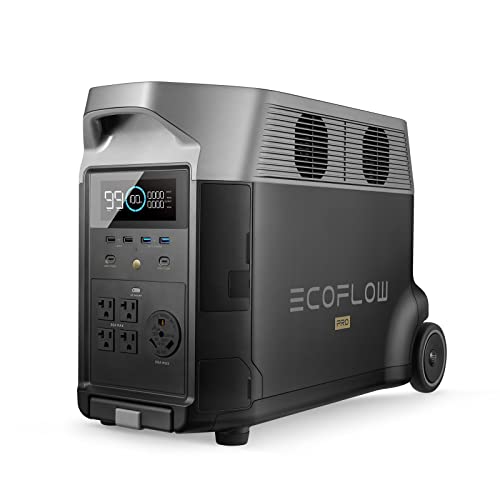
- Large Capacity. Featuring a 3600Wh LFP battery capacity, DELTA Pro provides strong electrical storage for home battery backup p…
- Maximum Output Flexibility. A single DELTA Pro unit packs a 3600W AC output, which can be expanded up to 4500W with X-Boost tec…
- X-Stream Fast Charging. Fully recharge the lifepo4 battery in 1.8 hrs with 240V outlets(3000W), 2.7 hrs with 1800W wall outlets…
EcoFlow Delta Pro Ultra is the serious whole-home option, with enough base capacity and expansion headroom to approach true whole-house backup rather than just critical circuits – priced accordingly, and really only worth it if the goal is covering most of a home’s load, not just a home lab and a few essentials.

- Save All Day, Every Day. DELTA Pro Ultra X works nonstop to lower your energy bills. It automatically switches between solar, b…
- Reliable Power. Instant Response. When the grid fails, DELTA Pro Ultra X restores power in under 20 milliseconds—faster than a…
- Power Every Room. Every Day. EcoFlow DELTA Pro Ultra X delivers whole-home power with 12–36 kW output and expandable 12–180 kWh…
Anker SOLIX F3800 matches EcoFlow’s flagship on output and edges ahead on max wattage, a real consideration if your load includes anything with a high startup surge, like a well pump or a larger appliance alongside the home lab.
- Extended Backup Power: Add a Smart Generator 5500 for Auto Start-Stop, Hands-Free Runtime
- Enlarged Capacity From 3.84kWh: Anker SOLIX F3800 has 3.84kWh to power your family’s needs for one day. If that’s not enough, a…
- Dual-Voltage for Any Appliance: No more limitations when you’re powering your dryer. The 120V/240V and 6,000W AC output runs ev…
Bluetti AC500 + B300S takes a modular approach from the start – buy the AC500 inverter base and add B300S battery modules as budget allows, which spreads the cost over time better than committing to a single large fixed-capacity unit.
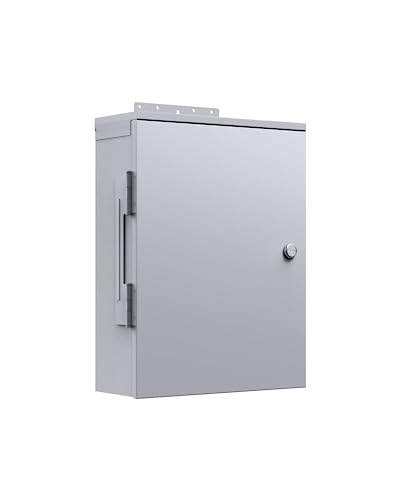
- [What’s It Used For] – Used to connect 1 set of BLUETTI AC500&B300S power station with the main panel to build up a home backup…
- [24/7 UPS Home Backup] – Tie the AC500&B300S power system to your home grid to power your home whenever a blackout occurs. Only…
- [Compatible Version] – It only works with 100-120V US plug version.
Jackery Explorer 3000 Pro is the value entry into genuine multi-kilowatt-hour capacity – less expansion flexibility than the others here, but a real step up from smaller portable power stations at a price that undercuts the true flagship tier.

- Essential Home Backup: With a robust 3600W output (7200W surge) and a 3072Wh capacity, the Jackery HomePower 3000 provides reli…
- ≤20ms UPS: Featuring a UL-certified UPS that switches seamlessly within ≤20ms, the Jackery HomePower 3000 Portable Power Statio…
- Power for Essentials: The Jackery HomePower 3000 keeps your essentials charged at once with versatile AC, USB-C, USB-A, and DC…
Solar Charging Changes the Math for Long Outages
Every unit in this guide supports solar panel charging as an option, which matters specifically for outages that run longer than the battery’s base runtime – a multi-day event where grid power isn’t coming back soon. Solar input adds real cost (panels aren’t included with most of these units) but turns a fixed-runtime battery into something that can sustain a home lab and essentials indefinitely, weather permitting. If your area has a real history of multi-day outages rather than multi-hour ones, factor solar panel cost into the total budget rather than treating the power station alone as the complete solution.
Generator vs. Power Station: Different Tools for Different Outages
A gas or propane generator remains cheaper per watt-hour of runtime for a genuinely extended outage measured in days, and it’s worth being honest that a power station isn’t strictly the better tool in every scenario – it’s the better tool specifically for shorter outages, indoor-safe operation (generators produce carbon monoxide and cannot run indoors or in an attached garage), and silent operation that doesn’t announce to the whole street that your home has power when neighbors don’t. If your realistic outage scenario is measured in days rather than hours, and noise and fuel storage aren’t concerns, a generator paired with a smaller UPS for the clean-transition gap may be the more cost-effective combination. The power stations in this guide earn their premium specifically for shorter-duration, quieter, indoor-safe backup – a different job than a generator solves. If a whole-house standby generator is looking like the better fit for your specific outage pattern and climate, HomeMechanicals’ home battery vs. generator comparison by climate is a useful next read before committing either way.
Noise and Heat From a Unit This Size
A power station in this capacity class isn’t silent – the inverter and cooling fans inside a 3-6kWh unit under real load produce an audible hum, louder than the small UPS units most home labs are already used to. This matters for placement: a unit running your home lab through a multi-hour outage needs to sit somewhere ventilated, since these units do generate real heat under sustained output, and somewhere the noise won’t be disruptive if the outage happens overnight. A closet with some airflow or a basement utility area works better than a bedroom or home office for exactly this reason, even though the unit is portable enough to physically fit in either.
Transfer Switches and Whole-Home Integration
A power station on its own only backs up whatever is physically plugged into it – a fridge on a long extension cord, a home lab on a power strip. Backing up specific existing circuits (part of the kitchen, the home lab’s dedicated circuit, a few key lights) without running extension cords through the house requires a transfer switch, either a manual one covering a handful of circuits or, on the higher end of this hardware tier, a home integration kit that ties the power station directly into the electrical panel and switches over automatically during an outage. This is genuinely electrical work and should be installed by a licensed electrician – done wrong, a transfer switch can backfeed power onto grid lines utility crews assume are dead, which is a real safety hazard, not just a compliance formality. Budget the transfer switch and its installation as a separate line item from the power station itself; several manufacturers in this guide sell matched hardware for exactly this integration, at additional cost beyond the base unit.
Battery Longevity and Charge Cycles
These are lithium batteries, and like any lithium battery, capacity degrades gradually over hundreds of charge cycles – most units in this tier are rated for 3,000-6,000 cycles to 80% of original capacity, which translates to years of regular use before a meaningful capacity loss shows up. The practical takeaway: don’t leave a power station sitting at 100% charge indefinitely if avoidable, since sustained high state-of-charge accelerates degradation more than cycling through a moderate range does. Most units in this guide include a storage-charge mode (typically holding around 50-60%) specifically for exactly this scenario – a battery that mostly sits idle waiting for an outage rather than cycling daily. Use it if the unit is primarily emergency backup rather than daily-use power, and it’ll measurably extend the years before you’re shopping for a replacement.
The Practical Recommendation
For most households buying into this tier for the first time, the EcoFlow Delta Pro is the safest default – established hardware, a real expansion path, and pricing below the true flagship options. If your goal is closer to whole-home backup than just a home lab and essentials, the EcoFlow Delta Pro Ultra or Anker SOLIX F3800 are worth the jump. If budget is the constraint but you still want genuine multi-kilowatt-hour capacity rather than a smaller consumer unit, the Jackery Explorer 3000 Pro delivers that at the most accessible price in this guide – just size your actual expected load against its runtime honestly before buying.