
See also: Using Your Own Router With Starlink: Bypass Mode, Mesh Wi-Fi and Covering a Large Home (2026).
AI-narrated version of this post using a synthetic voice. Great for accessibility or listening while busy.
Affiliate disclosure: As an Amazon Associate, HomeNode earns from qualifying purchases at no additional cost to you. Product availability subject to change.
Our backup internet strategy guide already covers the bigger decision – LTE failover versus Starlink versus doing nothing, and when each makes sense. This piece is narrower and more concrete: given that you’ve decided cellular failover is the right approach, which actual router hardware handles it well in 2026. It’s a genuinely newer buying category than it looks – dual-SIM automatic failover routers with real 5G speed only became broadly available and affordable in the last couple of years, and ISPs themselves only started offering competing automatic-failover services as of January 2026.
Who Needs Dedicated Failover Hardware
If your ISP is one of the growing list now offering automatic residential backup as an add-on service – Spectrum, Xfinity, Frontier, Verizon Fios, Cox, Astound, and AT&T Fiber all began rolling this out starting January 2026 – it’s worth pricing that against buying your own hardware before assuming you need a separate router. The DIY router route makes the most sense if you want full control over which cellular carrier and data plan you use, if your ISP doesn’t offer a backup add-on, or if you’re already running your own firewall/router setup and want failover integrated into that existing infrastructure rather than a separate bolted-on service.
ISP Add-On vs. DIY Router: The Real Trade-off
ISP-provided backup services are the simpler path – T-Mobile Home Internet Backup includes 100 hours of data a month for $20, and Verizon’s Wi-Fi Backup offers seven days of unlimited monthly data starting around the same price, both integrated directly with your existing service and requiring no separate hardware purchase or setup. The DIY router path costs more upfront – $100 to $300 for decent hardware – but gives you carrier flexibility and control: budget data SIMs and prepaid hotspot plans start around $15/month, and some nonprofit programs offer unlimited cellular data in the $40-50 range, which can be cheaper than an ISP’s backup add-on over time if you’re comfortable managing it yourself.
Comparison: Dedicated Failover Router Hardware
| Router | Cellular | Wi-Fi Standard | Failover Type | Price Tier |
|---|---|---|---|---|
| GL.iNet Spitz AX (GL-X3000) | 5G, dual-SIM | Wi-Fi 6 | Automatic, sub-second SIM switching | Mid-range |
| Netgear Nighthawk M6 Pro | 5G | Wi-Fi 6E | Standalone mobile router/hotspot | High-end |
| Cudy P5 5G Router | 5G, dual-SIM | Wi-Fi 6 | Automatic WAN failover | Budget |
| Peplink MAX BR1 Mini 5G | 5G, dual-SIM | Wi-Fi 5/6 (model dependent) | Enterprise-grade automatic failover, SD-WAN capable | Premium |
| TP-Link M7350 (4G/5G variants) | 4G/5G depending on model | Wi-Fi 5 | Simple standalone hotspot/router | Budget |
The Picks
GL.iNet Spitz AX is the strongest all-around pick for a home setup specifically built around failover – dual-SIM slots that automatically select the stronger signal and switch seamlessly between connections, paired with real Wi-Fi 6 speeds (up to 574 Mbps on 2.4GHz and 2402 Mbps on 5GHz) that don’t feel like a downgrade from your primary connection during an outage.

- 【Fast Wi-Fi 6 Cellular Router】GL-X3000 provides reliable cellular networks for remote access and high speed internet in urban a…
- 【5G Network & Dual-SIM with Single Standby】Experience lightning-fast 5G speeds under both NSA and SA standards. Dual-SIM flexib…
- 【VPN Tunnelling & Remote Access】Provides pre-installed OpenVPN and WireGuard to support 30+ VPN services and encrypts all netwo…
Netgear Nighthawk M6 Pro is the premium standalone option – genuinely fast 5G with Wi-Fi 6E, aimed more at being a fully capable mobile router in its own right than a narrow failover-only device, which matters if you also want strong cellular performance while traveling, not just as an emergency backup sitting idle at home.

- Renewed condition, which means there might be signs of previous use.
- DESIGNED FOR AT&T | Provides connectivity anywhere you go, with access to low-band 5G on the AT&T network
- Powered by the Qualcomm Snapdragon X65 5G Modem-RF System to deliver premium performance & groundbreaking speeds.
Cudy P5 5G Router is the practical mid-range pick – automatic WAN failover with dual-SIM support at roughly half the price of the Peplink option below, a reasonable trade for most households that don’t need enterprise-grade management features.
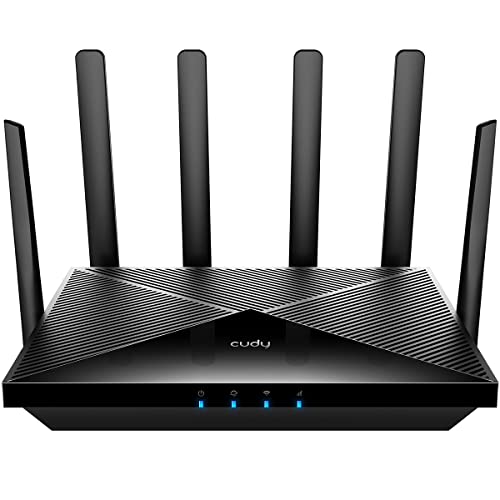
- Lightning-fast Qualcomm Snapdragon SDX62 5G NR SA / NSA Modem Inside . The Cudy P5 supports 5G NR downlink speeds of up to 2.5…
- Qualcomm IPQ5018 WiFi 6 SoC. 1 GHz Dual-core ARM Cortex-A53 CPU High Capacity 802.11ax SoC, delivers super fast dual band Wi-Fi…
- Dual SIM and WAN Failover Keep You Always On-internet. Dual SIM slots provide redundancy and keep the device always online. Bot…
Peplink MAX BR1 Mini 5G is built for a genuinely different tier of reliability need – SD-WAN capable, enterprise-grade automatic failover logic, the kind of hardware a small business or a home office that truly cannot go offline would choose over a consumer-grade router.

- 3x 10/100/1000M Ethernet LAN (LAN port 3 can be configured as WAN port with PrimeCare or Feature Pack Add-on licence)
- 1x CAT-4 Embedded Cellular Modem with Redundant SIM Slots (Uplink / Downlink datarate: 150Mbps/50Mbps)
- Simultaneous Dual-Band (2.4GHz / 5GHz) Wi-Fi 5, 2X2 MIMO, Wi-Fi WAN and/or AP | 300Mbps Router Throughput
TP-Link M7350 is the budget entry point – a simple standalone hotspot/router covering 4G or 5G depending on the exact model, without the automatic dual-SIM failover logic of the other picks here, better suited to manual backup use than a set-and-forget failover setup.
What “Automatic Failover” Actually Means in Practice
Not every router marketed for backup internet handles the switch the same way, and it’s worth understanding the difference before assuming any dual-WAN router behaves identically. True automatic failover continuously monitors the primary connection and switches to cellular within seconds of detecting an outage, with no manual intervention – that’s what the GL.iNet, Cudy, and Peplink models above are specifically built around. A basic hotspot router, like the TP-Link M7350, may require manually switching your devices to connect to it during an outage instead, which works but adds friction exactly when you’re already dealing with an inconvenient outage.
Modern 5G Speed Makes This Category Genuinely Viable
Older 4G LTE failover setups were usable for basic connectivity but noticeably compromised for anything demanding – video calls, VPN connections, or streaming often struggled on LTE-only failover hardware. Modern 5G changes that meaningfully: current 5G service delivers 100 to 400 Mbps with latency low enough to support video calls, VPN connections, and cloud applications comfortably during a failover event, which is a real functional difference from the LTE-only failover era, not just a faster number on a spec sheet. This is a meaningful part of why this category has become worth a dedicated hardware purchase rather than settling for “good enough to check email” backup connectivity.
Data Plan Costs Are the Ongoing Expense, Not the Hardware
The router itself is a one-time cost, but don’t overlook the recurring data plan expense when budgeting for this setup – it’s the part that actually determines whether DIY failover saves money over an ISP add-on long-term. A prepaid data SIM used only during outages, sized for occasional use rather than daily heavy usage, keeps ongoing costs low; several nonprofit and budget carrier programs specifically cater to this occasional-use pattern in the $15-50/month range referenced above. Confirm your chosen router supports the SIM format and carrier bands for whichever budget data plan you’re considering before buying either piece separately.
Data Caps and Throttling on Backup Plans Deserve a Close Read
Whichever data plan ends up powering the failover connection, read the fine print on throttling and overage behavior specifically, not just the headline data allowance – some budget and prepaid plans marketed as “unlimited” throttle speeds dramatically after a modest threshold, which can mean a failover connection that technically stays connected but becomes too slow to be useful for anything beyond basic browsing right when you need it most. This is a meaningfully different failure mode than simply running out of data, since the connection appears to be working while actually being nearly unusable. Confirm the specific throttling threshold and post-throttle speed on any plan being considered for this purpose, particularly if the failover connection needs to support video calls or VPN use during an extended outage rather than just basic connectivity.
Antenna Position and Signal Strength Still Determine Real-World Speed
A 5G router’s advertised speed figures assume strong signal conditions, and actual throughput during an outage depends heavily on where the router physically sits relative to the nearest cell tower and what’s blocking the signal path – a basement installation, thick exterior walls, or a rural location with weaker coverage can all meaningfully undercut the numbers on the box. Most of the dedicated routers above, including the GL.iNet Spitz AX, support detachable external antennas specifically because signal quality varies enough that repositioning or upgrading antennas is often the single biggest real-world speed improvement available, more than switching between comparable router models. Check your carrier’s coverage map for your specific address before buying, and if signal is marginal, budget for an external antenna upgrade as part of the setup rather than assuming the router’s built-in antennas will be adequate.
Test the Failover Before You Actually Need It
A failover router that’s never been tested is a false sense of security, not real backup coverage – the only way to know it actually works is to deliberately simulate an outage (unplugging the primary WAN connection) and confirm the switch happens automatically and devices reconnect within an acceptable window. Do this once during initial setup and periodically afterward, since firmware updates on either the primary router or the failover device can occasionally change behavior in ways that aren’t obvious until the moment a real outage happens. This is a five-minute check that meaningfully changes whether the setup is genuinely reliable backup or just hardware sitting untested in a closet.
The Practical Recommendation
Before buying any hardware, check whether your existing ISP now offers an automatic backup add-on – as of January 2026 a meaningful number of major providers do, and it may be the simpler, cheaper path if it’s available on your account. If you want your own hardware with carrier flexibility, the GL.iNet Spitz AX is the strongest all-around pick for a typical home setup, and the Cudy P5 is a reasonable budget alternative if the Spitz AX’s price is a stretch. Reserve the Peplink MAX BR1 Mini 5G for a genuine can’t-go-offline scenario – a home office running a business, not casual backup for streaming during an outage – since its price reflects enterprise-grade reliability most households don’t need.