
See also: Using Your Own Router With Starlink: Bypass Mode, Mesh Wi-Fi and Covering a Large Home (2026).
AI-narrated version of this post using a synthetic voice. Great for accessibility or listening while busy.
A Zigbee or Z-Wave device that works perfectly in one corner of the house and drops constantly in another isn’t usually a broken device – it’s a dead zone, a spot outside reliable mesh range from the nearest working node, and the fix has almost nothing to do with the device itself. This is a different, more specific problem than the general troubleshooting our Zigbee dropping guide covers, and it’s a genuinely huge long-tail search topic that this site’s existing hub and dongle comparisons haven’t directly addressed with a dedicated troubleshooting post of their own.
Our Zigbee/Z-Wave USB dongle guide covers picking the right controller hardware in the first place – this guide picks up from there, for the specific case where the controller is fine but coverage at the edges of the house isn’t.
How Zigbee and Z-Wave Mesh Networks Actually Extend Range
Both protocols build a mesh network where mains-powered devices, not battery-powered ones, act as repeaters, relaying signal from the hub outward through the house one hop at a time – a device far from the hub can still work reliably if there’s a repeater-capable device between them, even if it couldn’t reach the hub directly. Dead zones happen when there’s a genuine gap in that repeater chain: a detached garage, a converted basement with concrete walls, or simply a large enough house that too much distance sits between mains-powered devices for the mesh to bridge reliably. Understanding this is the key to fixing it – the solution generally isn’t a stronger or more expensive hub, it’s adding a repeater-capable device in the gap.
Diagnosing a True Dead Zone vs a Different Problem
Before buying a range extender, confirm the problem is actually range and not something else masquerading as it – a device that drops intermittently even when close to the hub is more likely a channel interference issue, Wi-Fi routers using the same 2.4GHz spectrum as Zigbee is a common culprit, or a firmware/pairing problem than a coverage gap. A genuine dead zone shows a consistent pattern: devices in a specific area or beyond a specific distance reliably fail to respond or drop off, while devices closer to the hub work fine. Most Zigbee and Z-Wave hub software, including Home Assistant’s Zigbee2MQTT and ZHA integrations, can show a network map or signal strength per device, which is worth checking before spending money on a fix for the wrong problem.
Zigbee-Specific Range Extenders
A dedicated Zigbee range extender/repeater plugs into a wall outlet in the gap between your hub and the dead zone, joining the mesh as a mains-powered repeater node without needing any hub reconfiguration beyond normal device pairing. Placement matters more than brand here – a repeater needs to be within reliable range of both the hub side of the network and the dead zone it’s meant to bridge, so a repeater placed at the edge of existing coverage, extending outward toward the gap, works better than one placed randomly closer to the problem area but out of range of the existing mesh entirely.
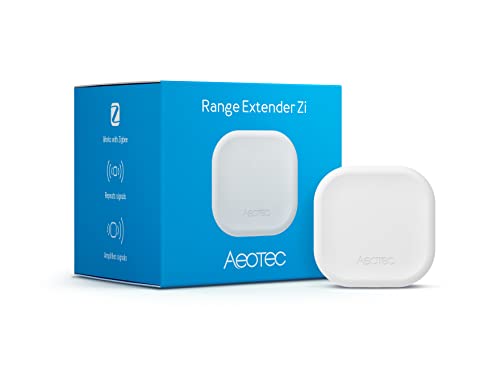
- Zigbee Extender – Extend the range of your SmartThings, HomeAssistant, or other Zigbee based wireless network
- Remove Dead Spots – The Range Extender Zi is the perfect solution to reach your Zigbee battery devices that may not have consis…
- Small and Discrete – Plugs directly into an outlet leaving the other outlet port accessible for use
Z-Wave-Specific Range Extenders
Z-Wave uses a similar mains-powered mesh repeating principle, but its lower frequency, 908MHz in the US versus Zigbee’s 2.4GHz, gives it somewhat better wall-penetration characteristics at the cost of typically fewer total devices supported per network. A dedicated Z-Wave range extender works the same way as its Zigbee counterpart – plugged into a wall outlet at the edge of current coverage, joining the mesh as a repeater. Note that Z-Wave and Zigbee extenders are not interchangeable; a Z-Wave device only repeats Z-Wave traffic and vice versa, so confirm which protocol your dead-zone devices actually use before buying the wrong extender type.

- [Reliable Z-Wave 800 Series] This z wave plug has built-in a 800 series chip. This 800 series zwave plug has better signal cove…
- [Easy to Setup and Secure Connectivity] This z-wave plug SmartStart combines automated processes, QR code integration and simpl…
- [Remote Control and Voice Control] Enjoy the convenience of remotely controlling connected devices through a Z-Wave controller,…
When the Problem Is the Controller Itself, Not the Mesh
Occasionally a persistent dead zone traces back to a weak or poorly-placed USB Zigbee dongle on the hub side rather than a genuine mesh coverage gap – a USB dongle plugged directly into the back of a computer or Home Assistant box, especially one in a closet or behind other electronics, can have meaningfully worse range than the same dongle on a USB extension cable with a clearer line of sight into the room. A USB Zigbee dongle with an external antenna, positioned with a short extension cable away from other electronics and USB 3.0 interference sources, often improves whole-house coverage more than an additional repeater would, particularly in the area immediately around the hub itself.

- Extend out 8 IO ports, can matching different firmware (Sniffer And BTool) to achieve bluetooth adapter and protocol analyzer f…
- Wireless CC2531 Sniffer Module USB Dongle, CC2531EMK Compatible, Zigbee USB Dongle
- Protocol Analyzer Operating Frequency:2.405-2.485GHz
Comparison: Which Fix Matches Which Symptom
| Symptom | Likely Cause | Fix |
|---|---|---|
| Devices drop only in one specific far area | Genuine coverage gap | Zigbee or Z-Wave range extender placed at the edge of existing coverage |
| Devices drop intermittently everywhere, including near hub | Interference or weak hub-side antenna | USB dongle with external antenna, moved away from interference sources |
| Devices drop only during heavy Wi-Fi use | Channel interference (2.4GHz overlap) | Change Zigbee channel to avoid overlapping Wi-Fi channels |
| Z-Wave devices fine, Zigbee devices dropping, or vice versa | Protocol-specific mesh gap | Extender matching the specific affected protocol, not the other one |
Repeater Placement Strategy for a Whole House
Think of repeater placement as filling in a chain rather than covering an area – each repeater needs to reliably reach both the device or repeater before it and the one after it, so a single extender placed exactly in the middle of a large dead zone is often less effective than the same extender placed at the boundary of existing good coverage, extending the chain outward incrementally. For a genuinely large or oddly-shaped house, this sometimes means two modest extenders placed strategically outperform one expensive extender placed in the geographic center of the problem area, because mesh range is about hop-to-hop reliability, not raw distance from a single point.
Mains-Powered Devices You Already Own Are Free Repeaters
Before buying a dedicated extender, check whether any Zigbee or Z-Wave smart plugs, in-wall switches, or other mains-powered devices you already own are actually acting as repeaters – depending on the specific device and firmware, some mains-powered smart devices repeat by default while others need a settings change or simply don’t support the repeater role at all. A smart plug you already own, moved to the right location, sometimes closes a coverage gap for free before a dedicated extender purchase becomes necessary at all.
How Many Extenders a Typical House Actually Needs
There’s no fixed formula for extender count, since it depends heavily on wall construction, house layout, and how many mains-powered devices are already in place acting as unintentional repeaters, but a useful rule of thumb is one extender per 1,000-1,500 square feet of single-story coverage, more in a multi-story home where floors themselves attenuate signal, and meaningfully more in a house with dense interior masonry or metal-backed insulation that blocks RF more aggressively than standard drywall construction. Start with one extender at the known problem area and reassess before buying a second – overbuying extenders speculatively wastes money that could go toward a better hub-side antenna setup instead, which as covered above is sometimes the actual bottleneck rather than genuine distance-based coverage.
Firmware and Mesh Network Health Over Time
A mesh network’s health isn’t static once configured – devices get added, removed, and occasionally replaced, and each change can shift which devices are acting as repeaters for which others in ways that aren’t always obvious from the outside. Periodically checking your hub’s network topology map, particularly after adding several new devices or after a device that was serving as a repeater gets removed or replaced, catches degradation before it becomes a persistent complaint rather than an occasional annoyance. Firmware updates on both extenders and the primary coordinator matter here too, since mesh routing algorithm improvements ship as firmware updates on most modern Zigbee and Z-Wave hardware, and an outdated device can route less efficiently than an updated one even with identical physical placement.
The Practical Recommendation
Diagnose before you buy – confirm it’s a genuine coverage gap using your hub’s network map rather than assuming, since interference and hub-side antenna problems look similar to a dead zone from the affected device’s perspective but need a different fix. Once you’ve confirmed a real gap, place a protocol-matched extender at the edge of existing good coverage rather than in the middle of the dead zone itself, and check whether an existing mains-powered device could serve the same purpose for free before buying new hardware. If the problem shows up close to the hub as well as far from it, look at the hub-side dongle and antenna placement before assuming you need more repeaters further out.
Affiliate disclosure: As an Amazon Associate, HomeNode earns from qualifying purchases at no additional cost to you. Product availability subject to change.
One more practical note worth flagging before you buy: re-check current pricing and availability on any linked product, since Amazon listings and prices change more often than review content does, and a specific model mentioned above can be superseded by a newer revision within months of publication.