
Affiliate disclosure: As an Amazon Associate, HomeNode earns from qualifying purchases at no additional cost to you.
Short answer: For a household with a fibre plan, several gaming PCs and consoles that deserve wired links, the ASUS ROG Rapture GT-BE98 Pro is the most capable pick thanks to its dual 10G and quad 2.5G ports plus quad-band Wi-Fi 7. The TP-Link Archer GE800 covers the same port density with a built-in game panel, and the ASUS RT-BE88U suits anyone whose fibre handoff is SFP+ rather than RJ45. On a gigabit plan where most machines are already cabled, the ASUS RT-AX86U Pro does the important parts with less complexity.
This guide is for people who keep losing duels and blaming the internet. Two players on consoles in the living room, someone streaming on a handheld upstairs, a desktop running a game and a download at once — that mix is where routers actually differ. The useful question is not which router is fastest but which one keeps latency low while the rest of the house is busy.
What actually lowers in-game lag
Your ping to a game server is mostly distance and your ISP’s routing. No router changes that. What a router controls is the queueing delay added on your own link when something else saturates it.
Bufferbloat control is the real feature
When an upload fills your connection, packets pile up in a buffer and every game packet waits behind them. Smart queue management (usually fq_codel or CAKE) and the adaptive QoS engines on consumer routers shrink those queues so latency stays flat under load. ASUS ships Adaptive QoS across its line, TP-Link brands its version Turbo Game Acceleration, and NETGEAR’s Nighthawk app exposes device-level controls.
Two things matter: the engine must police the upload as well as the download, and the CPU has to keep up. The Archer GE800 pairs a quad-core processor with 2 GB of RAM; the RT-BE88U uses a quad-core 2.6 GHz 64-bit CPU.
Cable the machines that sit still
A console under the TV never moves. Give it Ethernet. A wired link removes airtime contention, retransmissions and roaming hiccups in one step. If you are pulling new runs, our guide to wiring a house for Ethernet with patch panels and keystone jacks covers doing it tidily; where that work touches in-wall electrical routes, follow local code and use a licensed electrician where required. If you cannot run cable, see MoCA vs powerline for how those two fallbacks differ in latency behaviour.

- Beyond-fast WiFi 7 (802.11be) with new 320MHz channels in the 6 GHz band and 4096-QAM significantly increases network…
- Multi-link Operation links to multiple bands at the same time to ensure stable internet connections and efficient dat…
- current-generation external dual-feeding antennas boost coverage by providing high efficiency and significantly enhan…
Multi-gig WAN and LAN for fibre plans
Multi-gig ports do nothing for ping, but they stop the router being the bottleneck on a 2 Gbps or faster plan, and they let a NAS move large game installs without starving everyone else. The GT-BE98 Pro offers two 10G ports and four 2.5G ports, so one 10G can face the ONT and the other can feed a switch.
The RT-BE88U takes a different route: a 10G SFP+ cage alongside a 10G WAN/LAN port, four 2.5G and four gigabit ports, for stated wired capacity up to 34G. SFP+ helps if your provider hands off fibre directly or you already run DAC cables. Our write-up on which router, switch and NIC upgrades actually use a multi-gig fibre plan covers matching the chain end to end.

- Blazing-fast WiFi 7 tech boosts throughput up to 7200Mbps with Multi-Link Operation and 4096-QAM.
- Bolster your wired network capacity up to 34G with one current-generation 10G SFP+ port and one standard 10G WAN/LAN…
- Establish always-on internet through AI WAN detection, versatile WAN configuration options, and a convenient USB port…
Wi-Fi 7, MLO and 6 GHz for handhelds and laptops
Wi-Fi 7’s contribution to gaming is less about peak throughput and more about Multi-Link Operation, which lets a capable client hold connections on two bands at once and shift traffic when one gets noisy. For a handheld that cannot be cabled, that stability beats a bigger headline number.
The 6 GHz band helps because it is comparatively empty and supports 320 MHz channels, though range is shorter than 5 GHz — treat it as a same-floor band. The GT-BE98 Pro is quad-band with a stated ceiling of 30 Gbps; the Archer GE800 is tri-band BE19000 at up to 11,528 Mbps on 6 GHz; the Nighthawk RS700S is tri-band BE19000 rated up to 19 Gbps.
A lower-cost Wi-Fi 7 option without 6 GHz
Not every Wi-Fi 7 router needs a third band. The Tenda BE12 Pro is a dual-band BE7200 router: Tenda lists up to 5,765 Mbps on 5 GHz with 160 MHz channels and 1,376 Mbps on 2.4 GHz, with Multi-Link Operation across the two bands. Wired, it has two 2.5G ports and three Gigabit ports, each configurable as WAN or LAN, so a 2.5G fibre handoff and a cabled gaming PC can both run at multi-gig speed.
Tenda also lists a quad-core 2.0 GHz CPU with 512 MB of RAM, a GearUP game-acceleration feature, bandwidth control, a separate IoT network for smart-home devices, EasyMesh, and WireGuard and OpenVPN client support. The trade-off: no 6 GHz band, no 10G ports and no 320 MHz channels, so it suits plans up to about 2 Gbps and homes where the gaming machines are cabled or close to the router.

- Wi-Fi 7 dual-band BE7200 with Multi-Link Operation
- Two 2.5G and three Gigabit ports, each usable as WAN or LAN
- Quad-core 2.0 GHz CPU, 512 MB RAM, IoT network, EasyMesh
Consoles, NAT type and port forwarding
An open or moderate NAT type matters for matchmaking and party chat. UPnP on a single router usually sorts it; trouble appears when your ISP gateway and your own router both perform NAT. Put the gateway in bridge mode, or forward the ports your game needs to a static DHCP reservation. The five main picks here all expose manual port forwarding, and the RT-AX86U Pro lists it alongside its Mobile Game Mode.

- 𝐁𝐄𝟏𝟗𝟎𝟎𝟎 𝐓𝐫𝐢-𝐁𝐚𝐧𝐝 𝐖𝐢-𝐅𝐢 𝟕 – Experience fast gaming with speeds up to 11,528 Mbps (6 GHz), 5,764 Mbp…
- 𝐓𝐰𝐨 𝟏𝟎𝐆 𝐏𝐨𝐫𝐭𝐬 𝐟𝐨𝐫 𝐅𝐮𝐭𝐮𝐫𝐞-𝐏𝐫𝐨𝐨𝐟 𝐂𝐨𝐧𝐧𝐞𝐜𝐭𝐢𝐯𝐢𝐭𝐲 – No more bandwidth struggles, just…
- 𝐓𝐮𝐫𝐛𝐨 𝐆𝐚𝐦𝐞 𝐀𝐜𝐜𝐞𝐥𝐞𝐫𝐚𝐭𝐢𝐨𝐧 – Optimize your gaming experience with Archer GE800’s powerful quad-core…
The options compared
| Model | Wi-Fi generation and bands | Fastest wired ports | Manufacturer-stated peak | Best suited to |
|---|---|---|---|---|
| ASUS ROG Rapture GT-BE98 Pro | Wi-Fi 7, quad-band | 2× 10G, 4× 2.5G | Up to 30 Gbps | Multi-gig fibre with many wired gaming machines |
| TP-Link Archer GE800 | Wi-Fi 7, tri-band BE19000 | 2× 10G, 4× 2.5G, USB 3.0 | 11,528 Mbps on 6 GHz | Players who want a game panel and RGB |
| ASUS RT-BE88U | Wi-Fi 7, dual-band | 1× 10G SFP+, 1× 10G, 4× 2.5G, 4× 1G | Up to 7.2 Gbps wireless | SFP+ fibre handoff and dense wired setups |
| NETGEAR Nighthawk RS700S | Wi-Fi 7, tri-band BE19000 | 2× 10G (one Internet, one LAN), 4× Gigabit | Up to 19 Gbps, 200 devices | Coverage-first homes up to 3,500 sq ft |
| ASUS RT-AX86U Pro | Wi-Fi 6, dual-band AX5700 | 1× 2.5G, gaming port | Up to 5,700 Mbps | Gigabit plans where most devices are cabled |
| Tenda BE12 Pro | Wi-Fi 7, dual-band BE7200 | 2× 2.5G, 3× 1G | Up to 5,765 Mbps on 5 GHz | Lower-cost Wi-Fi 7 for plans up to about 2 Gbps |

- FASTER, FARTHER, MORE RELIABLE WIFI: A dedicated tri-band WiFi 7 router with a third high-speed band for demanding de…
- WORKS WITH YOUR EXISTING INTERNET SERVICE: Pairs with your existing modem or gateway via ethernet. Compatible with mo…
- SET UP AND MANAGE YOUR NETWORK WITH THE NIGHTHAWK APP: Download the free Nighthawk app on iOS or Android for guided s…
Trade-offs, mesh and who should choose something else
A gaming-branded router is the wrong purchase if your real complaint is dead zones two floors up. One box cannot fix building materials. The RS700S is rated for up to 3,500 sq ft, but NETGEAR points multi-storey homes towards a mesh system, and our Wi-Fi 7 mesh comparison explains where that shift pays off. ASUS models here extend via AiMesh, so you can start standalone and add nodes later.
The RS700S prioritises straightforward setup and coverage over port count — its LAN side is mostly gigabit, fine for consoles, with a single 10G LAN port that a NAS and a switch have to share. The GT-BE98 Pro and Archer GE800 go the other way, with more ports and more configuration surface than a casual user needs. If plain reliability matters more than tunables, a standard Wi-Fi 7 standalone router plus good Ethernet will beat a gaming model left on defaults.
What we recommend
Buy for your ports first, your bands second and the gaming branding last. Household with 2 Gbps-plus fibre, a NAS and three or four machines worth cabling: the GT-BE98 Pro. Same needs with an SFP+ handoff or a wish for LTE failover over USB: the RT-BE88U. Competitive players who like seeing network state at a glance: the Archer GE800, with its dedicated gaming port and performance panel.
Gigabit plan, modest house, consoles already wired: the RT-AX86U Pro, with a 2.5G port and AiMesh expansion. Then spend an evening enabling adaptive QoS, setting DHCP reservations for the consoles and checking that only one device performs NAT. Want Wi-Fi 7 and 2.5G wired ports for less, and can live without 6 GHz: the Tenda BE12 Pro.
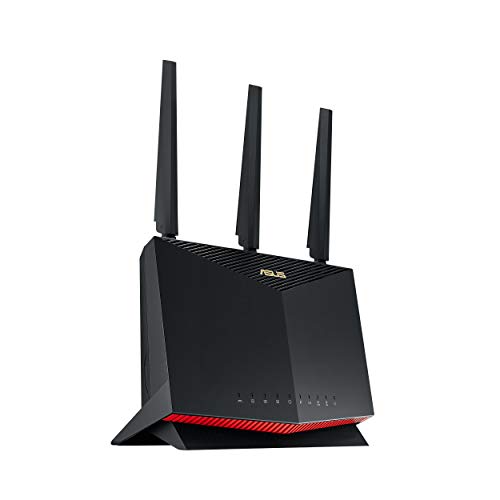
- New-generation WiFi 6 – Enjoy ultrafast speeds up to 5700 Mbps with the latest WiFi 6 (802.11ax) and 160MHz channels….
- Mobile Game Mode – Minimize lag and latency for mobile gaming with just a tap on the ASUS Router app
- True 2 Gbps wired and wireless speeds – Aggregated 2 Gbps WAN connections, wired 2.5 Gbps port and WiFi 6
Frequently asked questions
Does a gaming router lower ping to game servers?
Not the base ping, which is set by distance and ISP routing. What it can do is prevent latency spikes when other devices saturate your connection, using adaptive QoS or smart queue management.
Is Wi-Fi 7 worth it for consoles?
A wired connection is better for any console that stays in one place. Wi-Fi 7 pays off for handhelds and laptops, where Multi-Link Operation keeps a link stable across two bands at once.
Are 10G ports necessary on a gaming router?
Only if your internet plan or your local network exceeds what 2.5G can carry. The GT-BE98 Pro and Archer GE800 each offer two 10G ports, while the RT-BE88U adds a 10G SFP+ cage for direct fibre or DAC links.
How do you get an open NAT type on a console?
Make sure only one device on the network performs NAT by putting an ISP gateway into bridge mode, then enable UPnP or forward the game’s ports to a static DHCP reservation for the console.
How these picks were chosen: HomeNode compares products using manufacturer specifications, current Amazon listing details and published owner feedback. Products are not tested in-house, and listings change often, so confirm current specifications on the product page before buying.
Affiliate disclosure: As an Amazon Associate, HomeNode earns from qualifying purchases at no additional cost to you.