
AI-narrated version of this post using a synthetic voice. Great for accessibility or listening while busy.
Most home labs start with a cheap N100 box and a single gigabit link. That works until you add a second NVMe pool, start replicating backups, or notice that a TrueNAS share tops out long before the SSDs do. At that point the bottleneck moves from compute to networking, and the shopping list changes.
The Minisforum workstation line exists for that second stage. The MS-01, MS-A2 and MS-02 all pair laptop-class high-power CPUs with built-in SFP+ (or SFP28) ports, three or four M.2 slots, and a real PCIe slot — the combination that normally forces you into a tower or a used rack server. This guide explains what each model offers according to Minisforum’s specifications, where they lose to a small low-power box, and how to actually wire up the fast ports.
It is written for anyone running Proxmox, TrueNAS SCALE, or a mixed virtualisation host at home who has outgrown 2.5GbE and wants to know whether the jump makes sense before committing.
Why this line keeps showing up in home lab builds
Four things explain the popularity. First, 10G fibre networking is on the board, so you are not burning your only PCIe slot on a NIC. Second, multiple M.2 slots let you build a mirrored NVMe pool plus a separate boot drive inside one chassis. Third, the PCIe slot stays free for an HBA, a GPU, or another NIC. Fourth, the CPUs are fast enough that a single node can host a dozen VMs without feeling cramped.
That last point matters more than raw core counts suggest. Consolidating three mini PCs into one node reduces the number of things that can fail, the number of power bricks under the desk, and the amount of cabling. The counter-argument — that you have now built a single point of failure — is real, and worth weighing against a multi-node Proxmox cluster of smaller machines.
The networking is the actual selling point
The MS-01 ships with two 10Gbps SFP+ cages alongside two 2.5G RJ45 ports driven by Intel I226-LM and I226-V controllers, with the I226-LM variant supporting Windows Server. The MS-A2 mirrors that layout: dual SFP+ 10G plus dual 2.5Gb LAN. The MS-02 Ultra moves up to dual 25GbE plus 10GbE and 2.5GbE ports, which is more bandwidth than most home labs will ever saturate but gives headroom for direct node-to-node links.
MS-01: the Intel 13th-gen option
The configuration covered here uses the Core i9-13900H — 14 cores, 20 threads, 24MB cache, up to 5.4GHz — with vPro Enterprise support, 32GB of DDR5 and a 1TB SSD. Integrated Iris Xe graphics handle transcoding duties, which is the main reason people pick Intel over AMD for a Plex or Jellyfin host.
Storage is generous: three M.2 slots (one PCIe 4.0 x4 rated up to 7000MB/s, one PCIe 3.0 x4 and one PCIe 3.0 x2), with the PCIe 4.0 slot also able to take a U.2 drive via the included adapter, plus RAID 0 and RAID 1 support. A U.2-to-M.2 conversion adapter is in the box. The x16-length slot runs at PCIe 4.0 x8 and takes low-profile cards.
Beyond the SFP+ and RJ45 ports, the MS-01 has two USB4 40Gbps Type-C ports that support Thunderbolt networking at 20Gbps, three USB 3.0 Type-A, two USB 2.0 Type-A and HDMI 2.0 at 4K60. Those USB4 ports are what makes Thunderbolt-mesh Ceph clusters possible without any switch at all.

- 【Intel 13th Generation Core i9】:Mini desktop computer MS-01 S1390 is equipped with the high-end Intel 13th Core i9 13…
- 【Super Fast Network Speed】2x 10Gbps SFP+ network ports, supporting link aggregation; 2x 2.5G RJ45 network ports with…
- 【Enterprise storage】MS-01 Mini Workstation supports up to 3x M.2 NVME SSDs, including one interface that supports PCI…
MS-A2: Zen 5 cores and a splittable slot
The MS-A2 configuration here carries the Ryzen 9 9955HX: 16 cores, 32 threads, Zen 5, 64MB of L3 cache, up to 5.4GHz. For compile jobs, heavy container workloads, or a lot of concurrent VMs, that thread count does more work than the MS-01’s hybrid core layout.
Memory runs DDR5 SODIMM at 5600 MT/s up to 96GB. Three NVMe slots: one that takes a U.2 drive up to 15TB and two M.2 2280/22110 slots up to 4TB each, for a stated maximum of 23TB, plus RAID 0/1. The PCIe x16 slot can split into two x4 slots, so you could run two 10G network cards or a half-height professional GPU. Cooling uses three copper heat pipes and phase-change thermal material, rated by Minisforum for continuous 24/7 operation.
The trade-off against the MS-01 is graphics. AMD’s integrated GPU is capable, but Intel Quick Sync remains the better-documented path for hardware transcoding in home media stacks.

- Powerful Ryzen 9 9955HX: The MS-A2 mini PC is equipped with an AMD Ryzen 9 9955HX processor (16 cores/32 threads, Zen…
- Fast memory & expandable storage: Equipped with DDR5 SODIMM, supporting 5600 MT/s, up to 96 GB and three M.2 NVMe SSD…
- Efficient Cooling: Equipped with three pure copper heat pipes, phase-change thermal materials, and turbo-accelerated…
MS-02 Ultra: 25GbE and four memory slots
The MS-02 Ultra is a different class of machine. Core Ultra 9 285HX with 24 cores and 24 threads up to 5.5GHz, a 13 TOPS NPU, four DDR5 SODIMM slots reaching 256GB with ECC support, and four PCIe 4.0 M.2 slots totalling up to 24TB with RAID 0/1/5/10.
ECC plus four memory slots is the detail that matters for ZFS users. The primary PCIe slot is 5.0, up to three slots can be populated including a dual-slot x16 GPU, and USB4 v2 runs at 80Gbps. Wi-Fi 7 is included. Minisforum rates the 6-pipe dual-fan cooler for up to 140W turbo against a 100W TDP, with noise as low as 36 dB, and the unit ships with a 350W PSU.
That 350W supply is a clue. This is not a low-idle machine, and if your lab runs 24/7 on a metered circuit, the role-based mini PC comparison is worth reading before you commit.
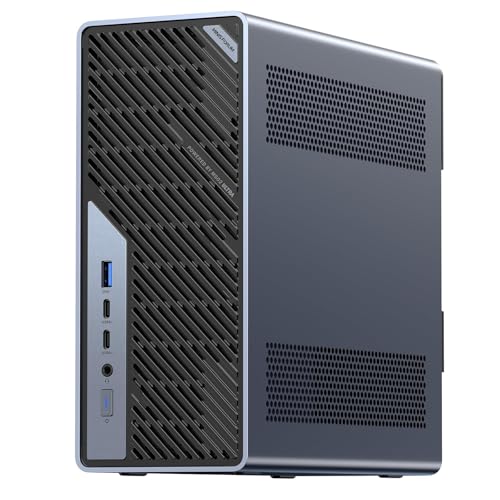
- High-Performance AI Processor:The MS-02 Ultra features an Intel Core Ultra 9 285HX (24C/24T, up to 5.5 GHz, 13 TOPS N…
- 4 × M.2 PCIe 4.0 + 4 × DDR5 SODIMM slots:Four DDR5 SODIMM slots support up to 256 GB of memory, while ECC helps maint…
- PCIe & USB 4.0 v2: Up to three PCIe slots can be equipped, including a dual-slot x16 GPU. The main slot supports PCIe…
Specification comparison
| Model | CPU (as listed) | Fast networking | M.2 slots | PCIe slot |
|---|---|---|---|---|
| MS-01 | Core i9-13900H, 14C/20T, up to 5.4GHz | 2× 10G SFP+, 2× 2.5G RJ45, 2× USB4 (20Gbps TB net) | 3 (2280/22110/U.2) | PCIe 4.0 x16 slot (x8 electrical) |
| MS-A2 | Ryzen 9 9955HX, 16C/32T, up to 5.4GHz | 2× 10G SFP+, 2× 2.5G LAN, Wi-Fi 6E | 3 (2280/22110/U.2) | PCIe x16 slot (4.0 x8), splittable to 2× x4 |
| MS-02 Ultra | Core Ultra 9 285HX, 24C/24T, up to 5.5GHz | 2× 25GbE, 10GbE, 2.5GbE, Wi-Fi 7 | 4 (PCIe 4.0) | PCIe 5.0 x16, up to 3 slots |
| Typical N100/N150 box | 4 efficiency cores | 1–2× 2.5GbE | 1–2 | None |
Power, noise and the barebone question
These machines idle higher than an N100 box and their fans are audible under load — that is the price of 45W-class and 100W-class CPUs in a small shell. Published idle figures vary widely depending on BIOS version, C-state settings, how many M.2 drives are populated, and whether the SFP+ ports are linked up, so treat any single number you read online as specific to that configuration rather than a spec.
The direction of the trade-off is clear enough. Expect several times the idle draw of a low-power box, and expect fan noise that suits a utility room better than a bedroom shelf. If placement is tight, some of the ideas in the mini PC cooling guide apply here too.
Barebone versus configured
All three models sell in barebone form as well as the RAM-and-SSD configurations described above. Barebone makes sense if you already have DDR5 SODIMMs and NVMe drives on the shelf, or if you want specific endurance-rated SSDs for a ZFS pool. Configured units get you running the same day with a known-good memory kit. Neither choice is wrong; it depends on what is already in your parts bin.
Wiring up SFP+
SFP+ cages are empty. For runs inside a rack or between two machines on the same shelf, passive direct-attach copper is the simplest answer — a twinax DAC like the 10Gtek 1-metre cable terminates in both SFP+ cages directly, no transceivers needed. For longer runs you need optical modules and fibre instead.

- 10GBase-CU, 1 Meter (Note that this length includes two connectors.)
- 2-pair differential twinax cable, Passive, EEPROM I2C
- Compatible with Cisco SFP-H10GB-CU1M, Ubiquiti, Fortinet and more
Note that a 10G link only helps if the other end can keep up. Plenty of labs pair these workstations with a 2.5G switch such as the TP-Link TL-SG108S-M2, which gives eight auto-negotiating 2.5G ports in a fanless chassis, and reserve the SFP+ ports for a direct cable to a NAS or a second node. That is often the cheaper path to useful throughput than replacing the whole switch.

- 𝗘𝗶𝗴𝗵𝘁 𝟮.𝟱 𝗚𝗯𝗽𝘀 𝗣𝗼𝗿𝘁𝘀 𝗳𝗼𝗿 𝗦𝘂𝗽𝗲𝗿-𝗙𝗮𝘀𝘁 𝗖𝗼𝗻𝗻𝗲𝗰𝘁𝗶𝗼𝗻𝘀: 8× 2.5-Gigabit ports access t…
- 𝗔𝘂𝘁𝗼-𝗡𝗲𝗴𝗼𝘁𝗶𝗮𝘁𝗶𝗼𝗻: Auto-negotiation intelligently senses the link speeds and adjusts between 3-speeds (…
- 𝗜𝗱𝗲𝗮𝗹 𝗳𝗼𝗿 𝗩𝗮𝗿𝗶𝗼𝘂𝘀 𝗦𝗰𝗲𝗻𝗮𝗿𝗶𝗼𝘀: Built for LAN parties, home entertainment, small and home office…
Who should buy something smaller
If your lab is Home Assistant, Pi-hole, a few Docker containers and a Plex library served over gigabit, none of this hardware is necessary. An N150 box will run that workload quietly and sip power, and the budget Proxmox picks cover that ground properly.
Buyers who need large unified memory for local language models are also looking in the wrong place; the Ryzen AI Max+ platform prioritises memory bandwidth over expansion slots. And anyone wanting many spinning disks should still build a tower — three or four M.2 slots is a flash-only story.
Practical recommendation
For most home labbers moving up from a small box, the MS-01 is the balanced pick: Quick Sync for transcoding, three M.2 slots, dual SFP+, and USB4 ports that open up switchless Thunderbolt clustering. Choose the MS-A2 instead if thread count drives your workload and the splittable x16 slot fits your expansion plan.
The MS-02 Ultra earns its place when ECC memory, four DIMM slots and 25GbE are genuine requirements rather than nice-to-haves — large ZFS pools and sustained AI inference being the clearest cases. Whichever you pick, budget for DAC cables or transceivers up front, and plan the backup target before the migration, since none of this hardware protects you from a bad pool import.
How these picks were chosen: HomeNode compares products using manufacturer specifications, current Amazon listing details and published owner feedback. Products are not tested in-house, and listings change often, so confirm current specifications on the product page before buying.
Affiliate disclosure: As an Amazon Associate, HomeNode earns from qualifying purchases at no additional cost to you.