
See also: MoCA vs Powerline: Wired Ethernet Without Running New Cable (2026). See also: Travel Routers for Home Lab Owners: WireGuard and Tailscale Back to Your Network (2026).
AI-narrated version of this post using a synthetic voice. Great for accessibility or listening while busy.
Affiliate disclosure: As an Amazon Associate, HomeNode earns from qualifying purchases at no additional cost to you. Product availability subject to change.
Buying a smart home hub in 2026 is a different decision than it was even two years ago. Matter has gone through four point releases since early 2025 – 1.4, 1.4.1, 1.4.2, and 1.5 – and the most recent one, Matter 1.5, added the first standardized model for cameras and video doorbells, something the spec simply didn’t handle before. Thread certification tightened too: as of January 1, 2026, new Thread Border Routers can only be certified against Thread 1.4, and applications built against the older 1.3 spec stop being accepted. None of that is marketing noise. It changes which hub hardware is actually worth buying today versus what was the safe pick eighteen months ago.
Our smart home hub comparison already covers the core four options in depth – Home Assistant Yellow, SmartThings, Hubitat, and Aqara’s M3 – and remains the right starting point if you’re choosing your first hub platform. This piece picks up where that one leaves off: the hardware that’s actually new, what Matter 1.5 now lets a camera do that older hubs simply couldn’t, and where a genuinely different box now makes more sense than it did when that comparison was written.
For which Aqara devices work with Home Assistant and Matter, see the Aqara buyer’s guide.
Who Needs to Pay Attention to This
If you already own a functioning hub setup and nothing about your smart home has changed, you likely don’t need to do anything – Matter and Thread updates are mostly backward compatible, and most existing hubs receive the new spec versions as firmware updates rather than requiring new hardware. This guide matters if you’re buying your first hub, if you’re adding a camera or video doorbell and want to know whether your current hub can actually control it under Matter now, or if you’re building out Thread mesh coverage and want to know which new devices double as border routers worth adding to the network.
What Actually Changed, in Plain Terms
Matter 1.4 and 1.4.1 (May 2025) mostly cleaned up onboarding – NFC-based setup and multi-device pairing flows that make adding several Matter devices at once less tedious than the one-at-a-time QR code dance from the spec’s early days. Matter 1.4.2 (August 2025) tightened network security behavior across Matter networks generally. The bigger shift is Matter 1.5 (November 2025): it introduced the first real device model for cameras and video doorbells, meaning a Matter-certified camera can now expose its stream and events to any Matter controller instead of being locked to one manufacturer’s app. Matter 1.5.1 (March 2026) followed as a camera-focused maintenance update, ironing out issues from the first camera-model rollout. Combined, these two releases are the reason “does this hub support Matter cameras” is now a real question worth asking, when a year ago it wasn’t a category that existed under the spec at all.
The New Hub Hardware
Amazon Echo Hub ships as a dedicated wall-mounted control panel with Matter and Thread support built in, positioning itself less as a bridge for enthusiasts and more as a always-visible dashboard for a household that wants one screen controlling everything. It’s already running Matter 1.5 firmware, ahead of some competitors, which matters if camera support is a priority.

- Echo Hub — An easy-to-use smart home control panel redesigned for your home. Arrange controls on your dashboard to quickly adju…
- Customize your dashboard — Arrange devices into sections and resize them to focus on what matters most. Create a personalized l…
- Reimagined for your home – With an Alexa+ and compatible Ring subscription (sold separately), get Ring camera event summaries t…
Samsung SmartThings Station is Samsung’s compact answer to the same problem – a small puck-style hub with a built-in Thread border router and a wireless charging pad on top, so it earns a spot on a nightstand or entryway table instead of disappearing into a closet. Like Echo Hub, it’s shipped with Matter 1.5 support, putting it ahead of hubs still waiting on that firmware.
SwitchBot Hub 3 widens what a single hub covers by pairing Matter/Thread controller duties with an infrared blaster and a built-in temperature/humidity sensor, letting it also control older non-smart TVs, ACs, and other IR remotes from the same app. It’s a genuinely useful design if your home is a mix of Matter-native devices and older infrared gear you don’t want to replace.

- Unify Your Smart Home with One Hub—Your “Command Center” for Everyday Control: Transform your living space into a connected eco…
- Full Home Status “At a Glance” on the IPS Screen: Stay updated with real-time data on a vivid IPS screen. Features a built-in h…
- Works with Scenes & Geofencing for Hands-Off Comfort: Temperature, humidity, and light levels detected by SwitchBot Hub 3 can b…
Aqara Hub M3 isn’t brand new, but it earns a spot here because it remains, as of this writing, one of the only affordable hubs that combines a Thread border router, a Zigbee 3.0 bridge, and a Matter controller in a single mains-powered box with a wired Ethernet option. If your home runs a mix of Aqara’s Zigbee sensor lineup and newer Matter devices, this is still the most efficient single box to bridge both onto every major ecosystem at once.

- [Multi-Protocol Hub with Matter Bridge] The M3 is a versatile hub supporting Aqara Zigbee and Thread devices. It integrates thi…
- [Edge Compatibilities and Local Automations] The M3 serves as an Edge Hub, prioritizing local control and automation. Upon inte…
- [Smart IR Blaster with Feedback and Learning] The 360°IR blaster not only sends commands but also provides accurate status upda…
Apple TV 4K deserves a mention not as a hub in the traditional sense but as a Thread border router most Apple households already own. Apple TV 4K, HomePod, and HomePod mini all quietly act as Thread border routers the moment they’re set up, and adding more of them to a home genuinely strengthens the Thread mesh – more border routers means more redundant paths for Thread devices to route through, which is exactly what improves reliability in a spread-out house.
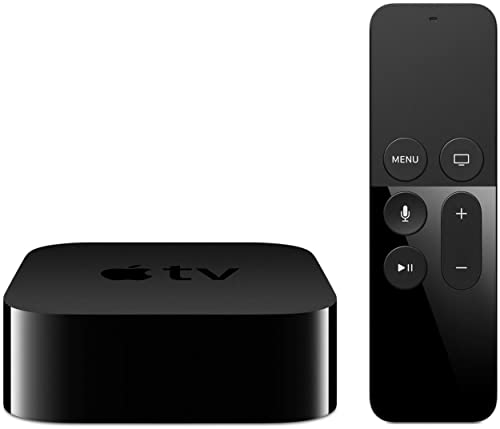
- 4K High Dynamic Range (Dolby Vision and HDR10) for stunning picture quality
- Dolby Digital Plus 7.1 surround sound
- A10X Fusion chip for ultra-fast graphics and performance
Comparison: What Each New Hub Actually Adds
| Hub | Matter Version | Thread Border Router | Standout Feature | Price Tier |
|---|---|---|---|---|
| Amazon Echo Hub | 1.5 | Yes | Wall-mounted always-on dashboard | High-end |
| SmartThings Station | 1.5 | Yes | Wireless charging pad built in | Budget |
| SwitchBot Hub 3 | 1.4 (1.5 firmware pending at some retailers) | Yes | Built-in IR blaster for legacy devices | Budget |
| Aqara Hub M3 | 1.4 | Yes | Zigbee 3.0 bridge + Matter in one box | Mid-range |
| Apple TV 4K | Platform-dependent (Apple Home) | Yes | Most households already own one | Mid-range |
Do You Even Need a Dedicated Hub Purchase?
This is worth asking honestly before buying anything. If your household already has two or more HomePod minis, an Apple TV, a recent Echo device, or a newer eero mesh unit, you likely already have working Thread border routers on your network without realizing it – all of these devices have quietly gained Thread radios over the past few product generations. Check your ecosystem’s app (the Apple Home app, Alexa app, or Google Home app all show a list of Thread border routers under network settings) before assuming you need to buy new hardware just to get Thread coverage. Where a dedicated hub purchase still earns its price is in the extras: Aqara’s Zigbee bridging, SwitchBot’s IR blaster, or Echo Hub’s dashboard – not the base Thread/Matter radio itself, which a lot of households already own scattered around the house.
Matter Camera Support: Real, But Early
Matter 1.5’s camera model is a genuine step forward, but it’s worth tempering expectations for 2026. Camera manufacturers need to build and certify hardware against the new spec, and that pipeline takes time – most cameras on shelves right now, including recent releases, still rely on their own manufacturer app and cloud rather than exposing a Matter-certified camera profile. Treat “Matter 1.5 support” on a hub as forward-looking infrastructure rather than a feature you can fully use today. It’s the right time to make sure your hub supports it, not yet the time to expect every camera in a system to hand off cleanly between ecosystems.
Setup Time Is Shorter Than It Used to Be, But Still Worth Planning For
Pairing a new hub and bringing existing devices onto it used to be one of the more frustrating parts of smart home ownership, and while Matter’s newer onboarding improvements have genuinely helped, it’s still worth setting aside a real chunk of time for a first setup rather than expecting it to take five minutes. NFC-based onboarding and multi-device pairing flows from Matter 1.4 speed up adding several new devices at once, but migrating an existing device that was previously paired to a different ecosystem or hub often means removing it from the old platform first, which isn’t always as clean as the marketing suggests. Budget an evening for a full hub swap or a first-time multi-device setup, and don’t schedule it for a night when you specifically need everything working perfectly on the first try.
Thread Mesh Density Matters More Than People Think
A single Thread border router technically works, but a Thread network’s reliability comes from mesh density – the more border routers and Thread-capable devices routing traffic, the more redundant paths exist if one link degrades or a device goes offline. This is part of why Apple, Google, and Amazon all quietly added Thread radios to products that aren’t primarily “smart home hubs” at all – speakers, streaming boxes, mesh routers. Adding a second or third border router to a home that already has one is a real reliability upgrade, not redundant spending, especially in a larger house or one with a lot of interior walls between rooms.
The Practical Recommendation
If you’re setting up a smart home hub for the first time and want one clear answer, buy either the Echo Hub or SmartThings Station based on which voice assistant ecosystem you’re already using – both run current Matter 1.5 firmware and cover the fundamentals well. If your home mixes older infrared gear with newer Matter devices, the SwitchBot Hub 3’s IR blaster earns its keep in a way a plain Matter controller can’t match. If you’re already running Aqara’s Zigbee sensor lineup, the Hub M3 remains the most efficient bridge to Matter without replacing hardware you already own and trust. And before buying anything, check whether the Apple, Google, or Amazon devices already in your house are quietly serving as Thread border routers – the fastest, cheapest upgrade to a shaky Thread network is sometimes confirming what you already own is doing its job, not adding a new box.