Affiliate disclosure: As an Amazon Associate, HomeNode earns from qualifying purchases at no additional cost to you.
Short answer: For a parent or partner who has never touched network storage, the Synology BeeStation 4TB Personal Cloud Storage Device (BST151-4T) is the easiest gift to give because the drive is already inside and setup runs through an app. If the recipient is curious about tinkering and wants real NAS software with surveillance and app support, the Synology DS124 Personal Backup & File Hub paired with a Seagate IronWolf Pro 4TB NAS drive is the better long-term pick. The BUFFALO LinkStation 210 4TB suits a household that just wants a shared network folder and nothing more.
This guide is written for the person doing the buying, not the person unwrapping it. You want something that stops the “iPhone storage full” messages, keeps family photos in one place, and ideally replaces a recurring cloud storage tier without turning into a support job that lands back on you.
One-bay devices are the natural starting point. They hold a single hard drive and sit next to the router. That single drive is also the biggest thing to understand before you buy, so we will get to it early rather than burying it.
What a 1-bay NAS actually does once it is plugged in
The three jobs that matter to a normal household are phone photo backup, a shared family folder, and remote access from outside the house. All three devices here cover that ground, and all three are sold on the basis of no monthly subscription.
Phone backup is usually the feature that sells it. Synology’s BeeStation pulls photos and videos off phones automatically and can also bring in iCloud Photos, computers, tablets, external drives and supported cloud accounts into one location. The DS124 does the same job for iPhone, Android, Mac and Windows through Synology’s apps.
The shared folder part is less glamorous but gets used daily. Scanned documents, tax paperwork, a music library, video from a phone that is too big to email — it all lands somewhere the whole household can reach.

- Set up a personal cloud in minutes and get right into data managing works
- Bring files from computers, tablets, phones, external drives, and supported cloud accounts into one place for remote…
- Sync files: Edit files on your desktop while keeping changes synced across your computers.
The honest limitation: one drive means no redundancy
A single-bay NAS holds one hard drive. If that drive fails, everything on it goes with it. No amount of good software changes that, and it is the most important thing to explain to whoever receives the gift.
Treat a 1-bay unit as one copy in a wider plan, not as the plan. The usual approach is three copies of anything irreplaceable, on two kinds of media, with one copy off-site. In practice that means the NAS plus either a rotated external USB drive or a cloud backup target.
Snapshots help with a different problem. The BeeStation takes automated snapshots so previous file versions can be recovered after ransomware or an accidental overwrite. That protects against mistakes, not against hardware dying.
Setup difficulty, compared
Synology BeeStation: app-first and deliberately narrow
The BeeStation is built so a personal cloud can be running in minutes. There is no drive to install, no RAID decision, no volume to create. It also runs photo recognition locally on an onboard GPU, so people and subjects become searchable without sending images to a public cloud service. The trade-off is scope: it does the handful of things it advertises and leaves the rest alone.
Synology DS124: the full NAS operating system
The DS124 is a diskless 1-bay unit running Synology’s desktop-style software, which means file sharing, a private file cloud for sending large projects to family or clients, and a surveillance hub with AI detection for people and vehicles plus instant alerts. Synology lists a two-year warranty with ongoing software updates.
Expect a longer first evening. You install the drive, create a volume, make user accounts and install the apps you want. For a recipient who enjoys that, it is the more rewarding device, and our Synology NAS buyer’s guide covers how it sits below the two- and four-bay models.

- Complete Phone & Computer Backup – Automatically protect photos, documents and videos from iPhone android, Mac and Wi…
- Your Private File Cloud – Access files from anywhere and share large projects with family or clients without relying…
- Smart Home Security Hub – Monitor your home 24/7 with AI-powered surveillance that detects people, vehicles and sends…
Buffalo LinkStation 210: shared storage with the lid closed
The LinkStation 210 arrives with a 4TB drive fitted, connects to the router and presents itself as network storage to Windows and macOS. Buffalo describes it as a closed system that does not run third-party apps, which reduces the attack surface, and it uses SSL encryption for transfers. NAS Navigator and PC backup software are included for automated computer backups.
One compatibility note matters before gifting. Buffalo states macOS support for macOS 15 (Sequoia) and earlier, and points macOS 26 users to the LS 700 series instead.
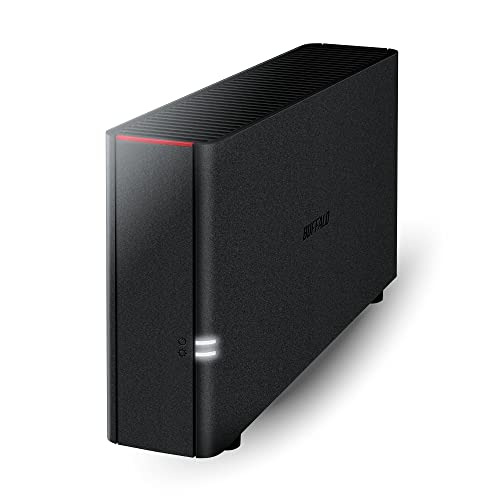
- Value NAS with RAID for centralized storage and backup for all your devices. Check out the LS 700 for enhanced featur…
- Connect the LinkStation to your router and enjoy shared network storage for your devices. The NAS is compatible with…
- Subscription-Free Personal Cloud – Store, back up, and manage all your videos, music, and photos and access them anyt…
How the options compare
| Option | Drive situation | Setup style | Best suited to |
|---|---|---|---|
| Synology BeeStation 4TB (BST151-4T) | 4TB included, sealed | App-driven, minutes to first backup | Non-technical gift recipients who want photo backup to just work |
| Synology DS124 (1-bay diskless) | Bring your own 3.5-inch drive | Full NAS OS, accounts and apps to configure | Curious beginners who want surveillance, apps and growth room |
| Buffalo LinkStation 210 4TB | 4TB included | Connect to router, use NAS Navigator utility | Households wanting plain shared network storage, macOS 15 or earlier |
| Seagate IronWolf Pro 4TB (ST4000NEZ01) | Bare drive for a diskless bay | Installed into the enclosure before first boot | Pairing with the DS124; 7200 RPM, 128MB cache, five-year limited warranty |
Drive included versus bring your own
Included-drive devices remove a step and a decision, which is exactly what you want in a wrapped box. Nobody has to open a chassis on Christmas morning.
Bring-your-own gives control over which drive spins inside. The IronWolf Pro 4TB is a 3.5-inch SATA 6Gb/s drive rated by Seagate at 7200 RPM with a 128MB cache, speeds up to 214MB/s, 1.2M hours MTBF, a five-year limited warranty and three years of Rescue Data Recovery Services. That recovery service is genuinely useful in a single-drive setup.
If you are tempted by used or refurbished stock to stretch capacity, read our take on recertified hard drives in a NAS first. In a no-redundancy box, drive provenance carries more weight than usual.
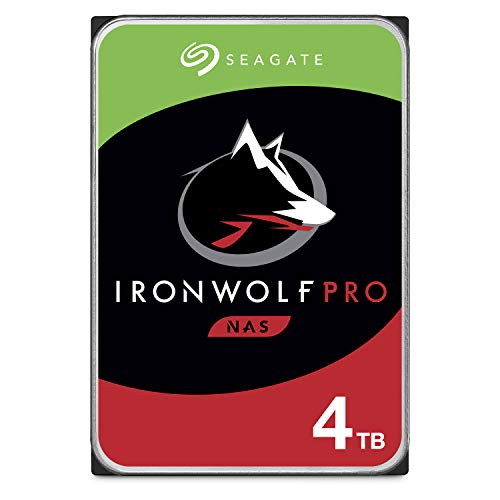
- IronWolf internal hard drives are the ideal solution for up to 24-bay, multi-user NAS server environments that demand…
- Store more and work faster with a NAS hard drive that provides 4TB and speeds up to 214MB/s
- Specifically built for less wear and tear, little to no noise/vibration, no lags or down time, increased file-sharing…
Trade-offs and when to buy a 2-bay instead
Step up to two bays if the recipient stores anything they would grieve over and is unlikely to maintain a second backup themselves. Two drives in a mirror survive one failure, which turns a disaster into a chore. Our 2-bay NAS comparison covers the usual candidates.
A 2-bay also makes sense for Mac households leaning on Time Machine, since those backups grow steadily and benefit from redundancy — the mechanics are in our guide to backing up Macs to a NAS. If the recipient already has opinions about ecosystems, our NAS brand comparison is a better starting point than any single-bay pick.
Stay with one bay when the content is mostly phone photos that also exist elsewhere, when desk space is tight, or when the goal is ending a paid storage tier with minimal fuss.
What to set up before you wrap it
Give the gift fully working. Plug it in on your own network, complete the initial setup, create an account for the recipient, install the phone app on their device if you can borrow it, and run the first photo backup so they see results immediately.
Then write down the remote access details and the admin password on a card in the box. Remote access on these devices runs through the vendor’s own relay service, so there is no router port forwarding to explain — worth saying out loud, because that is the step that usually derails first-time owners.
Finally, buy the second copy at the same time. A plain external USB drive, labelled and stored somewhere else in the house, turns a single-bay NAS into a sensible setup rather than a single point of failure.
Frequently asked questions
Is a 1-bay NAS safe enough for family photos?
Only as one copy among several, because a single drive has no redundancy and a failure takes everything with it. Pair it with an external USB drive or a cloud copy from day one.
Which is easier for a non-technical person, the BeeStation or the DS124?
The BeeStation, clearly. Its 4TB drive is already installed and setup runs through an app, while the DS124 is diskless and asks you to configure a full NAS operating system.
Does remote access need router ports opened?
No. These devices reach the outside world through their vendor’s own relay service, which is why remote access works without port forwarding on a home router.
Will the Buffalo LinkStation 210 work with a new Mac?
Buffalo states macOS 15 (Sequoia) and earlier for the LS200 series and NAS Navigator 2, and directs macOS 26 users to the LS 700 series instead. Check the recipient’s macOS version before buying.
How these picks were chosen: HomeNode compares products using manufacturer specifications, current Amazon listing details and published owner feedback. Products are not tested in-house, and listings change often, so confirm current specifications on the product page before buying.
Affiliate disclosure: As an Amazon Associate, HomeNode earns from qualifying purchases at no additional cost to you.