
Affiliate disclosure: As an Amazon Associate, HomeNode earns from qualifying purchases at no additional cost to you.
Short answer: For under $50, the most useful gift for someone with a 2.5GbE NAS is a matched pair: the UGREEN 2.5G USB-C Ethernet adapter for their laptop and the TP-Link TL-SG105S-M2 switch. Between $50 and $100, the 8-port TP-Link TL-SG108S-M2 gives a growing setup more 2.5G ports. From $100 to $250, a CyberPower CP1500PFCLCD UPS protects everything they already own, and a diskless 2-bay such as the Synology DS223j or UGREEN DH2300 is a first NAS for someone who does not have one yet.
This guide is for the person doing the shopping. If someone on your list talks about Plex, Immich, backups or “the server in the closet,” these are gifts that slot into what they already run, plus two entry-level NAS boxes for someone who is ready to start.
Picks are grouped into three budget tiers based on Amazon listings checked on November 16, 2026. Prices move often in late November, so treat the tiers as a guide and check the current price before you buy. We left bare hard drives out of the tiers on purpose: drive prices swing widely by capacity, and the right drive depends on the NAS. Our NAS hard drive guide covers that choice.
Quick picks by budget
| Budget tier | Pick | Best for |
|---|---|---|
| Under $50 | Cable Matters Cat6 Ethernet Cable, 5-Pack (5 ft) | Anyone with a rack, desk switch or NAS |
| Under $50 | UGREEN USB-C to 2.5G Ethernet Adapter | A laptop user whose NAS and switch already run at 2.5GbE |
| Under $50 | TP-Link TL-SG105S-M2 5-Port 2.5G Unmanaged Switch | Pairing with the adapter above, or a first 2.5G desk switch |
| Under $50 | UGREEN Dual-Bay Hard Drive Docking Station | Someone who tests, clones or wipes drives |
| Under $50 | Mini UPS for Router and Modem (6000mAh) | Keeping internet up through short outages |
| $50 to $100 | TP-Link TL-SG108S-M2 8-Port 2.5G Unmanaged Switch | A homelab that has outgrown five ports |
| $50 to $100 | TP-Link TL-SG108PE 8-Port Gigabit Easy Smart PoE Switch | Someone adding a PoE camera or access point and learning VLANs |
| $100 to $250 | CyberPower CP1500PFCLCD PFC Sinewave UPS | Protecting a NAS, mini PC and network gear together |
| $100 to $250 | CyberPower CP1500AVRLCD3 Intelligent LCD UPS | A lower-cost UPS for network gear and a basic desktop |
| $100 to $250 | Synology DS223j 2-Bay NAS (Diskless) | A first NAS for family photo backup and file sharing |
| $100 to $250 | UGREEN DH2300 2-Bay NAS (Diskless) | Phone backup and an AI photo album without a subscription |
Budget tiers reflect Amazon listings checked on November 16, 2026. Prices and stock change often, so check the current price on Amazon before you buy.
Under $50: small upgrades they will use every day
Cable Matters Cat6 Ethernet Cable, 5-Pack (5 ft)
Best for: anyone with a rack, desk switch or NAS.
It is the least exciting item here and the one most likely to fix something. A bad patch cable is the first suspect when a NAS drops off the network, which is why it is Fix 1 in our NAS not appearing troubleshooting guide. The listing describes 24 AWG bare copper conductors, snagless boots and Cat6 performance rated for 10-Gigabit Ethernet, with PoE, PoE+ and PoE++ support.
Strength: a set of known-good cables for patching and troubleshooting. Trade-off: five feet suits desk and rack patching, not room-to-room runs. The listing offers other lengths.

- 5-pack of 5 ft snagless Cat6 cables
- 24 AWG bare copper, gold-plated RJ45
- Rated for 10-Gigabit Ethernet and PoE++
UGREEN USB-C to 2.5G Ethernet Adapter
Best for: a laptop user whose NAS and switch already run at 2.5GbE.
Most laptops no longer have an Ethernet port, and Wi-Fi is often the real bottleneck on big NAS copies. This aluminum adapter adds a wired 2.5GbE port over USB-C. The listing names the Realtek RTL8156BG chip and Thunderbolt 4 and 3 compatibility. We compare more options in best 2.5GbE USB-C Ethernet adapters.
Strength: a cheap, immediate jump from Wi-Fi to wired 2.5GbE. Trade-off: it only reaches 2.5GbE if the switch and NAS on the other end do too.

- USB-C to 2.5GbE RJ45
- Realtek RTL8156BG chip per the listing
- Thunderbolt 4/3 compatible
TP-Link TL-SG105S-M2 5-Port 2.5G Unmanaged Switch
Best for: pairing with the adapter above, or a first 2.5G desk switch.
Five 2.5-Gigabit ports in a fanless metal case, with desktop or wall mounting. The listing gives 25 Gbps of switching capacity and auto-negotiation down to 1G and 100M, so older devices still connect. If the person you are buying for has been eyeing 2.5GbE, this plus the adapter above is a complete starter upgrade. More context in best 2.5GbE switches for a home lab.
Strength: silent, plug-and-play 2.5G for a small setup. Trade-off: unmanaged, so no VLANs or monitoring.

- 5 x 2.5GbE ports, fanless metal case
- 25 Gbps switching capacity per the listing
- Desktop or wall mount, plug and play
UGREEN Dual-Bay Hard Drive Docking Station
Best for: someone who tests, clones or wipes drives.
A dock makes it easy to check a used drive before it goes into a NAS, pull data off an old disk, or keep an offline copy of important files. The listing covers two 2.5-inch or 3.5-inch SATA drives over USB 3.0 (5Gbps) and an offline clone mode that copies one drive to another without a computer, as long as the target is at least as large as the source.
Strength: offline cloning plus easy access to bare drives. Trade-off: USB 3.0 at 5Gbps, and it is a tool for one-off copies rather than continuous backup.

- Two bays for 2.5″ and 3.5″ SATA drives
- USB 3.0 (5Gbps) connection
- Offline clone mode (target must be same size or larger)
Mini UPS for Router and Modem (6000mAh)
Best for: keeping internet up through short outages.
A small DC battery that keeps the modem and router running when the power blinks, so remote access to the NAS survives. The listing lists one USB 5V port plus DC outputs at 5V, 9V and two at 12V, with up to 5 hours of runtime depending on the device. Our DC mini UPS guide explains how to match voltages.
Strength: a low-cost way to keep the network alive during brief outages. Trade-off: DC output only. It cannot run a NAS, and you need to check the router’s input voltage and barrel plug first.

- 6000mAh battery, USB 5V + DC 5V/9V/12V outputs
- Up to 5 hours runtime (varies by device) per the listing
- For routers, modems and cameras, not computers
$50 to $100: more ports for a growing setup
TP-Link TL-SG108S-M2 8-Port 2.5G Unmanaged Switch
Best for: a homelab that has outgrown five ports.
The bigger sibling of the switch above: eight 2.5-Gigabit ports, 40 Gbps of switching capacity per the listing, fanless and wall-mountable. It suits a closet or rack with a NAS, a mini PC or two and a 2.5G access point. The listing showed limited stock on our check date, so have a backup choice in mind.
Strength: eight silent 2.5G ports without configuration. Trade-off: unmanaged, so anyone planning VLANs will want a managed switch instead.

- 8 x 2.5GbE ports
- 40 Gbps switching capacity per the listing
- Fanless, desktop or wall mount
TP-Link TL-SG108PE 8-Port Gigabit Easy Smart PoE Switch
Best for: someone adding a PoE camera or access point and learning VLANs.
Eight gigabit ports, four of them PoE, with VLAN, QoS and IGMP snooping through TP-Link’s Easy Smart web interface. It is a gentle first managed switch. Check the power each PoE device needs against the PoE budget on the listing before you buy, and see best managed switches for a home lab for bigger options.
Strength: PoE plus basic VLANs at a modest price. Trade-off: gigabit ports, not 2.5G, and a limited PoE budget for several cameras.

- 8 gigabit ports, 4 with PoE
- VLAN, QoS and IGMP snooping
- Easy Smart web management, fanless metal case
$100 to $250: power protection and a first NAS
CyberPower CP1500PFCLCD PFC Sinewave UPS
Best for: protecting a NAS, mini PC and network gear together.
A UPS is the gift that protects every other gift. This one is line-interactive with sine wave output for active-PFC power supplies, 1500VA/1000W, and 12 outlets (six on battery and surge, six surge only) per the listing, plus AVR and a 3-year warranty that includes the battery. Sizing advice is in our UPS guide for home servers.
Strength: sine wave output and enough capacity for a typical small homelab. Trade-off: heavier and bulkier than the simulated-sine model below.
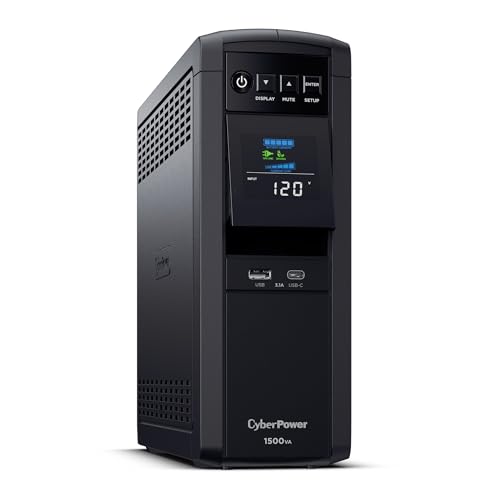
- 1500VA / 1000W, sine wave output
- 12 outlets (6 battery + surge, 6 surge)
- AVR, color LCD, 3-year warranty incl. battery
CyberPower CP1500AVRLCD3 Intelligent LCD UPS
Best for: a lower-cost UPS for network gear and a basic desktop.
Same 1500VA class and 12-outlet layout, with simulated sine wave output, AVR, one USB-A and one USB-C charge port and a 3-year warranty including the battery, per the listing. CyberPower’s range is covered in our CyberPower UPS buyer’s guide.
Strength: the 1500VA class at a lower price than the sine wave model. Trade-off: simulated sine output. Equipment with active-PFC power supplies is better matched to the model above.

- 1500VA / 900W, simulated sine wave
- 12 outlets, 2 USB charge ports
- AVR, 3-year warranty incl. battery
Synology DS223j 2-Bay NAS (Diskless)
Best for: a first NAS for family photo backup and file sharing.
Synology’s entry 2-bay runs the same DSM software as its larger models. The listing highlights private cloud access, set-and-forget backups for computers and phones, IP camera recording and a 2-year warranty. For how Synology compares with UGREEN and QNAP, see Synology vs UGREEN vs QNAP.
Strength: polished, beginner-friendly software. Trade-off: diskless, so drives are an extra purchase, and it is an entry-level box rather than a media transcoding machine.
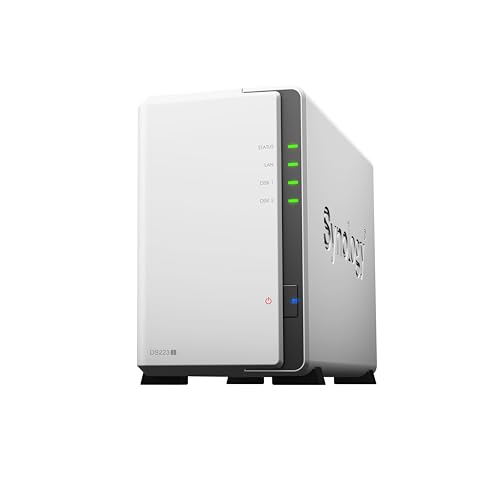
- 2-bay, diskless
- DSM software with backup and photo apps
- 2-year warranty per the listing
UGREEN DH2300 2-Bay NAS (Diskless)
Best for: phone backup and an AI photo album without a subscription.
UGREEN’s beginner 2-bay. The listing gives 4GB of onboard RAM, a 1GbE port, support for up to 64TB and an AI photo album that tags faces, places and objects. It is aimed at people moving off cloud storage or a pile of external drives. Our UGREEN NAS buyer’s guide covers the bigger models.
Strength: simple setup with strong photo features for the price tier. Trade-off: a 1GbE port, so the 2.5G gear above will not speed it up. Drives are not included.

- 2-bay, diskless, up to 64TB
- 4GB RAM, 1GbE per the listing
- AI photo album, phone and multi-device backup
Bundle ideas
- First NAS bundle: the Synology DS223j or UGREEN DH2300, two matching NAS drives and the Cat6 5-pack. See best 2-bay NAS for alternatives.
- Speed upgrade bundle: the UGREEN 2.5G adapter and the TL-SG105S-M2 switch, for someone whose NAS already has a 2.5GbE port.
- Outage-proof bundle: the CP1500PFCLCD for the NAS and mini PC, and the mini DC UPS for the modem and router.
Before you wrap it
- Check the NAS ports first. A 2.5G switch or adapter only helps if the NAS has a 2.5GbE port; many entry models, including the DH2300, are 1GbE.
- For the mini DC UPS, look at the router’s power brick for its voltage and plug size before buying.
- Diskless means diskless. If the NAS is the main gift, either include drives or a note that drives are coming.
- Keep the gift receipt with the box. Return windows differ by seller.
More gift ideas on HomeNode
- Networking gifts under $50
- Home networking gifts under $100
- Tech gifts for the homelab enthusiast
- 1-bay NAS and personal cloud gifts
Frequently asked questions
Is a 2.5GbE switch worth it if their NAS is gigabit only?
It will not speed up the NAS link itself, which stays at 1GbE. It still helps traffic between other 2.5G devices, such as a 2.5G mini PC and a 2.5G laptop adapter, and it is ready for a future NAS upgrade.
Do diskless NAS units come with drives?
No. Diskless means the enclosure ships empty and the drives are bought separately. Use drives designed for NAS use and check the maker’s compatibility list.
Which UPS suits a NAS?
A line-interactive UPS sized with headroom over the NAS’s draw. Sine wave output is the safer match for equipment with active-PFC power supplies. Check the NAS maker’s documentation for which UPS brands it can monitor over USB for automatic shutdown.
How these picks were chosen: HomeNode compares products using manufacturer specifications, current Amazon listing details and published owner feedback. Products are not tested in-house, and listings change often, so confirm current specifications on the product page before buying.
Affiliate disclosure: As an Amazon Associate, HomeNode earns from qualifying purchases at no additional cost to you.
General information only, not professional advice. Details can change or contain errors, so check with the manufacturer or an official source before you rely on them. Use of this site is subject to our Disclaimer and Terms of Service.

